How to install SMPlayer 14.3.0
{{postValue.id}}
To install SMPlayer 14.3.0
SMPlayer is an open source media player for Linux and Windows with built-in codecs that can play virtually all video and audio formats. In this article, we will learn the installation of SMPlayer 14.3.0 on Ubuntu and Linux Mint.
Characteristics Features
- Included YouTube browser to download and play videos online.
- Currently supports more than 30 languages, including Italian, Spanish, French, Russian, German, Chinese, and Japanese.
- Options to change style and icon set of the interface.
- Provided search function to search and download subtitles from opensubtitles.org
- Complete preferences dialog to change colors, key shortcuts and fonts of the subtitles, and many more.
- Supports multiple speed playbacks. You can play video at 2X, 4X and even in slow motion.
- Delay adjustments for Audio and Video subtitles and allows you to sync audio and subtitles.
Advantages of SMPlayer 14.3.0
- Added new option in the playlist preferences for adding other files automatically in the folder to the playlist.
- Better support for YouTube.
- Probability to compile with Qt 5.
- Added new audio presets to the audio equalizer.
- Developmental support for playing non-protected Blu-ray discs.
- Improved full screen controls.
- Improved support for multimedia kyes to control SMPlayer with a remote control.
To Install SMPlayer 14.3.0 Media Player
Run the following command to add a PPA for SMPlayer on Ubuntu, Xubuntu and Linux Mint.
user1@linuxhelp:~$ sudo add-apt-repository ppa:rvm/smplayer
[sudo] password for user1:
Packages for SMPlayer.
To install SMPlayer from this PPA
Run these commands on a terminal to install SMPlayer from PPA.
user1@linuxhelp:~$ sudo add-apt-repository ppa:rvm/smplayer

More info: https://launchpad.net/~rvm/+archive/ubuntu/smplayer
Press [ENTER] to continue or ctrl-c to cancel adding it

gpg: keyring `/tmp/tmp1hpvx9nu/secring.gpg'  created
gpg: keyring `/tmp/tmp1hpvx9nu/pubring.gpg'  created
gpg: requesting key E4A4F4F4 from hkp server keyserver.ubuntu.com
gpg: /tmp/tmp1hpvx9nu/trustdb.gpg: trustdb created
gpg: key E4A4F4F4: public key " Launchpad PPA named smplayer for rvm"  imported
gpg: no ultimately trusted keys found
gpg: Total number processed: 1
gpg: imported: 1 (RSA: 1)
OK
To update the system
Execute the following command to update the system.
user1@linuxhelp:~$ sudo apt-get update
Get:1 http://ppa.launchpad.net trusty InRelease [15.4 kB]
Ign http://extras.ubuntu.com trusty InRelease
Hit http://security.ubuntu.com trusty-security InRelease
Ign http://in.archive.ubuntu.com trusty InRelease
Get:2 http://ppa.launchpad.net trusty/main amd64 Packages [5,027 B]
Hit http://extras.ubuntu.com trusty Release.gpg
Get:3 http://ppa.launchpad.net trusty/main i386 Packages [5,020 B]
. . . . .
. . . . .
. . . . .
Ign http://in.archive.ubuntu.com trusty/main Translation-en_IN
Ign http://in.archive.ubuntu.com trusty/multiverse Translation-en_IN
Ign http://in.archive.ubuntu.com trusty/restricted Translation-en_IN
Ign http://in.archive.ubuntu.com trusty/universe Translation-en_IN
Fetched 31.7 kB in 22s (1,396 B/s)
Reading package lists... Done
To install the SMPlayer
Run the following command to install the SMPlayer, SMTube and Themes.
user1@linuxhelp:~$ sudo apt-get install smplayer smtube smplayer-themes
Reading package lists... Done
Building dependency tree
Reading state information... Done
The following extra packages will be installed:
esound-common libaacs0 libaudiofile1 libbluray1 libdca0 libdirectfb-1.2-9
libdvdnav4 libdvdread4 libenca0 libesd0 libgif4 libmpeg2-4 libopenal-data
libopenal1 libpostproc52 libsvga1 libts-0.0-0 libvdpau1 mplayer
smplayer-skins tsconf
. . . . .
. . . . .
Do you want to continue? [Y/n] y
Get:1 http://ppa.launchpad.net/rvm/smplayer/ubuntu/ trusty/main libbluray1 amd64 1:0.7.0-1~trusty [108 kB]
Get:2 http://in.archive.ubuntu.com/ubuntu/ trusty/universe libaacs0 amd64 0.7.0-1 [47.3 kB]
. . . . .
. . . . .
Setting up smplayer-skins (2:15.2.0-1~trusty1) ...
Setting up smplayer-themes (2:15.12.0-1~trusty1) ...
Setting up smtube (16.3.0-1~trusty1) ...
Processing triggers for libc-bin (2.19-0ubuntu6.6) ...
To Start SMPlayer
Run the following command to start the SMPlayer.
user1@linuxhelp:~$ smplayer
This is SMPlayer v. 16.4.0 running on Linux

(process:4590): GLib-CRITICAL **: g_slice_set_config: assertion ' sys_page_size ==
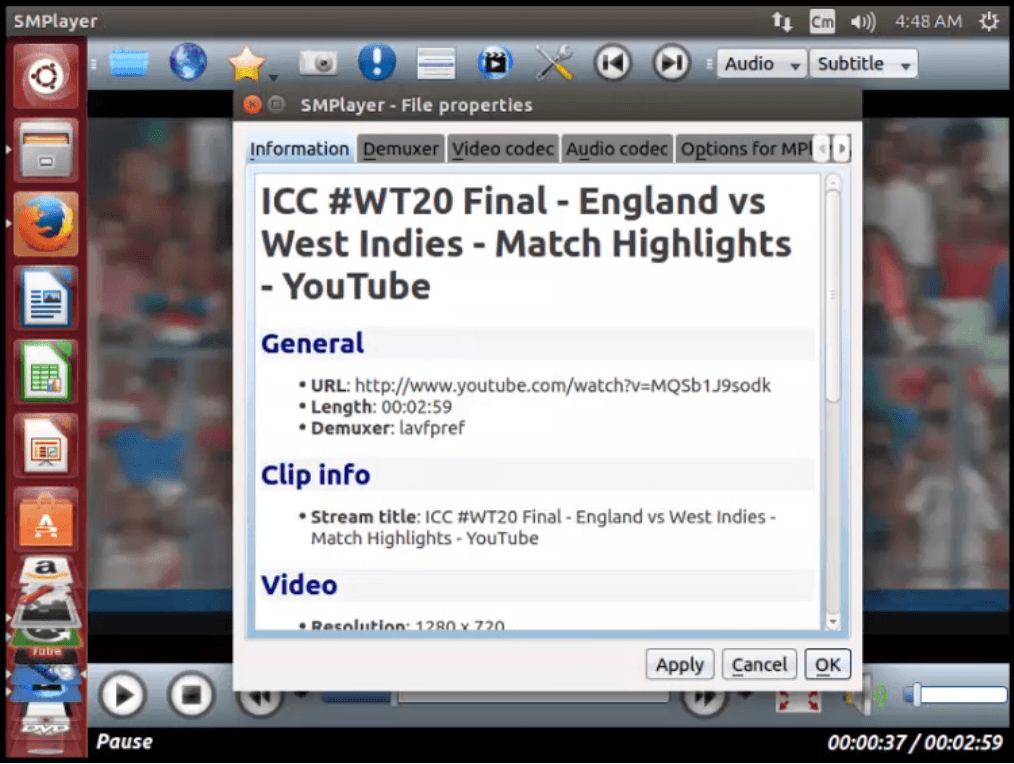
Screenshots of SMPlayer


Comments ( 0 )
No comments available