How to install SMplayer 17.1.0 On Ubuntu
{{postValue.id}}
How to install SMplayer 17.1.0 On Ubuntu
SMPlayer is an open-source and cross-platform media player with built-in codecs that can play virtually all video and audio formats. This article sheds light on the installation procedure of SMPlayer.
Features
- Use MPV base instead of MPlayer.
- Possibility to display two subtitles at once.
- Play videos from video sites, like Youtube, DailyMotion, Vimeo, Vevo and many more.
- SMPlayer has a better performance than the flashplayer in a web browser, specially in old PCs.
- Support for MKV ordered chapters.
- Video equalizer, allows you to adjust the brightness, contrast, hue, saturation and gamma of the video image.
- Multiple speed playback. You can play at 2X, 4X... and even in slow motion.
- Audio and subtitles delay adjustment. Allows you to sync audio and subtitles.
- Advanced options, such as selecting a demuxer or video & audio codecs.
- Possibility to search and download subtitles from opensubtitles.org.
- It can play YouTube videos. A YouTube browser is included
Additional Features
- Experimental support to play videos on Chromecast.
- Support for some of the #EXTVLCOPT options in m3u/m3u8 playlists. This may help to play online streams from playlists intended for VLC.
- New options in the context menu of the playlist: ' copy URL to clipboard' , ' open source folder' and ' play on Chromecast' .
- Option to display bitrate information in the status bar.
- Possibility to display the playback time with milliseconds in the status bar.
To install SMPlayer
Add the smplayer package into repository via PPA.
root@linuxhelp1:/home/user1# add-apt-repository ppa:rvm/smplayer

 Packages for SMPlayer.
To install SMPlayer from this PPA, run these commands on a terminal:
..
.
gpg: requesting key E4A4F4F4 from hkp server keyserver.ubuntu.com
gpg: /tmp/tmpv37pa5ez/trustdb.gpg: trustdb created
gpg: key E4A4F4F4: public key " Launchpad PPA named smplayer for rvm"  imported
gpg: no ultimately trusted keys found
gpg: Total number processed: 1
gpg:               imported: 1  (RSA: 1)
OK
Once it is added, update the machine with the following command.
root@linuxhelp1:/home/user1# apt-get update
Hit http://security.ubuntu.com vivid-security InRelease
Hit http://in.archive.ubuntu.com vivid InRelease
Hit http://ppa.launchpad.net vivid InRelease
Hit http://in.archive.ubuntu.com vivid-updates InRelease
.
.
.
Hit http://in.archive.ubuntu.com vivid-backports/multiverse Translation-en
Hit http://in.archive.ubuntu.com vivid-backports/restricted Translation-en
Hit http://in.archive.ubuntu.com vivid-backports/universe Translation-en
Fetched 24.3 kB in 12s (2,014 B/s)
Reading package lists... Done
Install the SMplayer package with the following command.
root@linuxhelp1:/home/user1# apt-get install smplayer smplayer-themes smplayer-skins+
Reading package lists... Done
Building dependency tree
Reading state information... Done
The following extra packages will be installed:
.
.
.
Setting up smplayer-themes (2:16.8.0-1~vivid1) ...
Setting up smtube (16.7.2-2~vivid1) ...
Processing triggers for libc-bin (2.21-0ubuntu4) ...
To launch SMplayer open the dashboard of Ubuntu and search smplayer.


To check version of SMplayer click help -> about smplayer option .
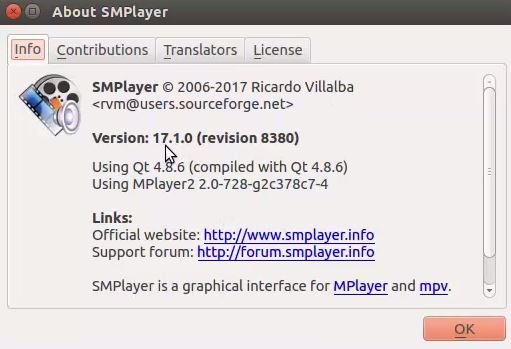
Now play your favorite video or audio file in SMplayer.

Comments ( 0 )
No comments available