How to install SMPlayer 18.3.0 on Ubuntu 18.04
To install SMPlayer 18.3.0 on Ubuntu 18.04
SMPlayer is an open source and cross-platform media player used to play video and audio files eg: Music, Movies, etc. This application is written by using the C++ programming language and released under GNU GPL license. It is so simple to install SMPlayer 18.3.0 on Ubuntu 18.04 and this tutorial covers the ground in the same process.
Installing SMPlayer 18.3.0
First, make sure you update the system repository by making use of the following command.
root@linuxhelp1:~# apt-get update
Hit:1 http://security.ubuntu.com/ubuntu bionic-security InRelease
Hit:3 http://in.archive.ubuntu.com/ubuntu bionic-updates InRelease
Hit:4 http://in.archive.ubuntu.com/ubuntu bionic-backports InRelease
Get:2 http://in.archive.ubuntu.com/ubuntu bionic InRelease [235 kB]
Get:5 http://in.archive.ubuntu.com/ubuntu bionic/main i386 Packages [1,011 kB]
.
.
Get:17 http://in.archive.ubuntu.com/ubuntu bionic/multiverse i386 Packages [143 kB]
Get:18 http://in.archive.ubuntu.com/ubuntu bionic/multiverse amd64 Packages [150 kB]
Get:19 http://in.archive.ubuntu.com/ubuntu bionic/multiverse amd64 DEP-11 Metadata [40.8 kB]
Get:20 http://in.archive.ubuntu.com/ubuntu bionic/multiverse DEP-11 64x64 Icons [213 kB]
Fetched 25.4 MB in 35s (720 kB/s)
Reading package lists... Done
And then you should add the necessary repository by making use of the following command.
root@linuxhelp1:~# add-apt-repository ppa:rvm/smplayer-qt4
 This PPA contains packages compiled with Qt 4.

More info: https://launchpad.net/~rvm/+archive/ubuntu/smplayer-qt4
Press [ENTER] to continue or Ctrl-c to cancel adding it.

gpg: keybox ' /tmp/tmpfe8ipl1e/pubring.gpg'  created
gpg: /tmp/tmpfe8ipl1e/trustdb.gpg: trustdb created
gpg: key 8AD328D8A58BCAE3: public key " Launchpad PPA for rvm"  imported
gpg: Total number processed: 1
.
.

Get:4 http://ppa.launchpad.net/rvm/smplayer-qt4/ubuntu bionic InRelease [15.4 kB]
Hit:5 http://in.archive.ubuntu.com/ubuntu bionic-updates InRelease
Hit:6 http://in.archive.ubuntu.com/ubuntu bionic-backports InRelease
Get:7 http://ppa.launchpad.net/rvm/smplayer-qt4/ubuntu bionic/main i386 Packages [892 B]
Get:8 http://ppa.launchpad.net/rvm/smplayer-qt4/ubuntu bionic/main amd64 Packages [888 B]
Get:9 http://ppa.launchpad.net/rvm/smplayer-qt4/ubuntu bionic/main Translation-en [528 B]
Fetched 17.7 kB in 2s (7,710 B/s)
Reading package lists... Done
Once it is done, you shall once again update the system repository by making use of the following command.
root@linuxhelp1:~# apt-get update
Hit:1 http://in.archive.ubuntu.com/ubuntu bionic InRelease
Hit:2 http://security.ubuntu.com/ubuntu bionic-security InRelease
Hit:3 http://ppa.launchpad.net/rvm/smplayer/ubuntu bionic InRelease
Hit:4 http://in.archive.ubuntu.com/ubuntu bionic-updates InRelease
Hit:5 http://in.archive.ubuntu.com/ubuntu bionic-backports InRelease
Hit:6 http://ppa.launchpad.net/rvm/smplayer-qt4/ubuntu bionic InRelease
Reading package lists... Done
Once you are done, you shall now install SMPlayer by making use of the following command.
root@linuxhelp1:~# apt-get install smplayer smtube smplayer-themes
Reading package lists... Done
Building dependency tree
Reading state information... Done
The following packages were automatically installed and are no longer required:
  apache2-bin apache2-data apache2-utils libapr1 libaprutil1 libaprutil1-dbd-sqlite3
  libaprutil1-ldap
Use ' sudo apt autoremove'  to remove them.
The following additional packages will be installed:
.
.
Setting up libqtgui4:amd64 (4:4.8.7+dfsg-7ubuntu1) ...
Setting up qt-at-spi:amd64 (0.4.0-8) ...
Setting up smplayer (18.3.0-1~bionic1) ...
Setting up libqt4-opengl:amd64 (4:4.8.7+dfsg-7ubuntu1) ...
Setting up smplayer-skins (2:15.2.0-1~bionic1) ...
Setting up smplayer-themes (2:17.3.0-1~bionic1) ...
Setting up libqtwebkit4:amd64 (2.3.2-0ubuntu13) ...
Setting up smtube (18.3.0-1~bionic1) ...
Processing triggers for libc-bin (2.27-0ubuntu2) ...
SMPlayer has been installed, you shall now launch it from your Ubuntu search field.

The application now appears on your screen.

You can check the version of your application to know more about it.
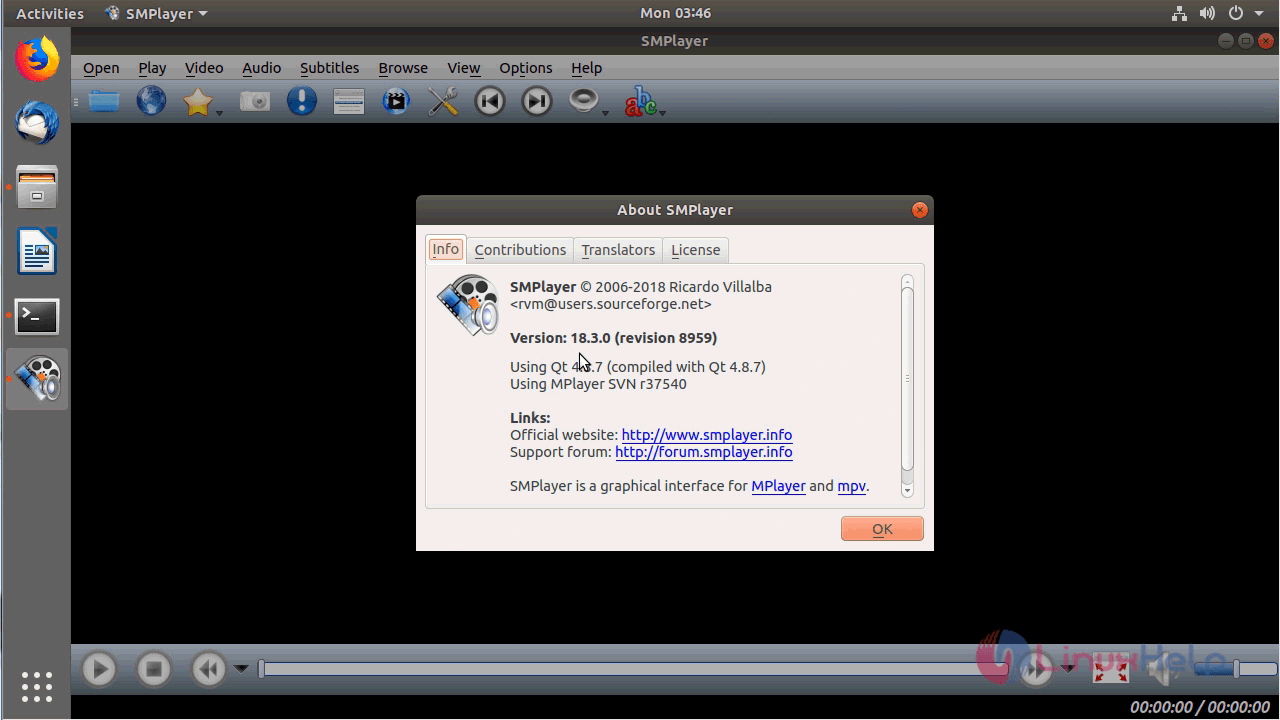
You can now open a video file with the SMPlayer application.

The video is getting played now.

With this, the method to install SMPlayer 18.3.0 on Ubuntu 18.04
Comments ( 0 )
No comments available