How to install Splashtop on Ubuntu
To install Splashtop on Ubuntu
Splashtop is a free remote application like team viewer used for remote access. Splashtop is very easy and fast application to access your home computer from anywhere. Installing Splashtop is so simple, and this article will guide you through the installation of Splashtop on Ubuntu.
Installing Splashtop
You can install Splashtop by downloading its official package to your system. Use the following command to download it.
root@linuxhelp1:~# wget http://d17kmd0va0f0mp.cloudfront.net/linux/Splashtop_Streamer_Ubuntu_14.04_v2.2.5.1-4_amd64.deb
--2017-03-30 05:18:58--  http://d17kmd0va0f0mp.cloudfront.net/linux/Splashtop_Streamer_Ubuntu_14.04_v2.2.5.1-4_amd64.deb
Resolving d17kmd0va0f0mp.cloudfront.net (d17kmd0va0f0mp.cloudfront.net)... 52.84.102.20, 52.84.102.32, 52.84.102.189, ...
Connecting to d17kmd0va0f0mp.cloudfront.net (d17kmd0va0f0mp.cloudfront.net)|52.84.102.20|:80... connected.
.
.
.
Splashtop_Streamer_Ubuntu_14.04_v2.2.5.1-4_ 100%[===========================================================================================> ] 718.77K   912KB/s    in 0.8s

2017-03-30 05:18:59 (912 KB/s) - ‘ Splashtop_Streamer_Ubuntu_14.04_v2.2.5.1-4_amd64.deb’  saved [736016/736016]
Once the package is downloaded, use the following command to install gdebi package manager, as it is very essential for installing the Splashtop package on your Ubuntu machine.
root@linuxhelp1:~# apt-get install gdebi -y
Reading package lists... Done
Building dependency tree
Reading state information... Done
The following additional packages will be installed:
  gdebi-core gksu gnome-icon-theme libcairo-perl libgksu2-0 libglib-perl libgtk2-perl libpango-perl
Suggested packages:
  libfont-freetype-perl libgtk2-perl-doc
The following NEW packages will be installed:
  gdebi gdebi-core gksu gnome-icon-theme libcairo-perl libgksu2-0 libglib-perl libgtk2-perl libpango-perl
0 upgraded, 9 newly installed, 0 to remove and 466 not upgraded.

.
.
.
Setting up libcairo-perl (1.106-1build1) ...
Setting up libglib-perl (3:1.320-2) ...
Setting up libpango-perl (1.227-1) ...
Setting up libgtk2-perl (2:1.2498-1) ...
Processing triggers for gconf2 (3.2.6-3ubuntu6) ...
Setting up gksu (2.0.2-9ubuntu1) ...
Setting up gdebi (0.9.5.7ubuntu1) ...
Processing triggers for libc-bin (2.23-0ubuntu3) ...
Also, it is essential to install libx264-142 dependency package as it is not available on your system.
Use the following command to open the apt sources.list
root@linuxhelp1:~# vim /etc/apt/sources.list
Add the following line at the end of the file.
deb http://cz.archive.ubuntu.com/ubuntu trusty main universe
Once it is done, update it.
root@linuxhelp1:~# apt-get update
Hit:1 http://in.archive.ubuntu.com/ubuntu xenial InRelease
Get:2 http://in.archive.ubuntu.com/ubuntu xenial-updates InRelease [102 kB]
Get:3 http://security.ubuntu.com/ubuntu xenial-security InRelease [102 kB]
Ign:4 http://cz.archive.ubuntu.com/ubuntu trusty InRelease
Get:5 http://cz.archive.ubuntu.com/ubuntu trusty Release [58.5 kB]
Get:6 http://cz.archive.ubuntu.com/ubuntu trusty
.
.
.
142:amd64.
(Reading database ... 183160 files and directories currently installed.)
Preparing to unpack .../libx264-142_2%3a0.142.2389+git956c8d8-2_amd64.deb ...
Unpacking libx264-142:amd64 (2:0.142.2389+git956c8d8-2) ...
Setting up libx264-142:amd64 (2:0.142.2389+git956c8d8-2) ...
Processing triggers for libc-bin (2.23-0ubuntu3) ...
Now Splashtop package is ready to be installed with the aid of gdebi command.
root@linuxhelp1:~# gdebi Splashtop_Streamer_Ubuntu_14.04_v2.2.5.1-4_amd64.deb
Reading package lists... Done
Building dependency tree
Reading state information... Done
Reading state information... Done
Requires the installation of the following packages: libappindicator1 libapr1 libaprutil1 libindicator7 libjavascriptcoregtk-1.0-0 libwebkitgtk-1.0-0 libwebkitgtk-1.0-common python-appindicator python-cairo python-crypto python-gi python-gobject python-gobject-2 python-gtk2 python-webkit
.
.
.
Unpacking splashtop-streamer (2.2.5.1-1) ...
Setting up splashtop-streamer (2.2.5.1-1) ...
Processing triggers for gnome-menus (3.13.3-6ubuntu3) ...
Processing triggers for desktop-file-utils (0.22-1ubuntu5) ...
Processing triggers for bamfdaemon (0.5.3~bzr0+16.04.20160415-0ubuntu1) ...
Rebuilding /usr/share/applications/bamf-2.index...
Processing triggers for mime-support (3.59ubuntu1) ...
Splashtop has been installed, open it from the Ubuntu Dashboard.
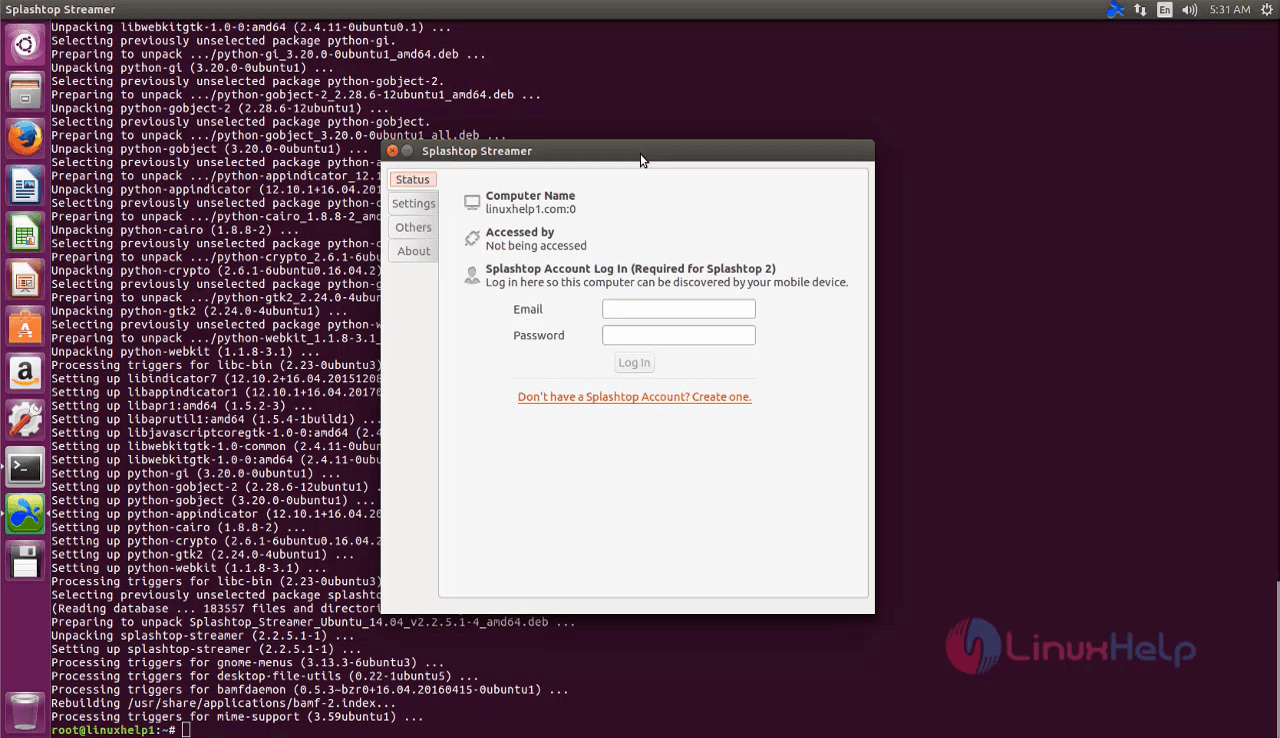
It was a simple installation, wasn' t it? Using Splashtop is as simple as its installation. You can remotely access a computer from any device such as your tablet, smartphone, or even from another computer.
Comments ( 1 )