How to Install Syncthing on Linux mint 18.03
To Install Syncthing on Linux mint 18.03
Syncthing is a free application that is used to synchronize files or directories between any network of computers and it transfers files and directories directly from one system to another system. The entire communication in this process is encrypted. It has the most reliable WebGUI, which supports the users for adding, deleting or managing directories over the network. In this tutorial, we will cover the installation of Syncthing on linuxmint-18.03.
Installation
To proceed with the installation procedure, add the key for syncthing and execute the required sudo command.
linuxhelp ~ #  curl -s https://syncthing.net/release-key.txt | sudo apt-key add -
OK
Add the stable version of Syncthing and run the following command.
linuxhelp ~ # echo "deb https://apt.syncthing.net/ syncthing stable" | sudo tee /etc/apt/sources.list.d/syncthing.list
deb https://apt.syncthing.net/ syncthing stable
The stable version has been added and now update the repo by executing the apt-get update command.
linuxhelp ~ # apt-get update
Hit:1 http://ppa.launchpad.net/ondrej/php/ubuntu xenial InRelease
Get:2 http://archive.canonical.com/ubuntu xenial InRelease [11.5 kB]
Hit:3 http://archive.ubuntu.com/ubuntu xenial InRelease
Ign:4 http://packages.linuxmint.com sylvia InRelease
Hit:5 http://ppa.launchpad.net/webupd8team/java/ubuntu xenial InRelease
Get:6 http://archive.canonical.com/ubuntu xenial/partner amd64 Packages [3,124 B]
Get:7 http://security.ubuntu.com/ubuntu xenial-security InRelease [107 kB]
Get:8 http://archive.canonical.com/ubuntu xenial/partner i386 Packages [3,116 B]
Get:9 https://apt.syncthing.net syncthing InRelease [15.1 kB]
.
.
.
Get:32 http://archive.ubuntu.com/ubuntu xenial-updates/universe i386 Packages [625 kB]
Get:33 http://archive.ubuntu.com/ubuntu xenial-updates/universe Translation-en [276 kB]
Get:34 http://archive.ubuntu.com/ubuntu xenial-updates/multiverse amd64 Packages [16.4 kB]
Get:35 http://archive.ubuntu.com/ubuntu xenial-updates/multiverse i386 Packages [15.5 kB]
Fetched 6,185 kB in 9s (631 kB/s)
Reading package lists... Done
Now install the syncthing package by running the following command.
linuxhelp ~ # apt-get install syncthing
Reading package lists... Done
Building dependency tree
Reading state information... Done
The following NEW packages will be installed:
  syncthing
0 upgraded, 1 newly installed, 0 to remove and 450 not upgraded.
Need to get 8,230 kB of archives.
After this operation, 18.2 MB of additional disk space will be used.
Get:1 https://apt.syncthing.net syncthing/stable amd64 syncthing amd64 0.14.50 [8,230 kB]
Fetched 8,230 kB in 9s (886 kB/s)
Selecting previously unselected package syncthing.
(Reading database ... 225163 files and directories currently installed.)
Preparing to unpack .../syncthing_0.14.50_amd64.deb ...
Unpacking syncthing (0.14.50) ...
Processing triggers for ufw (0.35-0ubuntu2) ...
Processing triggers for man-db (2.7.5-1) ...
Setting up syncthing (0.14.50) ...
Processing triggers for ufw (0.35-0ubuntu2) ...
Run the syncthing executable file.
linuxhelp ~ # syncthing
[monitor] 16:43:58 INFO: Starting syncthing
[FUGEL] 16:43:58 INFO: syncthing v0.14.50 "Dysprosium Dragonfly" (go1.11 linux-amd64) deb@build.syncthing.net 2018-09-02 19:36:07 UTC [noupgrade]
[FUGEL] 16:43:58 INFO: My ID: FUGEL4V-HG6KQWZ-JYIQWCX-T3UUPOB-22NCAGF-AZ7PH46-CGJPXD4-GWM6EAS
[FUGEL] 16:43:59 INFO: Single thread SHA256 performance is 234 MB/s using minio/sha256-simd (155 MB/s using crypto/sha256).
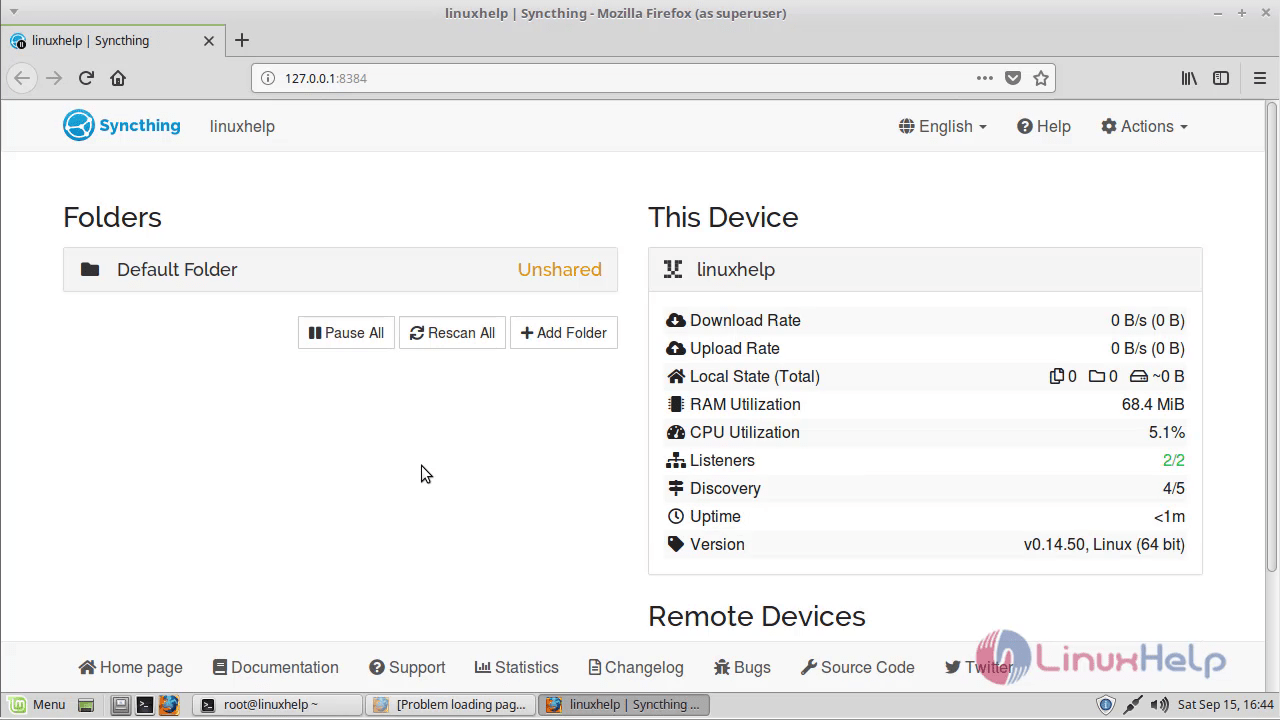 With this, the method to install Syncthing on Linuxmint-18.03 comes to an end.
Comments ( 0 )
No comments available