• Categories
    Category
    {{ postCtrl.tags }}
    • {{ category.tag_type }}

      • {{tag.tag_name}}
      • View more
  • Categories
    Category
    {{ postCtrl.tags }}
    • {{ category.tag_type }}

      • {{tag.tag_name}}
      • View more
  • News
  • Tutorials
  • Forums
  • Tags
  • Users
Tutorial News Comments FAQ Related Articles

How to install TimeShift in Ubuntu

{{postValue.id}}

To install TimeShift in Ubuntu

TimeShift is a free-ware application that restores the system’ s previous state. This is achieved through creating the snapshot of the system. Installation of TimeShift is explained in this manual.

To install TimeShift

Add the following repositories to start with the TimeShift installation.

root@linuxhelp:~# add-apt-repository ppa:teejee2008/ppa 
More info: https://launchpad.net/~teejee2008/+archive/ubuntu/ppa
Press [ENTER] to continue or ctrl-c to cancel adding it

gpg: keyring `/tmp/tmpbtafgnv5/secring.gpg'  created
gpg: keyring `/tmp/tmpbtafgnv5/pubring.gpg'  created
gpg: requesting key 2D0F61F0 from hkp server keyserver.ubuntu.com
gpg: /tmp/tmpbtafgnv5/trustdb.gpg: trustdb created
gpg: key 2D0F61F0: public key " Launchpad PPA for Tony George"  imported
gpg: no ultimately trusted keys found
gpg: Total number processed: 1
gpg:               imported: 1  (RSA: 1)
OK


Update your system’ s repository by executing the following command.

root@linuxhelp:~# apt-get update  
Hit http://security.ubuntu.com wily-security InRelease
Hit http://in.archive.ubuntu.com wily InRelease                        
Hit http://ppa.launchpad.net wily InRelease                                                 
Hit http://security.ubuntu.com wily-security/main Sources              
Hit http://in.archive.ubuntu.com wily-updates InRelease
Hit http://in.archive.ubuntu.com wily-backports InRelease                                                  
Hit http://security.ubuntu.com wily-security/restricted Sources                                
Hit http://ppa.launchpad.net wily/main amd64 Packages                 
Hit http://in.archive.ubuntu.com wily/main Sources                    
Hit http://security.ubuntu.com wily-security/universe Sources                       
.
.
.
Hit http://in.archive.ubuntu.com wily-backports/main amd64 Packages                                                                                                        
Hit http://in.archive.ubuntu.com wily-backports/restricted amd64 Packages                                                                                                  
Hit http://in.archive.ubuntu.com wily-backports/universe amd64 Packages                                                                                                    
Hit http://in.archive.ubuntu.com wily-backports/multiverse amd64 Packages                                                                                                  
Hit http://in.archive.ubuntu.com wily-backports/main i386 Packages                                                                                                         
Hit http://in.archive.ubuntu.com wily-backports/restricted i386 Packages                                                                                                   
Hit http://in.archive.ubuntu.com wily-backports/universe i386 Packages                                                                                                     
Hit http://in.archive.ubuntu.com wily-backports/multiverse i386 Packages                                                                                                   
Hit http://in.archive.ubuntu.com wily-backports/main Translation-en                                                                                                        
Hit http://in.archive.ubuntu.com wily-backports/multiverse Translation-en                                                                                                  
Hit http://in.archive.ubuntu.com wily-backports/restricted Translation-en                                                                                                  
Hit http://in.archive.ubuntu.com wily-backports/universe Translation-en                                                                                                    
Reading package lists... Done


After updating the system, utilize the following command to install timeshift.

root@linuxhelp:~# apt-get install timeshift -y  
Reading package lists... Done
Building dependency tree       
Reading state information... Done
The following NEW packages will be installed:
  timeshift
0 upgraded, 1 newly installed, 0 to remove and 252 not upgraded.
Need to get 246 kB of archives.
After this operation, 1,214 kB of additional disk space will be used.
Get:1 http://ppa.launchpad.net/teejee2008/ppa/ubuntu/ wily/main timeshift amd64 16.7~194~ubuntu15.10.1 [246 kB]
Fetched 246 kB in 1s (169 kB/s)     
Selecting previously unselected package timeshift.
(Reading database ... 177627 files and directories currently installed.)
Preparing to unpack .../timeshift_16.7~194~ubuntu15.10.1_amd64.deb ...
Unpacking timeshift (16.7~194~ubuntu15.10.1) ...
Processing triggers for gnome-menus (3.13.3-6ubuntu1) ...
Processing triggers for desktop-file-utils (0.22-1ubuntu3) ...
Processing triggers for bamfdaemon (0.5.2~bzr0+15.10.20150627.1-0ubuntu1) ...
Rebuilding /usr/share/applications/bamf-2.index...
Processing triggers for mime-support (3.58ubuntu1) ...
Processing triggers for man-db (2.7.4-1) ...
Setting up timeshift (16.7~194~ubuntu15.10.1) ...

To start the Timeshift

Open the TimeShift application from Unity Dash.
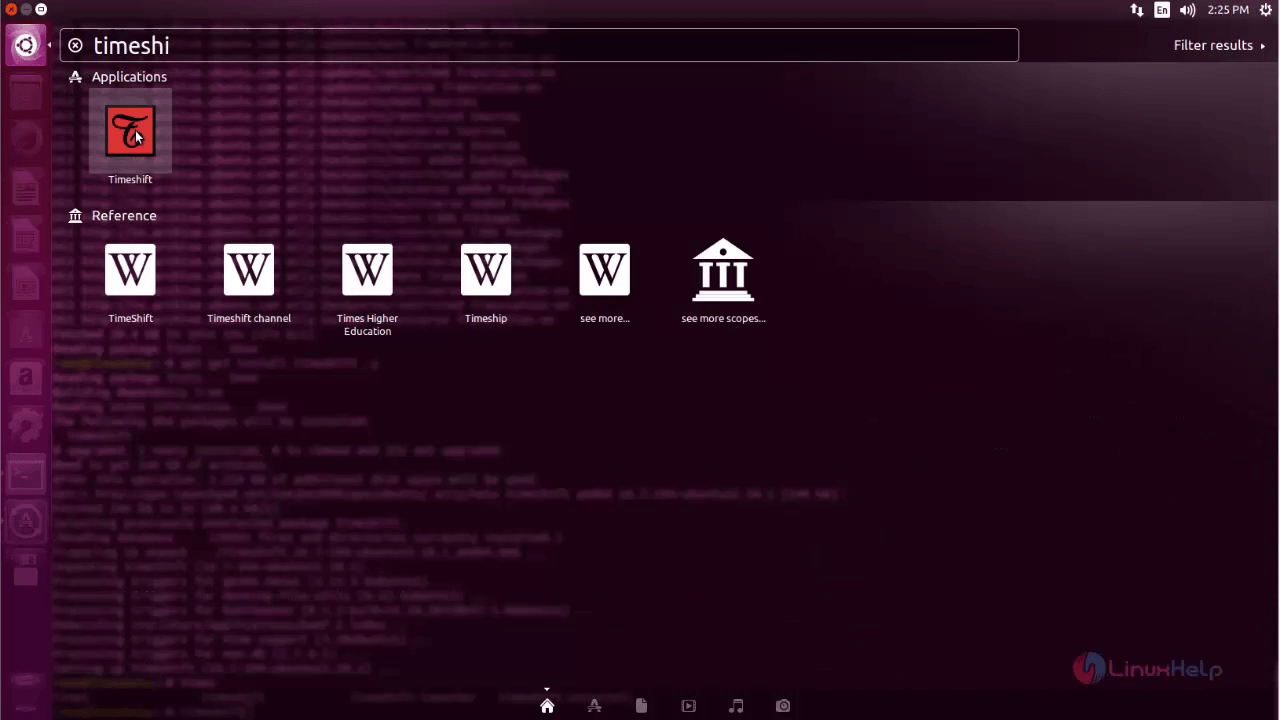
search
Create a backup of the system by hitting backup icon.
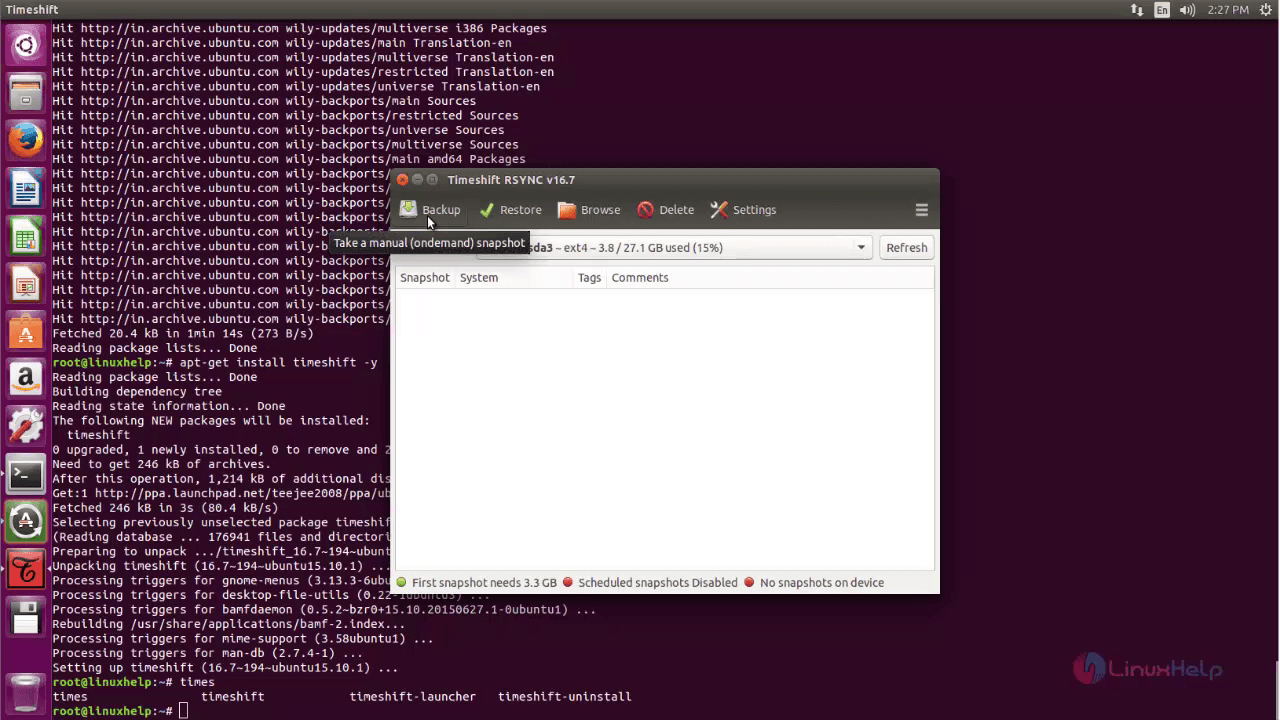
backup
Choose the backup that is to be restored and click restore.
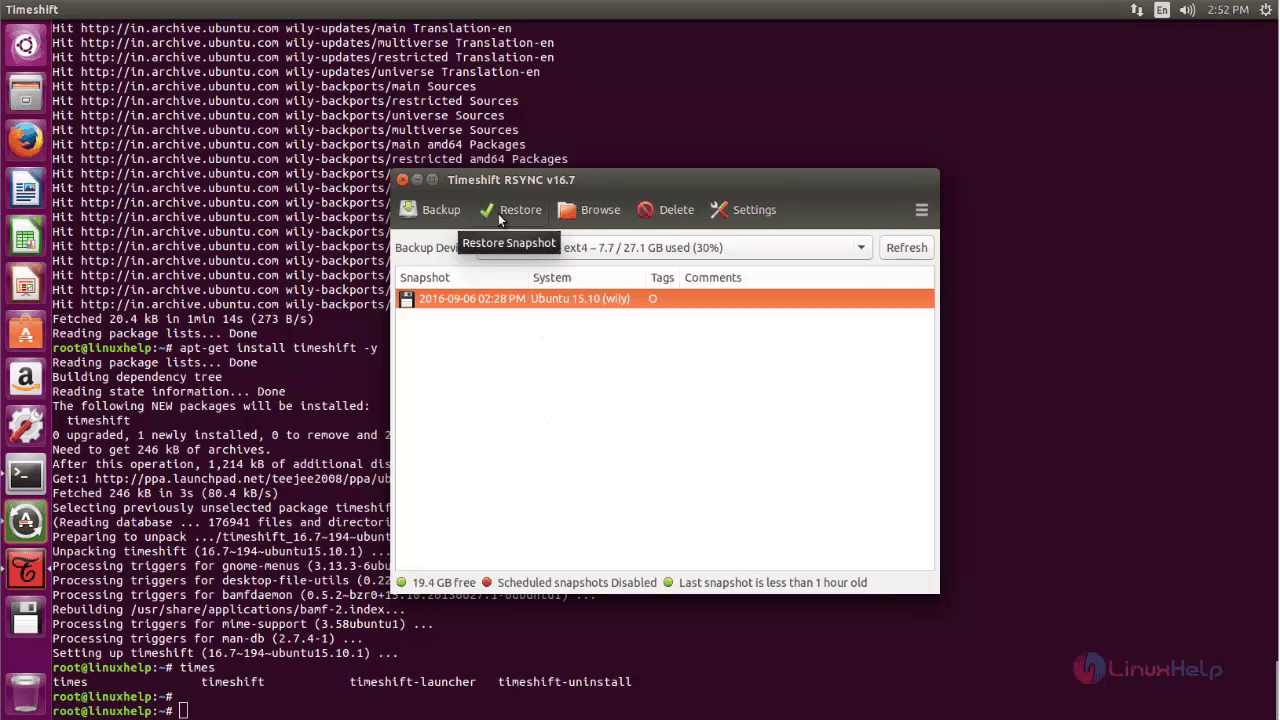
restore

Then choose the device, where the backup is to restored. Finally click Restore.
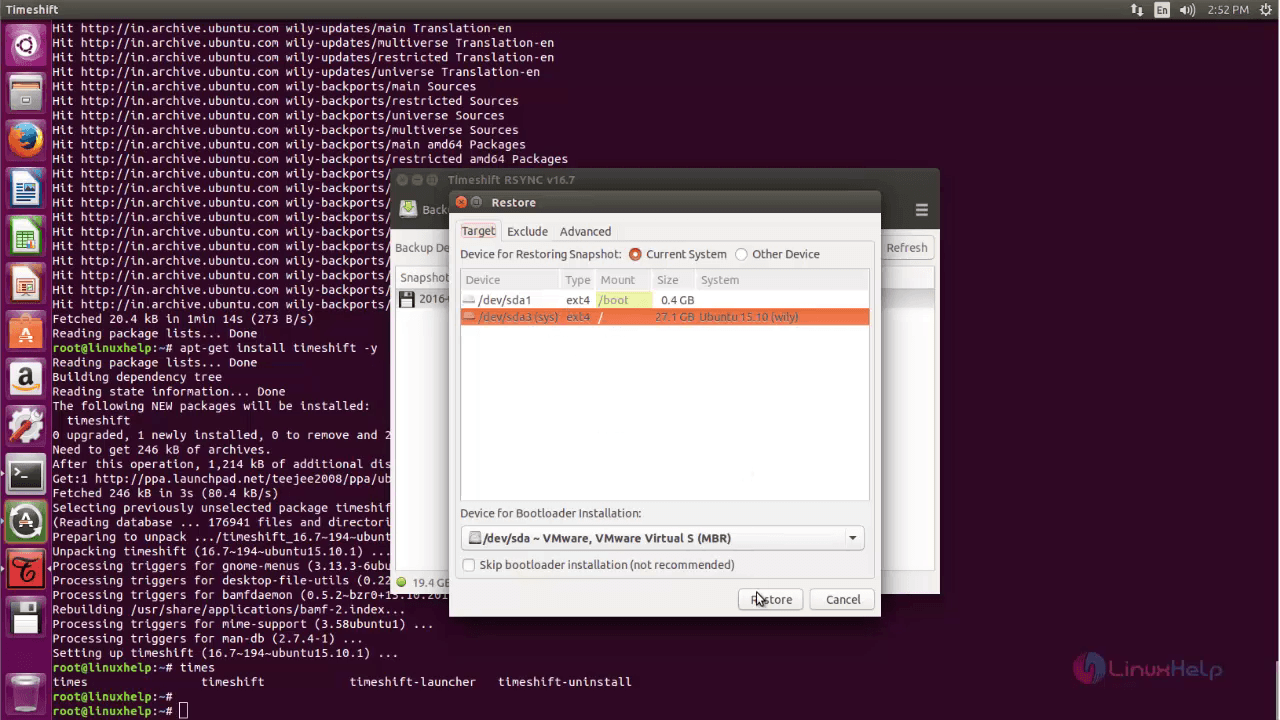
file_restoring
To create Scheduled backup, click Settings.
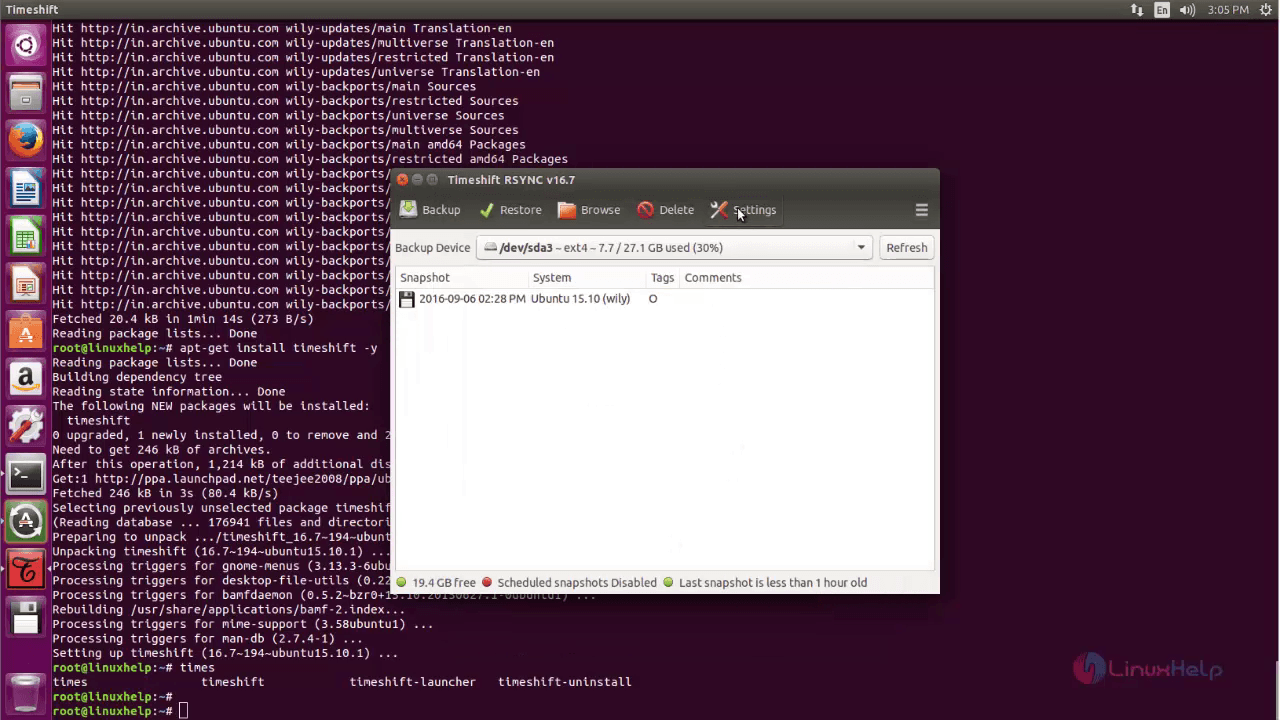
settings

Select scheduled Snapshots, enable the desired Backup level and click Save to generate backup automatically at the scheduled time interval.
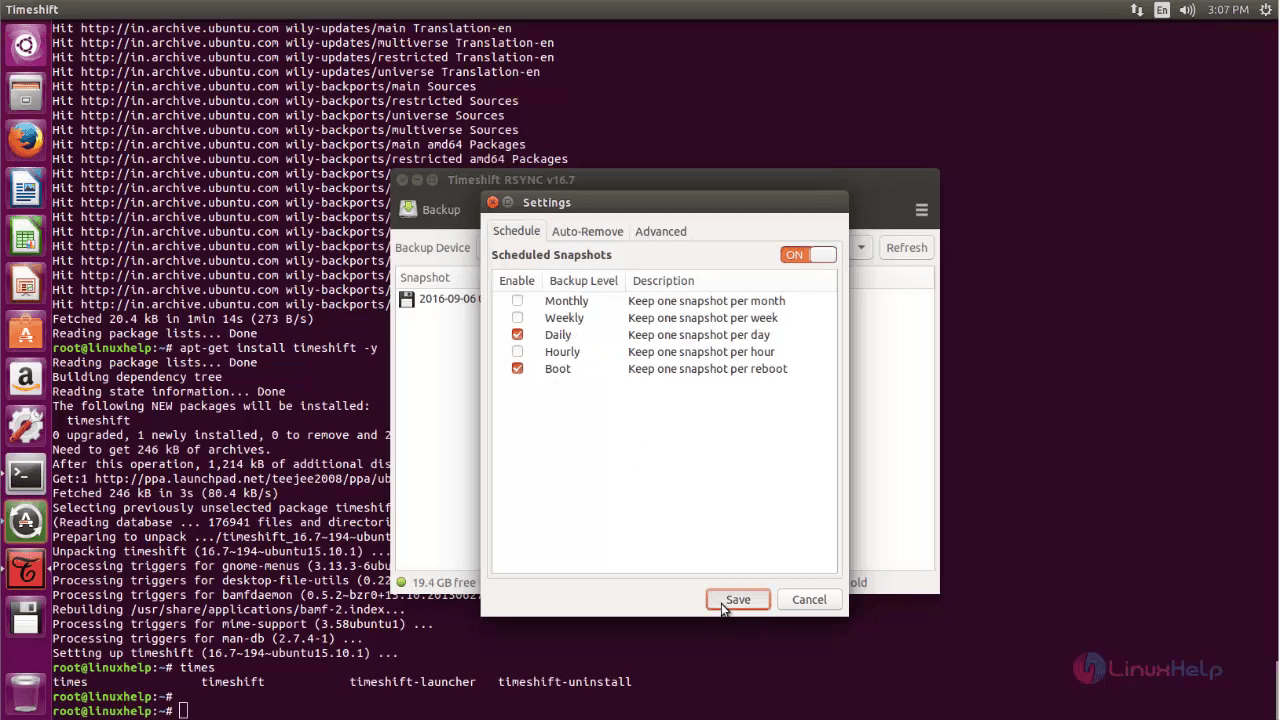
automatic_time_schedule

Tags:
jacob
Author: 

Comments ( 0 )

No comments available

Add a comment
{{postCtrl.cmtErrMsg}}

Frequently asked questions ( 5 )

Q

I still didn't get the idea of time shift what for it is used?

A

TimeShift is a free-ware application that restores the system’s previous state (It is like taking snapshot of the machine's current setup and configuration

Q

What is TimeShift Linux?

A

TimeShift for Linux is an application that provides functionality similar to the System Restore feature in Windows and the Time Machine tool in Mac OS. TimeShift protects your system by taking incremental snapshots of the file system at regular intervals. It is designed to protect only system files and settings.

Q

How can I schedule weekly snapshot?

A

click Save to generate backup automatically at the scheduled time interval in that select weekly option

Q

How to Install Timeshift in Linux?

A

Run the following command:
#sudo add-apt-repository -y ppa:teejee2008/ppa
#sudo apt-get update
#sudo apt-get install timeshift

Q

How do I restore Ubuntu to a previous date?

A

To restore your Ubuntu system, select the restore point of your choice and click System restore option found under Function menu. In the next window, select whether you want to do a full system restore or just the System files restore.

Back To Top!
Rank
User
Points

Top Contributers

userNamenaveelansari
135850

Top Contributers

userNameayanbhatti
92510

Top Contributers

userNamehamzaahmed
32150

Top Contributers

1
userNamelinuxhelp
31040

Top Contributers

userNamemuhammadali
24500
Can you help Jayce ?
What are the types of table used in IPtables

What are the various types of table used in IPtables and how to use that for my server security?

Networking
  • Routing
  • trunk
  • Netmask
  • Packet Capture
  • domain
  • HTTP Proxy
Server Setup
  • NFS
  • KVM
  • Memory
  • Sendmail
  • WebDAV
  • LXC
Shell Commands
  • Cloud commander
  • Command line archive tools
  • last command
  • Shell
  • terminal
  • Throttle
Desktop Application
  • Linux app
  • Pithos
  • Retrospect
  • Scribe
  • TortoiseHg
  • 4Images
Monitoring Tool
  • Monit
  • Apache Server Monitoring
  • EtherApe 
  • Arpwatch Tool
  • Auditd
  • Barman
Web Application
  • Nutch
  • Amazon VPC
  • FarmWarDeployer
  • Rukovoditel
  • Mirror site
  • Chef
Contact Us | Terms of Use| Privacy Policy| Disclaimer
© 2025 LinuxHelp.com All rights reserved. Linux™ is the registered trademark of Linus Torvalds. This site is not affiliated with linus torvalds in any way.