How to install Tixati on Ubuntu
To install Tixati on Ubuntu
Tixati is simple yet powerful Bittorrent Client application for Ubuntu. Tixati is used to download torrent files like Utorrent. It is very simple to install Tixati, and this article explains the installation process of Tixati on Ubuntu.
Installing Tixati
You ought to update the repositories in your system before you initiate the installation. Invoke the following command for the same purpose.
root@linuxhelp1:~# apt-get update
Hit:1 http://security.ubuntu.com/ubuntu xenial-security InRelease
Hit:2 http://in.archive.ubuntu.com/ubuntu xenial InRelease
Get:3 http://in.archive.ubuntu.com/ubuntu xenial-updates InRelease [102 kB]
Get:4 http://in.archive.ubuntu.com/ubuntu xenial-backports InRelease [102 kB]
Fetched 204 kB in 8s (24.6 kB/s)
Reading package lists... Done
Next, you should download the Tixati package by deploying wget command as follows.
root@linuxhelp1:~# wget www.tixati.com/download/tixati_1.96-1_amd64.deb
--2017-04-08 15:41:55--  http://www.tixati.com/download/tixati_1.96-1_amd64.deb
Resolving www.tixati.com (www.tixati.com)... 64.85.163.251
Connecting to www.tixati.com (www.tixati.com)|64.85.163.251|:80... connected.
HTTP request sent, awaiting response... 301 Moved Permanently
Location: https://www.tixati.com/download/tixati_1.96-1_amd64.deb [following]
--2017-04-08 15:41:56--  https://www.tixati.com/download/tixati_1.96-1_amd64.deb
Connecting to www.tixati.com (www.tixati.com)|64.85.163.251|:443... connected.
HTTP request sent, awaiting response... 200 OK
Length: 15144556 (14M) [application/octet-stream]
Saving to: ‘ tixati_1.96-1_amd64.deb’

tixati_1.96-1_amd64.deb                     100%[=========================================================================================> ]  14.44M  43.7KB/s    in 9m 43s

2017-04-08 15:51:42 (25.4 KB/s) - ‘ tixati_1.96-1_amd64.deb’  saved [15144556/15144556]

Debian packages can be installed using dpkg command, here I will prefer you to install it by using gdebi command because gdebi is the frontend for dpkg and also it will looks for dependent packages while installing any kind of package.
Once it is done, use the following command to install the package for gdebi as it is necessary for installing Tixati.
root@linuxhelp1:~# apt-get install gdebi -y
Reading package lists... Done
Building dependency tree
Reading state information... Done
The following additional packages will be installed:
  gdebi-core gksu gnome-icon-theme libcairo-perl libgksu2-0 libglib-perl libgtk2-perl libpango-perl
Suggested packages:
  libfont-freetype-perl libgtk2-perl-doc
The following NEW packages will be installed:
  gdebi gdebi-core gksu gnome-icon-theme libcairo-perl libgksu2-0 libglib-perl libgtk2-perl libpango-perl
0 upgraded, 9 newly installed, 0 to remove and 476 not upgraded.
Need to get 10.9 MB of archives.
After this operation, 21.8 MB of additional disk space will be used.
.
.
.
Setting up gnome-icon-theme (3.12.0-1ubuntu3) ...
Setting up libcairo-perl (1.106-1build1) ...
Setting up libglib-perl (3:1.320-2) ...
Setting up libpango-perl (1.227-1) ...
Setting up libgtk2-perl (2:1.2498-1) ...
Processing triggers for gconf2 (3.2.6-3ubuntu6) ...
Setting up gksu (2.0.2-9ubuntu1) ...
Setting up gdebi (0.9.5.7ubuntu1) ...
Processing triggers for libc-bin (2.23-0ubuntu3) ...
Now all is set for the installation of Tixati. Use the gdebi command for installing it on your Ubuntu machine.
root@linuxhelp1:~# gdebi tixati_1.96-1_amd64.deb
Reading package lists... Done
Building dependency tree
Reading state information... Done
Reading state information... Done

Tixati P2P Client
 Tixati P2P Client
Do you want to install the software package? [y/N]:y
Selecting previously unselected package tixati.
(Reading database ... 180397 files and directories currently installed.)
Preparing to unpack tixati_1.96-1_amd64.deb ...
Unpacking tixati (1.96-1) ...
Setting up tixati (1.96-1) ...
Processing triggers for gnome-menus (3.13.3-6ubuntu3) ...
Processing triggers for desktop-file-utils (0.22-1ubuntu5) ...
Processing triggers for bamfdaemon (0.5.3~bzr0+16.04.20160415-0ubuntu1) ...
Rebuilding /usr/share/applications/bamf-2.index...
Processing triggers for mime-support (3.59ubuntu1) ...
Processing triggers for hicolor-icon-theme (0.15-0ubuntu1) ...
Tixati has been installed, open the application from Ubuntu dashboard. The application looks as follows.
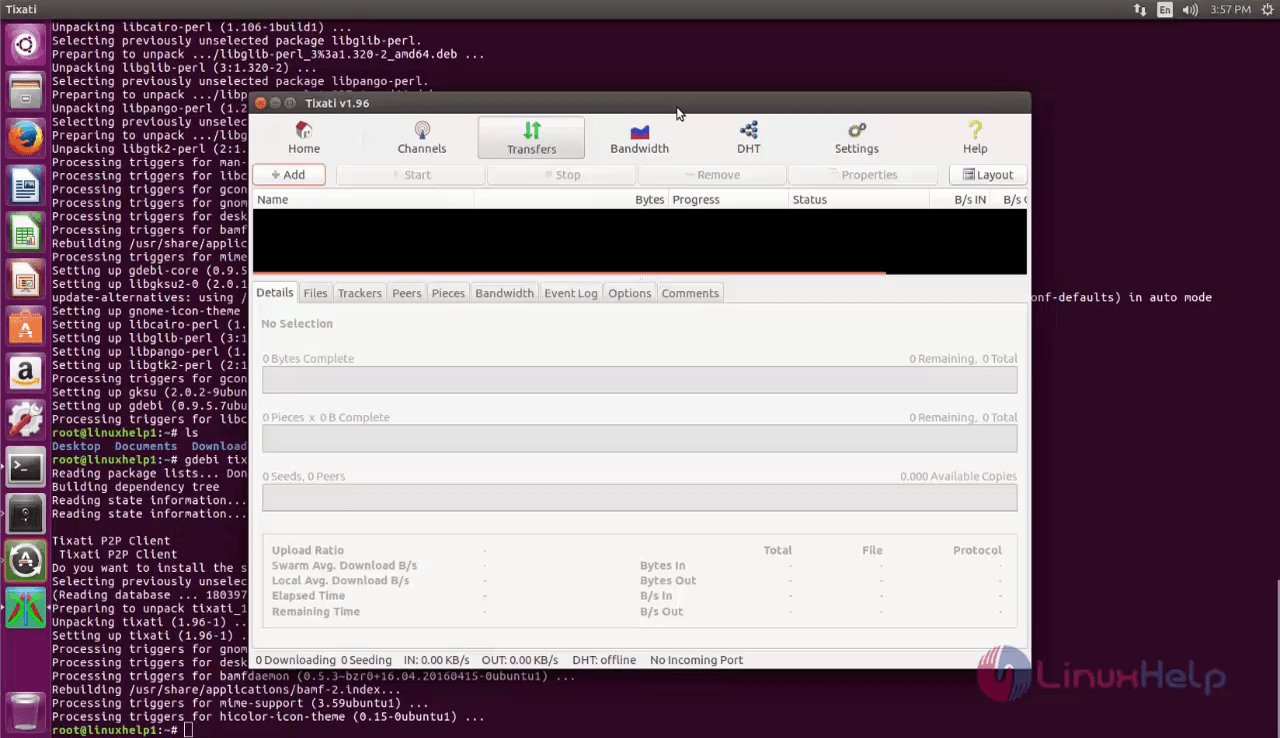
Don' t you agree it was a pretty simple installation? Tixati is also a cool application as it has all the tools a torrent app would have along with some additional features. It has complete DHT support and configuration options so that you will have all the options you need.
Comments ( 0 )
No comments available