How to install Tor Browser in CentOS
{{postValue.id}}
To install Tor Browser in CentOS
Tor is an open source, cross platform software that helps you to defend against traffic analysis, network surveillance, confidential business activities and relationships, and state security. In this article we will learn how to install Tor browser in CentOS.
Features
- Supports complex Data encryption.
- Automatic data decryption at client side.
- Sequence of Firefox Browser + Tor Project.
- Supports architectures x86 and x86_64.
- Setting of FTP with Tor is quite simple.
- Provides anonymity to servers and websites.
- Locked websites viewing option.
- Achieves task without revealing IP of Source.
- Routes data to/from hidden services and application.
- Portable
- Can handle thousands of relay and millions of users.
To install Tor Browser
Download the epel repository by running the following command.
[root@linuxhelp1 Desktop]#  wget http://dl.fedoraproject.org/pub/epel/7/x86_64/e/epel-release-7-8.noarch.rpm
--2016-09-30 17:45:28--  http://dl.fedoraproject.org/pub/epel/7/x86_64/e/epel-release-7-8.noarch.rpm
Resolving dl.fedoraproject.org (dl.fedoraproject.org)... 209.132.181.24, 209.132.181.26, 209.132.181.27, ...
Connecting to dl.fedoraproject.org (dl.fedoraproject.org)|209.132.181.24|:80... connected.
HTTP request sent, awaiting response... 200 OK
Length: 14612 (14K) [application/x-rpm]
Saving to: ‘ epel-release-7-8.noarch.rpm’

100%[======================================> ] 14,612      62.7KB/s   in 0.2s

2016-09-30 17:45:30 (62.7 KB/s) - ‘ epel-release-7-8.noarch.rpm’  saved [14612/14612]
Then install the epel repository by executing the below command.
[root@linuxhelp1 Desktop]# rpm -ivh epel-release-7-8.noarch.rpm
warning: epel-release-7-8.noarch.rpm: Header V3 RSA/SHA256 Signature, key ID 352c64e5: NOKEY
Preparing...                          ################################# [100%]
Updating / installing...
   1:epel-release-7-8                 ################################# [100%]
Now its time to install the Tor browser.
[root@linuxhelp1 Desktop]# yum install tor
Loaded plugins: fastestmirror, langpacks
Loading mirror speeds from cached hostfile
 * atomic: mirrors.hosting.in.th
 * base: centos.webwerks.com
 * epel: mirror01.idc.hinet.net
 * extras: centos.excellmedia.net
 * updates: centos.excellmedia.net
Resolving Dependencies
-->  Running transaction check
--->  Package tor.x86_64 0:0.2.8.7-1.el7 will be installed
-->  Processing Dependency: torsocks for package: tor-0.2.8.7-1.el7.x86_64
-->  Running transaction check
--->  Package torsocks.x86_64 0:2.1.0-1.el7 will be installed
-->  Finished Dependency Resolution

Dependencies Resolved

================================================================================
 Package           Arch            Version                  Repository     Size
================================================================================
Installing:
 tor               x86_64          0.2.8.7-1.el7            epel          2.2 M
Installing for dependencies:
 torsocks          x86_64          2.1.0-1.el7              epel           61 k

Transaction Summary
================================================================================
Install  1 Package (+1 Dependent package)

.
.
.
Warning: RPMDB altered outside of yum.
  Installing : torsocks-2.1.0-1.el7.x86_64                                  1/2
  Installing : tor-0.2.8.7-1.el7.x86_64                                     2/2
  Verifying  : torsocks-2.1.0-1.el7.x86_64                                  1/2
  Verifying  : tor-0.2.8.7-1.el7.x86_64                                     2/2

Installed:
  tor.x86_64 0:0.2.8.7-1.el7

Dependency Installed:
  torsocks.x86_64 0:2.1.0-1.el7

Complete!
To launch Tor Browser
For starting the Tor browser service, run the following command.
[root@linuxhelp1 Desktop]# systemctl start tor
Open and configure Tor browser. Go to Menu&rarr Advanced &rarr Network and settings
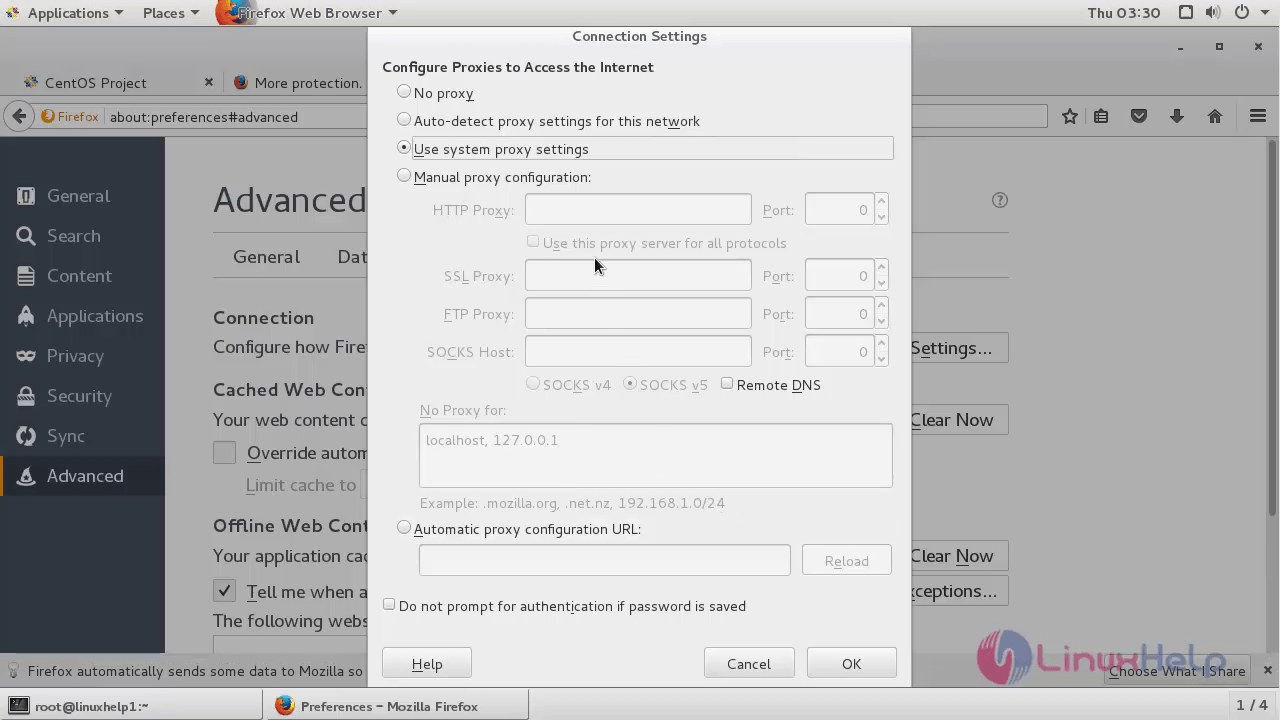
In the displayed Menu, set the SOCKS host address as 127.0.0.1, the port number as 9050 and click save.
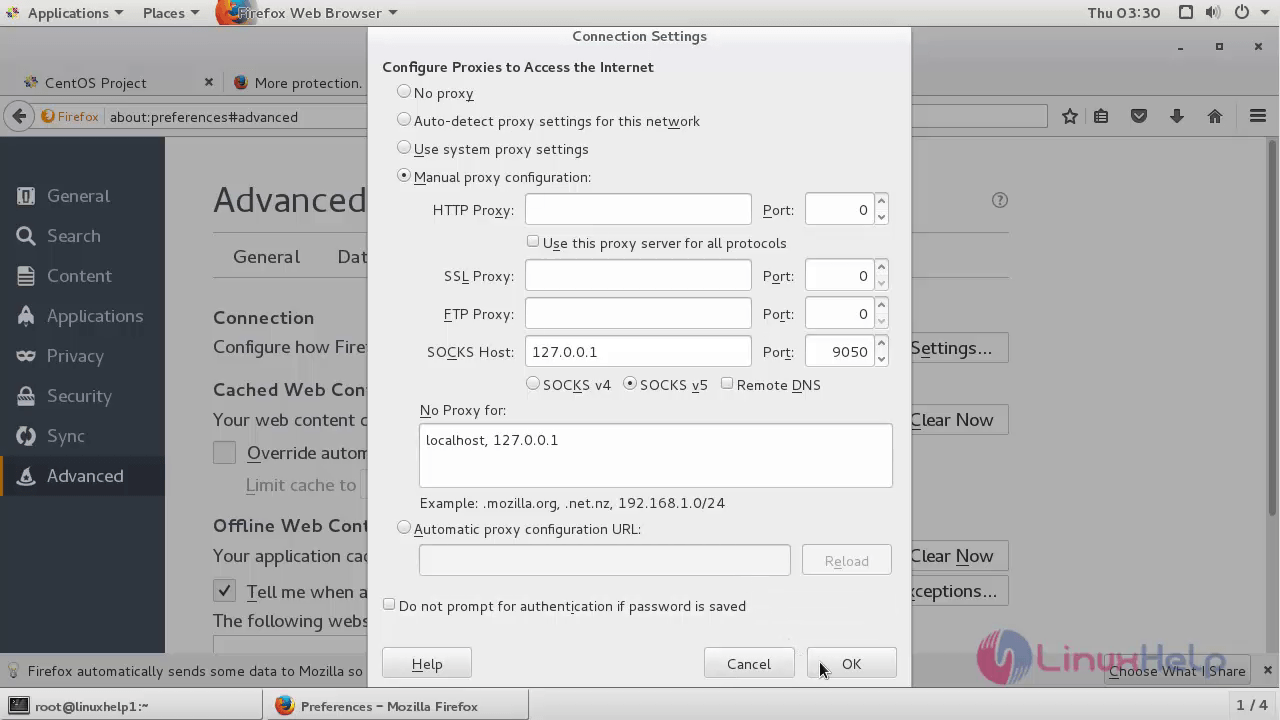
Now the Tor browser is configured successfully and enjoy surfing!
Comments ( 0 )
No comments available