How to install Typing Tutor on Debian 11.3
To Install Typing Tutor On Debian 11.3
Introduction:
A Typing Tutor is an application that can permit us to learn and test our typing skills. There are numerous popular Typing Tutor applications that can run efficiently on Debian. In this tutorial, let us see the installation of two of the most popular typing tutor applications Klavaro and Tuxtype.
Procedure:
Step 1: Check the OS Version by using the below command.
[root@linuxhelp:~#] lsb_release -a
No LSB modules are available.
Distributor ID:	Debian
Description:	Debian GNU/Linux 11 (bullseye)
Release:	11
Codename:	bullseye
Step 2: Next install Klavaro by simply running the below command.
[root@linuxhelp:~#] apt-get install klavaro -y
Reading package lists... Done
Building dependency tree... Done
Reading state information... Done

The following additional packages will be installed:
  fonts-beng fonts-beng-extra fonts-deva fonts-deva-extra fonts-gargi fonts-gubbi fonts-gujr fonts-gujr-extra fonts-guru fonts-guru-extra fonts-kalapi fonts-knda fonts-lohit-beng-assamese
  fonts-lohit-beng-bengali fonts-lohit-deva fonts-lohit-gujr fonts-lohit-guru fonts-lohit-knda fonts-lohit-orya fonts-lohit-taml fonts-lohit-taml-classical fonts-lohit-telu fonts-nakula fonts-navilu
  fonts-orya fonts-orya-extra fonts-sahadeva fonts-samyak-deva fonts-samyak-gujr fonts-samyak-taml fonts-sarai fonts-sil-andika fonts-sil-doulos fonts-taml fonts-telu fonts-telu-extra fonts-teluguvijayam
  fonts-yrsa-rasa libmad0 libmikmod3 libsdl-image1.2 libsdl-mixer1.2 libsdl-net1.2 libsdl-pango1 libsdl1.2debian libt4k-common0 tuxtype-data
The following NEW packages will be installed:
  fonts-beng fonts-beng-extra fonts-deva fonts-deva-extra fonts-gargi fonts-gubbi fonts-gujr fonts-gujr-extra fonts-guru fonts-guru-extra fonts-kalapi fonts-knda fonts-lohit-beng-assamese
  fonts-lohit-beng-bengali fonts-lohit-deva fonts-lohit-gujr fonts-lohit-guru fonts-lohit-knda fonts-lohit-orya fonts-lohit-taml fonts-lohit-taml-classical fonts-lohit-telu fonts-nakula fonts-navilu
 fonts-orya fonts-orya-extra fonts-sahadeva fonts-samyak-deva fonts-samyak-gujr fonts-samyak-taml fonts-sarai fonts-sil-andika fonts-sil-doulos fonts-taml fonts-telu fonts-telu-extra fonts-teluguvijayam
  fonts-yrsa-rasa libmad0 libmikmod3 libsdl-image1.2 libsdl-mixer1.2 libsdl-net1.2 libsdl-pango1 libsdl1.2debian libt4k-common0 tuxtype tuxtype-data
0 upgraded, 48 newly installed, 0 to remove and 0 not upgraded.
Step 3: Next check the Version of Klavaro by using the below command.
[root@linuxhelp:~#] klavaro -v
3.13
Step 4: Once the installation has been completed, open the application from your terminal using the command “klavaro.” The Klavaro application appears on your screen.
[root@linuxhelp:~#] klavaro
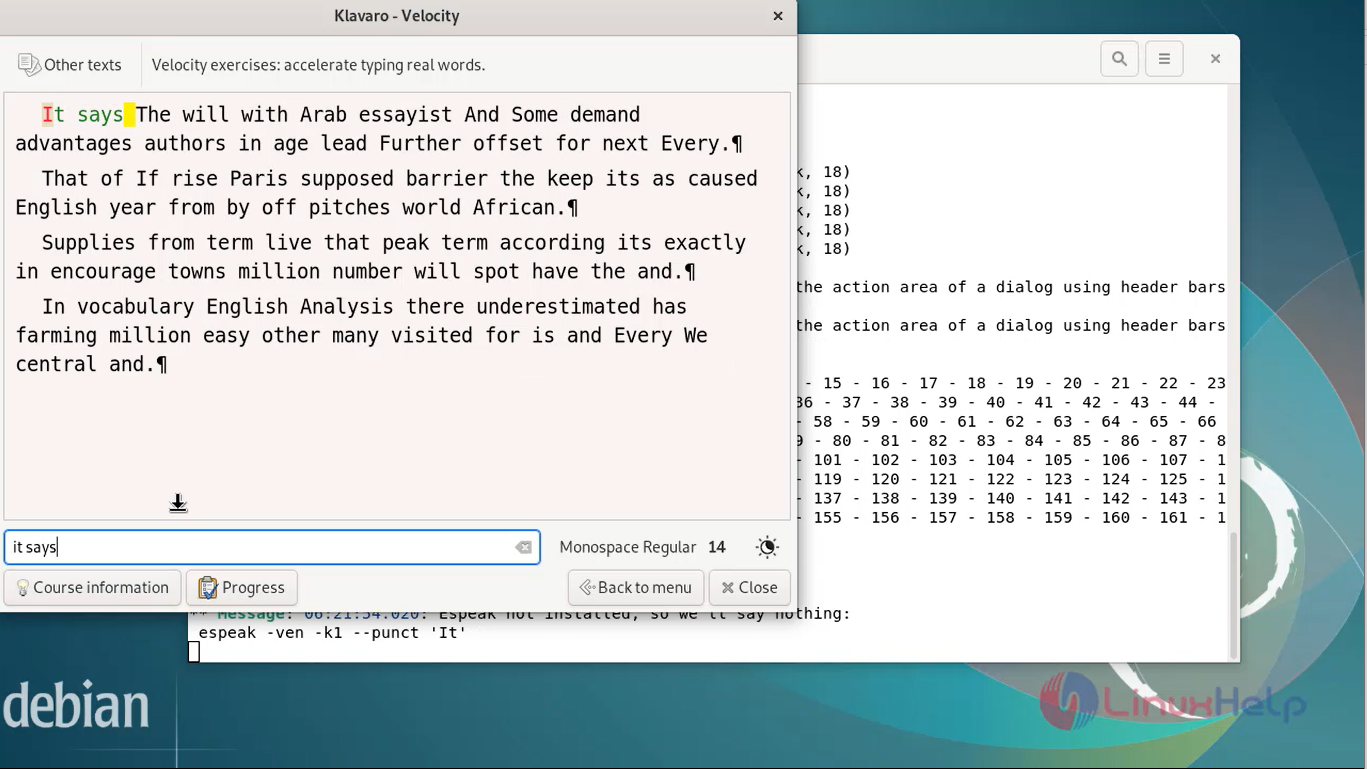
Step 5: You can choose the test options and test your typing skills as shown in the below image.

Step 6: Now type the passage shown on the screen.
Step 7: Install TuxType, you can simply install TuxType by running the below command.
[root@linuxhelp:~#] apt-get install tuxtype -y
Reading package lists... Done
Building dependency tree... Done
Reading state information... Done
The following additional packages will be installed:
  fonts-beng fonts-beng-extra fonts-deva fonts-deva-extra fonts-gargi fonts-gubbi fonts-gujr fonts-gujr-extra fonts-guru fonts-guru-extra fonts-kalapi fonts-knda fonts-lohit-beng-assamese

fonts-yrsa-rasa libmad0 libmikmod3 libsdl-image1.2 libsdl-mixer1.2 libsdl-net1.2 libsdl-pango1 libsdl1.2debian libt4k-common0 tuxtype-data
0 upgraded, 48 newly installed, 0 to remove and 0 not upgraded.
Step 8: After install the go to menus and to search TuxType. You will see the application and open the application. You will choose and check your typing skills as shown in the below images.


Conclusion:
We have reached the end of this article. In this guide, we have walked you through the steps required to install typing tutor on Debian 11.3. Your feedback is much welcome.
Comments ( 0 )
No comments available