How to install Typo3 8.7.3 on MX Linux 17
How to install Typo3 8.7.3 on MX Linux 17
TYPO3 is a free and open source enterprise content management system. It is written in PHP and uses MySQL to store its data. TYPO3 can run on HTTP server such as Apache or IIS. It also runs on PHP 5.3 or newer versions. TYPO3 is a responsive, multilingual and secure CMS. It can also be customized and extended without writing any code. In this tutorial, we will cover the installation of Typo3 on MX Linux 17.
Prerequisites
Install LAMP(Apache, MariaDB, php7) In MariaDB (create database and user and give privileges to that user )
Php installation with required following modules
add-apt-repository ppa:ondrej/php
apt-get update
apt-get install php7.0 php7.0-mysql php7.0-curl php7.0-json php7.0-cgi libapache2-mod-php7.0 php7.0-mcrypt php7.0-xmlrpc php7.0-gd
php7.0-mbstring php7.0  php7.0-common  php7.0-xmlrpc php7.0-soap  php7.0-xml php7.0-intl  php7.0-cli  php7.0-ldap php7.0-zip php7.0-readline php7.0-imap php7.0-tidy php7.0-recode php7.0-sq php7.0-intl
Installation
Download a Typo3 package using the following URL
root@linuxhelp:~# wget https://excellmedia.dl.sourceforge.net/project/typo3/TYPO3%20Source%20and%20Dummy/TYPO3%208.7.3/typo3_src-8.7.3.tar.gz
--2018-09-12 03:33:10--  https://excellmedia.dl.sourceforge.net/project/typo3/TYPO3%20Source%20and%20Dummy/TYPO3%208.7.3/typo3_src-8.7.3.tar.gz
Resolving excellmedia.dl.sourceforge.net (excellmedia.dl.sourceforge.net)... 202.153.32.19
Connecting to excellmedia.dl.sourceforge.net (excellmedia.dl.sourceforge.net)|202.153.32.19|:443... connected.
HTTP request sent, awaiting response... 200 OK
Length: 18024088 (17M) [application/x-gzip]
Saving to: ‘typo3_src-8.7.3.tar.gz’

typo3_src-8.7.3.tar.gz   100%[==================================>]  17.19M  1.08MB/s    in 16s

2018-09-12 03:33:26 (1.10 MB/s) - ‘typo3_src-8.7.3.tar.gz’ saved [18024088/18024088]
After Downloading extract the downloaded package
root@linuxhelp:~# tar -zxvf typo3_src-8.7.3.tar.gz
typo3_src-8.7.3/
typo3_src-8.7.3/CONTRIBUTING.md
typo3_src-8.7.3/INSTALL.md
typo3_src-8.7.3/LICENSE.txt
typo3_src-8.7.3/README.md
typo3_src-8.7.3/_.htaccess
typo3_src-8.7.3/composer.json
.
.
typo3_src-8.7.3/vendor/typo3fluid/fluid/src/ViewHelpers/LayoutViewHelper.php
typo3_src-8.7.3/vendor/typo3fluid/fluid/src/ViewHelpers/OrViewHelper.php
typo3_src-8.7.3/vendor/typo3fluid/fluid/src/ViewHelpers/RenderViewHelper.php
typo3_src-8.7.3/vendor/typo3fluid/fluid/src/ViewHelpers/SectionViewHelper.php
typo3_src-8.7.3/vendor/typo3fluid/fluid/src/ViewHelpers/SpacelessViewHelper.php
typo3_src-8.7.3/vendor/typo3fluid/fluid/src/ViewHelpers/SwitchViewHelper.php
typo3_src-8.7.3/vendor/typo3fluid/fluid/src/ViewHelpers/ThenViewHelper.php
typo3_src-8.7.3/vendor/typo3fluid/fluid/src/ViewHelpers/VariableViewHelper.php
Move the extracted file into the HTML directory
root@linuxhelp:~# mv typo3_src-8.7.3 /var/www/
Navigate to the apache document root directory
root@linuxhelp:~# cd /var/www/
Change ownership and permission of the as Typo3 follows
root@linuxhelp:/var/www# chown -R www-data.www-data typo3_src-8.7.3
root@linuxhelp:/var/www# chmod -R 775 typo3_src-8.7.3
Create a new virtual host configuration for accessing the Typo3
root@linuxhelp:/var/www# vim /etc/apache2/sites-available/typo3.conf
<VirtualHost *:80>
ServerName www.linuxhelp1.com
DocumentRoot /var/www/typo3_src-8.7.3/

<Directory /var/www/typo3_src-8.7.3/>
AllowOverride All
Allow from All
</Directory>

</VirtualHost>
Enable site access
root@linuxhelp:/var/www# a2ensite typo3.conf
Enabling site typo3.
To activate the new configuration, you need to run:
  service apache2 reload
Disable default access
root@linuxhelp:/var/www# a2dissite 000-default.conf
Site 000-default disabled.
To activate the new configuration, you need to run:
  service apache2 reload
Enable rewrite module
root@linuxhelp:/var/www# a2enmod rewrite
Enabling module rewrite.
To activate the new configuration, you need to run:
  service apache2 restart
Restart the apache service to make the changes effect
root@linuxhelp:/var/www# service apache2 restart
[ ok ] Restarting Apache httpd web server: apache2.
Now you can proceed the further installation and configuration from the browser by navigating to the following URL: http://<ipaddress or domain name

Verify the compatibility for installing Typo3 as shown below

Configure the Database setup as follows

You will select the database

Configure the Admin user setup and Site information as follow

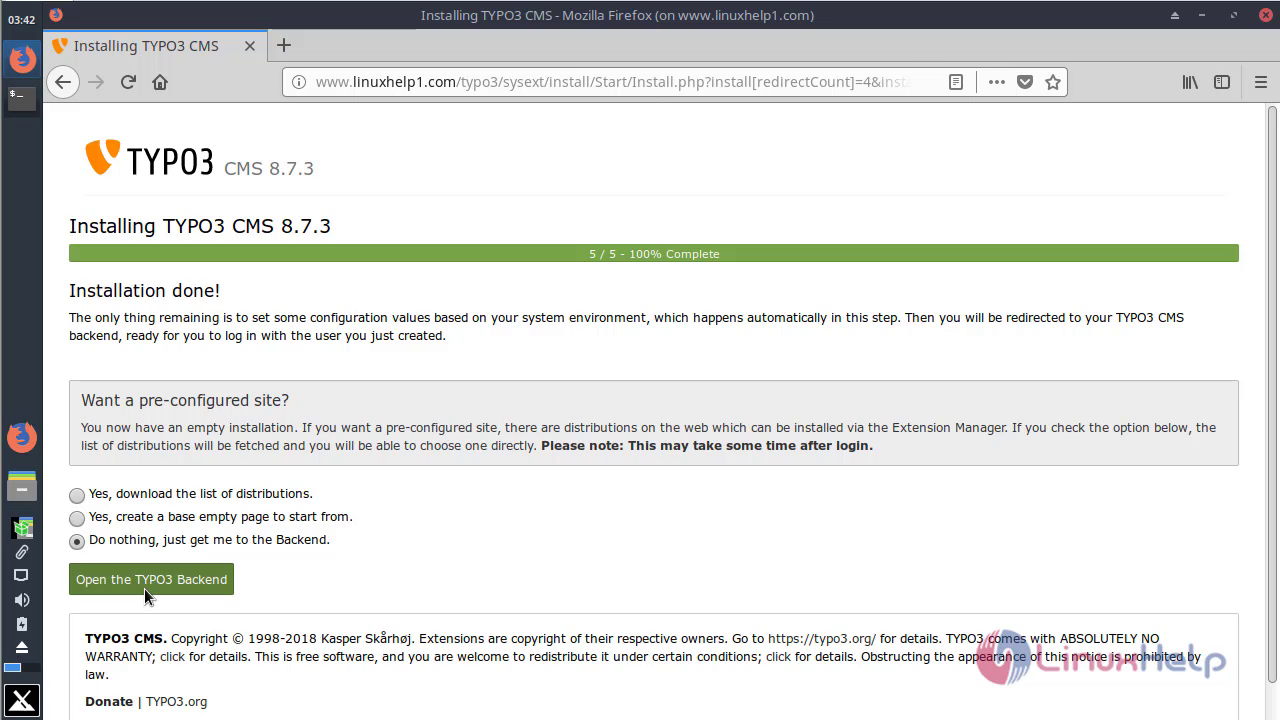
After the configuration, you will see the following page as shown below

Access the login page from the options shown below
You can log in using the admin user credentials

After the Successful login, you will see the Admin dashboard of Typo3 as shown below

You will see the version of Typo3 CMS

With this, the method to install Typo3 on MX Linux 17 comes to an end.
Comments ( 0 )
No comments available