How to install typo3 cms using lamp configuration in centos 7.5
- 0:52 rpm -q centos-release
- 8:1 mv typo3/_.htacces typo3/.htaccess
- 1:08 yum install httpd
- 1:59 yum install mariadb-server mariadb
- 2:49 mysql_secure_installation
- 3:15 yum install php php-mcrypt php-mysql php-mbstring php-ctype php-tokenizer php-simplexml php-pcre php-zip php-pdo php-curl php-xml
- 3:41 systemctl restart httpd
- 3:51 mysql -u root -p
- 5:45 wget https://excellmedia.dl.sourceforge.net/project/typo3/TYPO3%20Source%20and%20Dummy/TYPO3%208.7.3/typo3_src-8.7.3.tar.gz
- 6:12 tar –xvf typo3_src-8.7.3.tar.gz
- 6:33 vim /etc/php.ini
- 7:23 mv typo3_src-8.7.3 /var/www/typo3
- 8:35 chown -R apache:apache /var/www/typo3
- 8:56 vim /etc/httpd/conf.d/typo3.conf
- 9:54 vim /etc/hosts
- 10:52 touch /var/www/typo3/FIRST_INSTALL
- 11:02 systemctl restart httpd
Installation of TYPO3 cms using lamp configuration in centos 7.5
Installation
TYPO3 is a free and open source enterprise content management system. It is written in PHP and uses MySQL to store its data. TYPO3 can run on HTTP server such as Apache or IIS. It also runs on PHP 5.4 or newer versions. TYPO3 is a responsive and secure CMS. This tutorial covers the ground on the installation procedure of Typo3 CMS on CentOS 7.5.
Checking centos version
[root@linuxhelp ~]#rpm -q centos-release
lamp configuration
Install the apache by using the Following command
[root@linuxhelp ~]#yum install httpd
Loaded plugins: fastestmirror, langpacks
Loading mirror speeds from cached hostfile
 * base: centos.mirrors.estointernet.in
 * epel: epel.scopesky.iq
 * extras: centos.mirrors.estointernet.in
 * remi-php70: fr2.rpmfind.net
 * remi-safe: remirepo.reloumirrors.net
 * updates: mirrors.123host.vn
Resolving Dependencies
--> Running transaction check
.
.
.
Running transaction test
Transaction test succeeded
Running transaction
  Installing : httpd-2.4.6-88.el7.centos.x86_64                                                                                         1/1
  Verifying  : httpd-2.4.6-88.el7.centos.x86_64                                                                                         1/1
Installed:
  httpd.x86_64 0:2.4.6-88.el7.centos
Once the Installation of apache Is completed start the service
[root@linuxhelp ~]# systemctl start httpd
Enable the service of apache by using the Following Command
[root@linuxhelp ~]# systemctl enable httpd
Created symlink from /etc/systemd/system/multi-user.target.wants/httpd.service to /usr/lib/systemd/system/httpd.service.
Next step will be installing mariadb and mariadb-server
root@linuxhelp ~]# yum install mariadb-server mariadb
Loaded plugins: fastestmirror, langpacks
Loading mirror speeds from cached hostfile
 * base: centos.mirrors.estointernet.in
 * epel: mirror.xeonbd.com
 * extras: centos.mirrors.estointernet.in
 * remi-php70: mirror.xeonbd.com
 * remi-safe: mirror.xeonbd.com
 * updates: mirrors.123host.vn
Resolving Dependencies
--> Running transaction check
---> Package mariadb.x86_64 1:5.5.60-1.el7_5 will be installed
.
.
.
Installing : 1:mariadb-5.5.60-1.el7_5.x86_64                                                                                          1/2
  Installing : 1:mariadb-server-5.5.60-1.el7_5.x86_64                                                                                   2/2
  Verifying  : 1:mariadb-server-5.5.60-1.el7_5.x86_64                                                                                   1/2
  Verifying  : 1:mariadb-5.5.60-1.el7_5.x86_64                                                                                          2/2
Installed:
  mariadb.x86_64 1:5.5.60-1.el7_5                                   mariadb-server.x86_64 1:5.5.60-1.el7_5
Complete!
Once the mariadb Installation is completed start the service
[root@linuxhelp ~]# systemctl start mariadb
Enable the mariadb service by using the Following command
[root@linuxhelp ~]# systemctl enable mariadb
Created symlink from /etc/systemd/system/multi-user.target.wants/mariadb.service to /usr/lib/systemd/system/mariadb.service.
After completing secure the root password for mysql database as Follows
[root@linuxhelp ~]#mysql_secure_installation
NOTE: RUNNING ALL PARTS OF THIS SCRIPT IS RECOMMENDED FOR ALL MariaDB
      SERVERS IN PRODUCTION USE!  PLEASE READ EACH STEP CAREFULLY!
In order to log into MariaDB to secure it, we'll need the current
password for the root user.  If you've just installed MariaDB, and
you haven't set the root password yet, the password will be blank,
so you should just press enter here.
Enter current password for root (enter for none):
OK, successfully used password, moving on...
Setting the root password ensures that nobody can log into the MariaDB
root user without the proper authorization.
Set root password? [Y/n] y
New password:
Re-enter new password:
Password updated successfully!
Reloading privilege tables..
 ... Success!
 By default, a MariaDB installation has an anonymous user, allowing anyone
to log into MariaDB without having to have a user account created for
them.  This is intended only for testing, and to make the installation
go a bit smoother.  You should remove them before moving into a
production environment.
Remove anonymous users? [Y/n] y
 ... Success!
Normally, root should only be allowed to connect from 'localhost'.  This
ensures that someone cannot guess at the root password from the network.
Disallow root login remotely? [Y/n] y
 ... Success!
By default, MariaDB comes with a database named 'test' that anyone can
access.  This is also intended only for testing, and should be removed
before moving into a production environment.
Remove test database and access to it? [Y/n] y
 - Dropping test database...
 ... Success!
 - Removing privileges on test database...
 ... Success!
Reloading the privilege tables will ensure that all changes made so far
will take effect immediately.
Reload privilege tables now? [Y/n] y
 ... Success!
Cleaning up...
All done!  If you've completed all of the above steps, your MariaDB
installation should now be secure.
Thanks for using MariaDB!
Once mariadb is Installed, install the php and php modules
[root@linuxhelp ~]# yum install php php-mcrypt php-mysql php-mbstring php-ctype php-tokenizer php-simplexml php-pcre php-zip php-pdo php-curl php-xml
Loaded plugins: fastestmirror, langpacks
Loading mirror speeds from cached hostfile
 * base: ftp.iitm.ac.in
 * epel: ftp.jaist.ac.jp
 * extras: centos-hcm.viettelidc.com.vn
 * remi-php70: remi.xpg.com.br
 * remi-safe: remi.xpg.com.br
 * updates: mirrors.123host.vn
Package php-mysql is obsoleted by php-mysqlnd, trying to install php-mysqlnd-7.0.33-5.el7.remi.x86_64 instead
Resolving Dependencies
--> Running transaction check
---> Package php.x86_64 0:7.0.33-5.el7.remi will be installed
--> Processing Dependency: php-cli(x86-64) = 7.0.33-5.el7.remi for package: php-7.0.33-5.el7.remi.x86_64
---> Package php-common.x86_64 0:7.0.33-5.el7.remi will be installed
---> Package php-json.x86_64 0:7.0.33-5.el7.remi will be installed
.
.
.
Installed:
  php.x86_64 0:7.0.33-5.el7.remi                    php-common.x86_64 0:7.0.33-5.el7.remi        php-json.x86_64 0:7.0.33-5.el7.remi
  php-mbstring.x86_64 0:7.0.33-5.el7.remi           php-mysqlnd.x86_64 0:7.0.33-5.el7.remi       php-pdo.x86_64 0:7.0.33-5.el7.remi
  php-pecl-zip.x86_64 0:1.15.4-1.el7.remi.7.0       php-xml.x86_64 0:7.0.33-5.el7.remi
Dependency Installed:
  libzip5.x86_64 0:1.5.2-1.el7.remi                                    php-cli.x86_64 0:7.0.33-5.el7.remi
Restart the apache service by using following command
[root@linuxhelp ~]# systemctl restart httpd
Next,Configure the MySQL database. Log into MySQL as a root user and make the necessary settings
[root@linuxhelp ~]# mysql -u root -p
Enter password:
Welcome to the MariaDB monitor.  Commands end with ; or \g.
Your MariaDB connection id is 6
Server version: 5.5.60-MariaDB MariaDB Server
Copyright (c) 2000, 2018, Oracle, MariaDB Corporation Ab and others.
MariaDB [(none)]>  create database typo3db;
Query OK, 1 row affected (0.00 sec)

MariaDB [(none)]> create user 'typo3user'@localhost identified by '123456';
Query OK, 0 rows affected (0.00 sec)

MariaDB [(none)]> grant all privileges on typo3db.* to 'typo3user' @localhost;
Query OK, 0 rows affected (0.00 sec)

MariaDB [(none)]> flush privileges;
Query OK, 0 rows affected (0.00 sec)


MariaDB [(none)]> Ctrl-C -- exit!
Aborted
Next download the typo3 package from its official site by executing the wget command followed by the download link.
[root@linuxhelp ~]# wget https://excellmedia.dl.sourceforge.net/project/typo3/TYPO3%20Source%20and%20Dummy/TYPO3%208.7.3/typo3_src-8.7.3.tar.gz
--2019-03-21 03:10:24--  https://excellmedia.dl.sourceforge.net/project/typo3/TYPO3%20Source%20and%20Dummy/TYPO3%208.7.3/typo3_src-8.7.3.tar.gz
Resolving excellmedia.dl.sourceforge.net (excellmedia.dl.sourceforge.net)... 202.153.32.19
Connecting to excellmedia.dl.sourceforge.net (excellmedia.dl.sourceforge.net)|202.153.32.19|:443... connected.
HTTP request sent, awaiting response... 200 OK
Length: 18024088 (17M) [application/x-gzip]
Saving to: ‘typo3_src-8.7.3.tar.gz.1’
100%[=====================================================================================================================================================================>] 18,024,088   626KB/s   in 23s
2019-03-21 03:10:40 (1.1 MB/s) - ‘typo3_src-8.7.3.tar.gz’ saved [18024088/18024088]
Extract the downloaded file by executing the tar command.
[root@linuxhelp ~]# tar –xvf  typo3_src-8.7.3.tar.gz
Output:
typo3_src-8.7.3/vendor/typo3fluid/fluid/src/ViewHelpers/Format/RawViewHelper.php
typo3_src-8.7.3/vendor/typo3fluid/fluid/src/ViewHelpers/GroupedForViewHelper.php
typo3_src-8.7.3/vendor/typo3fluid/fluid/src/ViewHelpers/IfViewHelper.php
typo3_src-8.7.3/vendor/typo3fluid/fluid/src/ViewHelpers/LayoutViewHelper.php
typo3_src-8.7.3/vendor/typo3fluid/fluid/src/ViewHelpers/OrViewHelper.php
typo3_src-8.7.3/vendor/typo3fluid/fluid/src/ViewHelpers/RenderViewHelper.php
typo3_src-8.7.3/vendor/typo3fluid/fluid/src/ViewHelpers/SectionViewHelper.php
typo3_src-8.7.3/vendor/typo3fluid/fluid/src/ViewHelpers/SpacelessViewHelper.php
typo3_src-8.7.3/vendor/typo3fluid/fluid/src/ViewHelpers/SwitchViewHelper.php
typo3_src-8.7.3/vendor/typo3fluid/fluid/src/ViewHelpers/ThenViewHelper.php
typo3_src-8.7.3/vendor/typo3fluid/fluid/src/ViewHelpers/VariableViewHelper.php
Edit the php configuration file and edit the following changes in the file and save it.
[root@linuxhelp ~]#  vim /etc/php.ini
Output:
max_input_vars = 1500
max_execution_time = 240
After extracting the file move it to this location
[root@linuxhelp ~] # mv typo3_src-8.7.3 /var/www/typo3
Enter into the directory.
[root@linuxhelp ~]# cd /var/www/
Rename the _.htaccess file by running the following command.
[root@linuxhelp ~]# mv typo3/_.htaccess typo3/.htaccess
Change the ownership and permission of file in typo3 directory.
[root@linuxhelp ~]# chown -R apache:apache /var/www/typo3
Configure your Apache VirtualHost, and for that you need to open a .conf file for Typo3 CMS. Use the following command to open it.
[root@linuxhelp ~]# vim /etc/httpd/conf.d/typo3.conf
<Virtualhost *:80>
        Servername www.linuxhelp1.com
        Documentroot /var/www/typo3
</Virtualhost>
Configur the host entry by using the following command
[root@linuxhelp ~]# vim /etc/hosts
<ipaddress>      <domain name>
Create a empty file in typo3 directory and while installing the typo3 application, it will automatically get the file.
[root@linuxhelp ~]# touch /var/www/typo3/FIRST_INSTALL
Then we need to restart the apache server
[root@linuxhelp ~]# systemctl restart httpd
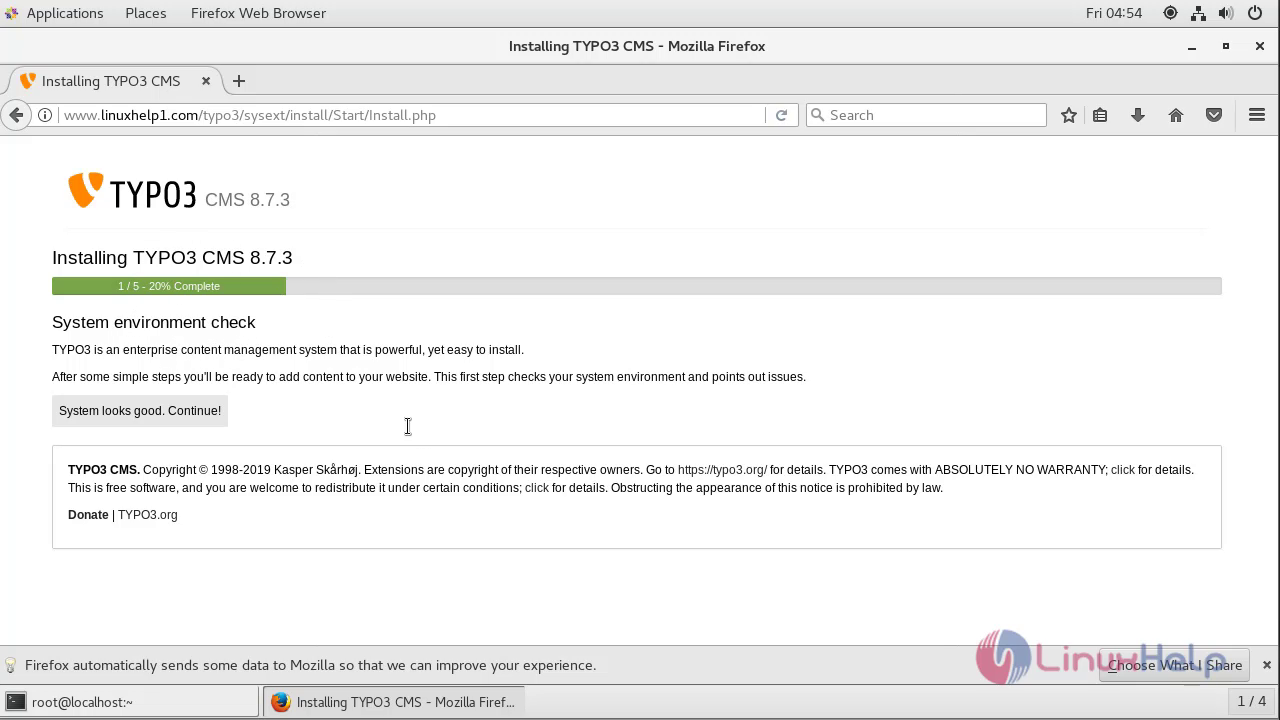
Switch over to a browser and enter your domain name. The installation page appears on the screen. Click continue.
This is the configuration file setup for typo3 cms
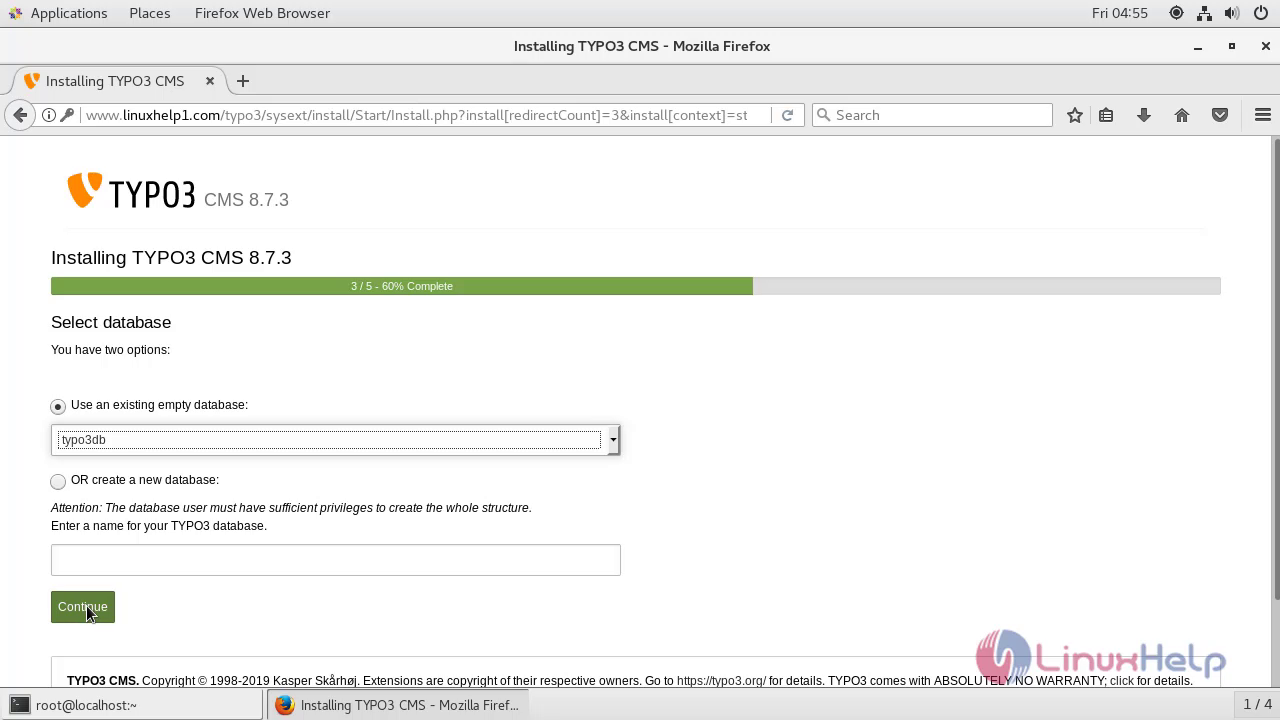
Enter the database connection detail and click continue

Select the database and click continue.
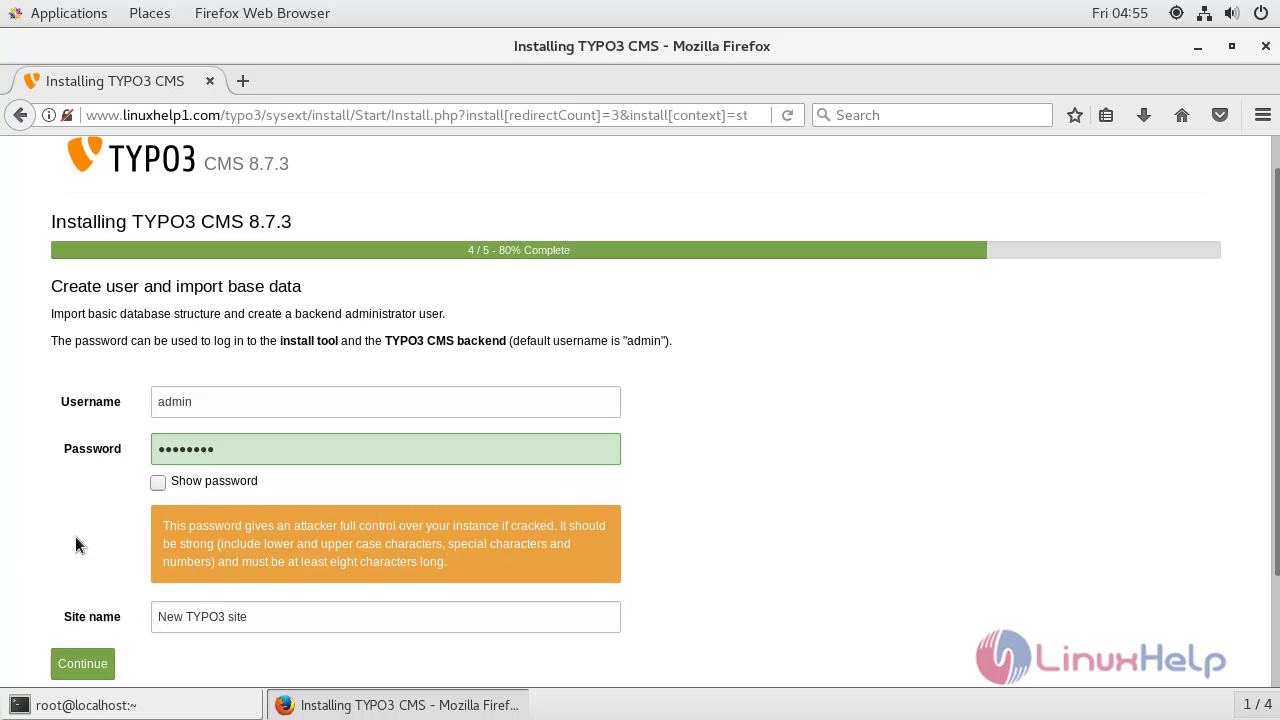
Enter the admin credentials details and click continue.
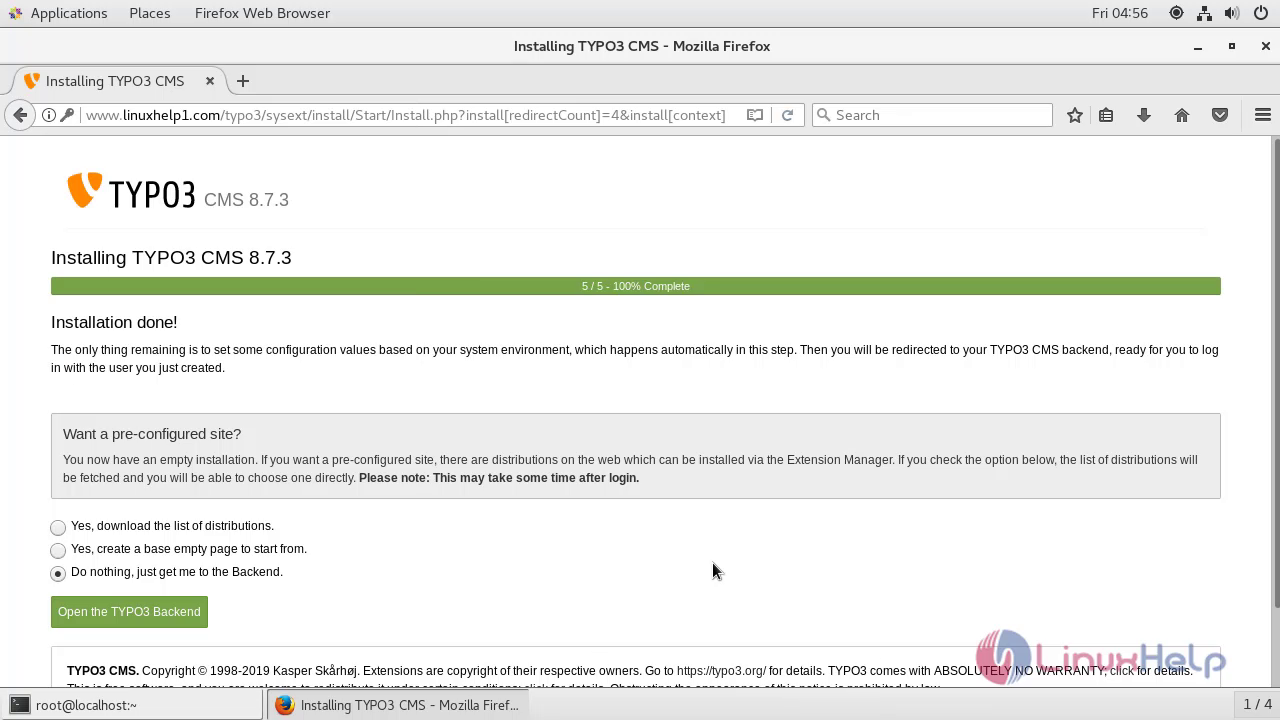
The installation is complete. Click open typo backend option to access the admin side of the Typo3 CMS.
Enter the admin login
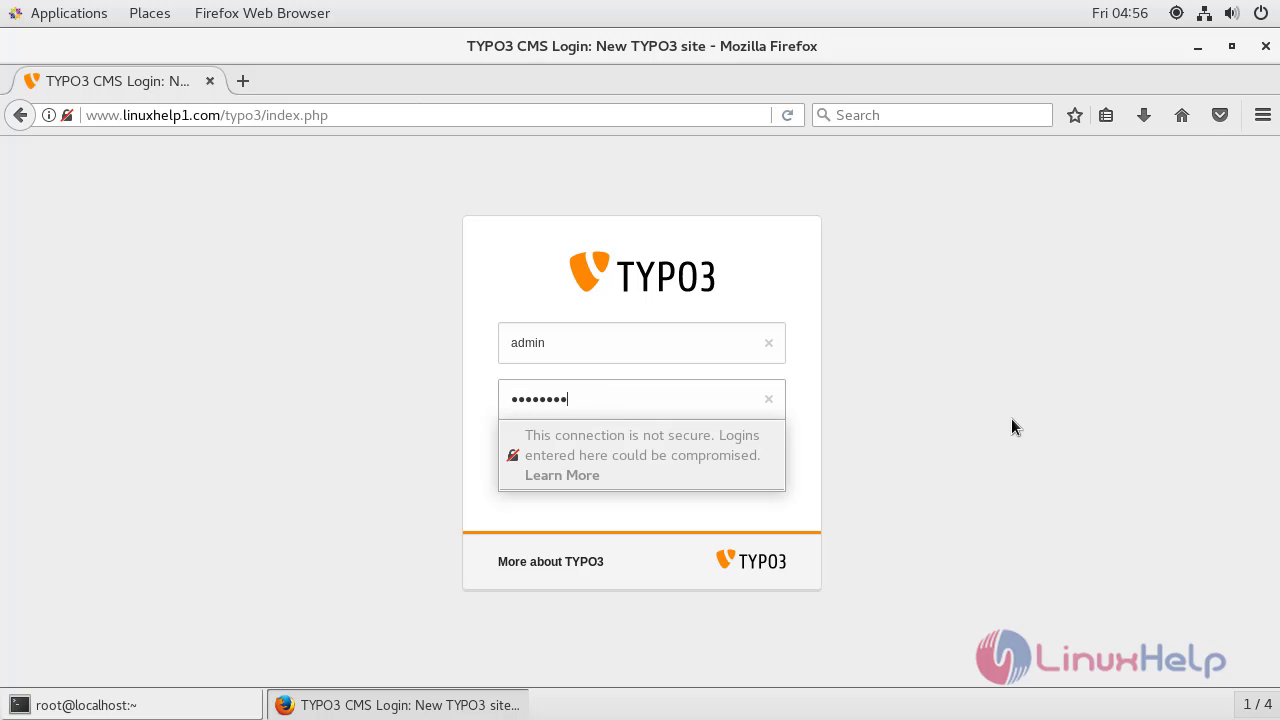
The Admin page of typo 3 is shown to the user as below.

The installation of typo3 cms in centos 7.5
Comments ( 0 )
No comments available