• Categories
    Category
    {{ postCtrl.tags }}
    • {{ category.tag_type }}

      • {{tag.tag_name}}
      • View more
  • Categories
    Category
    {{ postCtrl.tags }}
    • {{ category.tag_type }}

      • {{tag.tag_name}}
      • View more
  • News
  • Tutorials
  • Forums
  • Tags
  • Users
Tutorial News Comments FAQ Related Articles

How to Install UF-Raw on Linuxmint 18.03

{{postValue.id}}

To Install UFRaw on Linuxmint 18.03
UFRaw is an open source tool used to read and manipulate the raw images from the digital cameras. It supports the color management workflow and enables the users to apply ICC color profiles. This tutorial covers the installation procedure of UFraw on Linuxmint-18.03.

Installation

Let' s first start with updating the system repositories


linuxhelp ~ # apt-get update
Hit:1 http://archive.canonical.com/ubuntu xenial InRelease
Hit:2 http://security.ubuntu.com/ubuntu xenial-security InRelease                    
Hit:3 http://archive.ubuntu.com/ubuntu xenial InRelease                                   
Hit:4 http://archive.ubuntu.com/ubuntu xenial-updates InRelease                           
Hit:5 http://archive.ubuntu.com/ubuntu xenial-backports InRelease                        
Ign:6 http://packages.linuxmint.com sylvia InRelease               
Hit:7 http://packages.linuxmint.com sylvia Release
Reading package lists... Done

Install the UFRaw application.


linuxhelp ~ # apt-get install ufraw
Reading package lists... Done
Building dependency tree       
Reading state information... Done
The following additional packages will be installed:
  libgtkimageview0 liblensfun-data liblensfun0 ufraw-batch
Suggested packages:
  gimp-ufraw
The following NEW packages will be installed:
  libgtkimageview0 liblensfun-data liblensfun0 ufraw ufraw-batch
0 upgraded, 5 newly installed, 0 to remove and 400 not upgraded.
Need to get 1,098 kB of archives.
.
.
.
Preparing to unpack .../ufraw\_0.20-3build1\_amd64.deb ...
Unpacking ufraw (0.20-3build1) ...
Processing triggers for libc-bin (2.23-0ubuntu9) ...
Processing triggers for man-db (2.7.5-1) ...
Processing triggers for gconf2 (3.2.6-3ubuntu6) ...
Processing triggers for desktop-file-utils (0.22+linuxmint1) ...
Processing triggers for mime-support (3.59ubuntu1) ...
Setting up libgtkimageview0 (1.6.4+dfsg-1) ...
Setting up liblensfun-data (0.2.8-3) ...
Setting up liblensfun0 (0.2.8-3) ...
Setting up ufraw-batch (0.20-3build1) ...
Setting up ufraw (0.20-3build1) ...
Processing triggers for libc-bin (2.23-0ubuntu9) ...

After installation type ufraw from a terminal.


linuxhelp ~ #ufraw

Now, you can able to use the UFRaw application.
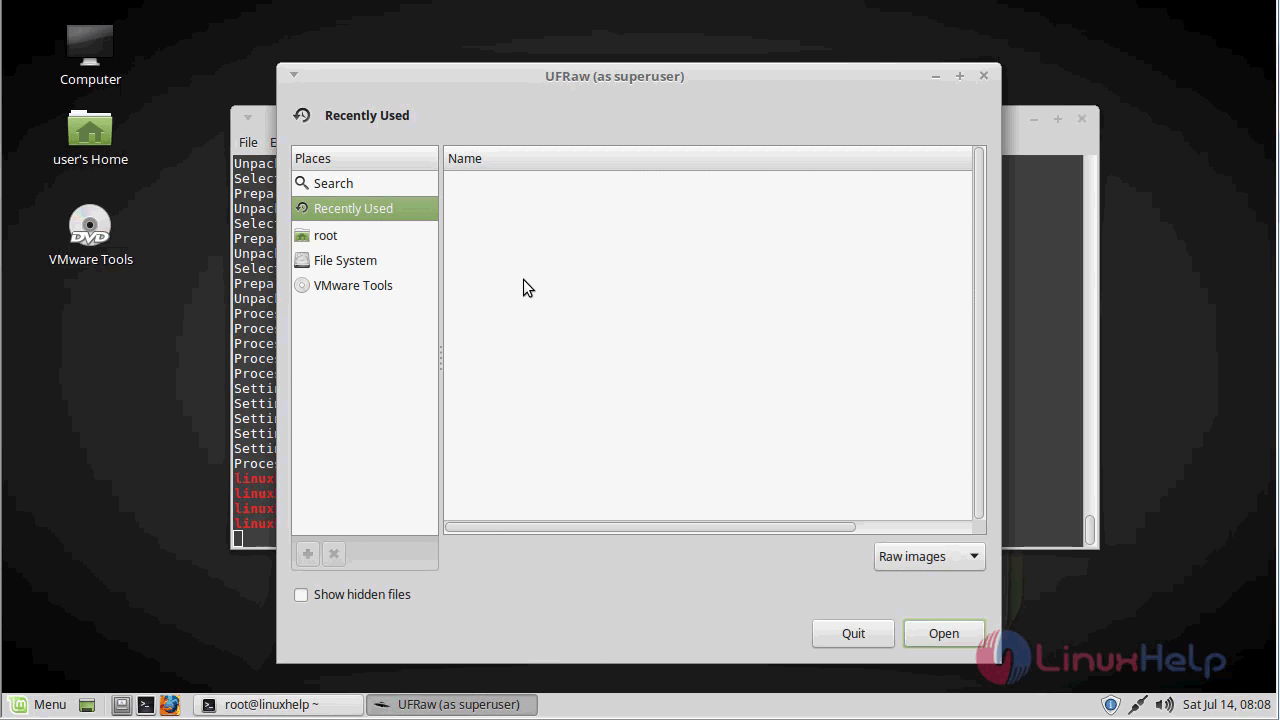
UFraw application

With this, the method to install the UFraw application on Linuxmint18.03 comes to an end.

Tags:
noah
Author: 

Comments ( 0 )

No comments available

Add a comment
{{postCtrl.cmtErrMsg}}

Frequently asked questions ( 5 )

Q

Can I update the system repositories?

A

Let' s first start with updating the system repositories:
linuxhelp ~ # apt-get update

Q

What is UFRaw on Linuxmint?

A

UFRaw is an open source tool used to read and manipulate the raw images from the digital cameras. It supports the color management workflow and enables the users to apply ICC color profiles.

Q

How to Install the UFRaw application?

A

Run the following command:
# apt-get install ufraw

Q

UF-Raw is does the stand alone mode?

A

You can also use the stand-alone tool ufraw to convert images interactively. ..

Q

Is there any alternatives for UF-Raw?

A

Adobe Photoshop Lightroom CC. Adobe Photoshop Lightroom CC is a commercial photo processor and image organizer. ...
Darktable. ...
RawTherapee. ...
Polarr. ...
photivo. ...
LightZone. ...

Back To Top!
Rank
User
Points

Top Contributers

userNamenaveelansari
135850

Top Contributers

userNameayanbhatti
92510

Top Contributers

userNamehamzaahmed
32150

Top Contributers

1
userNamelinuxhelp
31040

Top Contributers

userNamemuhammadali
24500
Can you help Owen ?
How to add SSH key to my Gitlab account

I need to add the SSH key in my gitlab account. How to do so ????

Networking
  • Routing
  • trunk
  • Netmask
  • Packet Capture
  • domain
  • HTTP Proxy
Server Setup
  • NFS
  • KVM
  • Memory
  • Sendmail
  • WebDAV
  • LXC
Shell Commands
  • Cloud commander
  • Command line archive tools
  • last command
  • Shell
  • terminal
  • Throttle
Desktop Application
  • Linux app
  • Pithos
  • Retrospect
  • Scribe
  • TortoiseHg
  • 4Images
Monitoring Tool
  • Monit
  • Apache Server Monitoring
  • EtherApe 
  • Arpwatch Tool
  • Auditd
  • Barman
Web Application
  • Nutch
  • Amazon VPC
  • FarmWarDeployer
  • Rukovoditel
  • Mirror site
  • Chef
Contact Us | Terms of Use| Privacy Policy| Disclaimer
© 2025 LinuxHelp.com All rights reserved. Linux™ is the registered trademark of Linus Torvalds. This site is not affiliated with linus torvalds in any way.