• Categories
    Category
    {{ postCtrl.tags }}
    • {{ category.tag_type }}

      • {{tag.tag_name}}
      • View more
  • Categories
    Category
    {{ postCtrl.tags }}
    • {{ category.tag_type }}

      • {{tag.tag_name}}
      • View more
  • News
  • Tutorials
  • Forums
  • Tags
  • Users
Tutorial News Comments FAQ Related Articles

How to install ulauncher on ubuntu 17.04

{{postValue.id}}

To install Ulauncher on ubuntu 17.04

Ulauncher is a simple desktop application launcher for Linux built based on Python with GTK as GUI toolkit. Although, Ulauncher has minimal design, it is considered to be fast and works virtually on almost all Linux desktops. Moreover, Ulauncher is packed with numerous features and some of them are mentioned here.

Features
Instant app launcher &ndash App provides you with instant search results. It also remembers your previous choices and automatically selects the best option for you
Fuzzy search &ndash This feature allows you to type in an application name without worrying about wrong spelling. Furthermore, it will automatically figure out what you were trying to search
Fast directory browser &ndash You can open your files and directories faster with the fuzzy search engine


It is very simple to install Ulauncher on Ubuntu and this article sheds light on it.

Installing Ulauncher:

Before you begin with the installation process, make sure you add the add the dependency package into repository via ppa.

root@linuxhelp:~#  add-apt-repository ppa:agornostal/ulauncher
 Application launcher for Linux
 More info: https://launchpad.net/~agornostal/+archive/ubuntu/ulauncher
Press [ENTER] to continue or ctrl-c to cancel adding it
.
.
gpg: Total number processed: 1
gpg:               imported: 1  (RSA: 1)
OK

Once it is done, update the machine by executing the apt-get update command.

root@linuxhelp:~# apt-get update 
Hit:1 http://in.archive.ubuntu.com/ubuntu xenial InRelease
Get:2 http://ppa.launchpad.net/agornostal/ulauncher/ubuntu xenial InRelease [18.1 kB]
Hit:3 http://ppa.launchpad.net/jonathonf/backports/ubuntu xenial InRelease     
.
.
Fetched 326 kB in 2s (128 kB/s)     
Reading package lists... Done

All is now set for the installation of ulauncer, trigger its installation with the following command.

root@linuxhelp:~# apt-get install ulauncher
Reading package lists... Done
Building dependency tree       
Reading state information... Done
The following packages were automatically installed and are no longer required:
  gnome-software-common libgtkspell3-3-0
.
.
Setting up ulauncher (3.1.1.r0-0ubuntu1ppa1~xenial) ...
Processing triggers for libc-bin (2.23-0ubuntu3) ...

After installation, go to your Ubuntu dashboard and type Ulauncher. It shows the application icon . Click on the icon to open it.
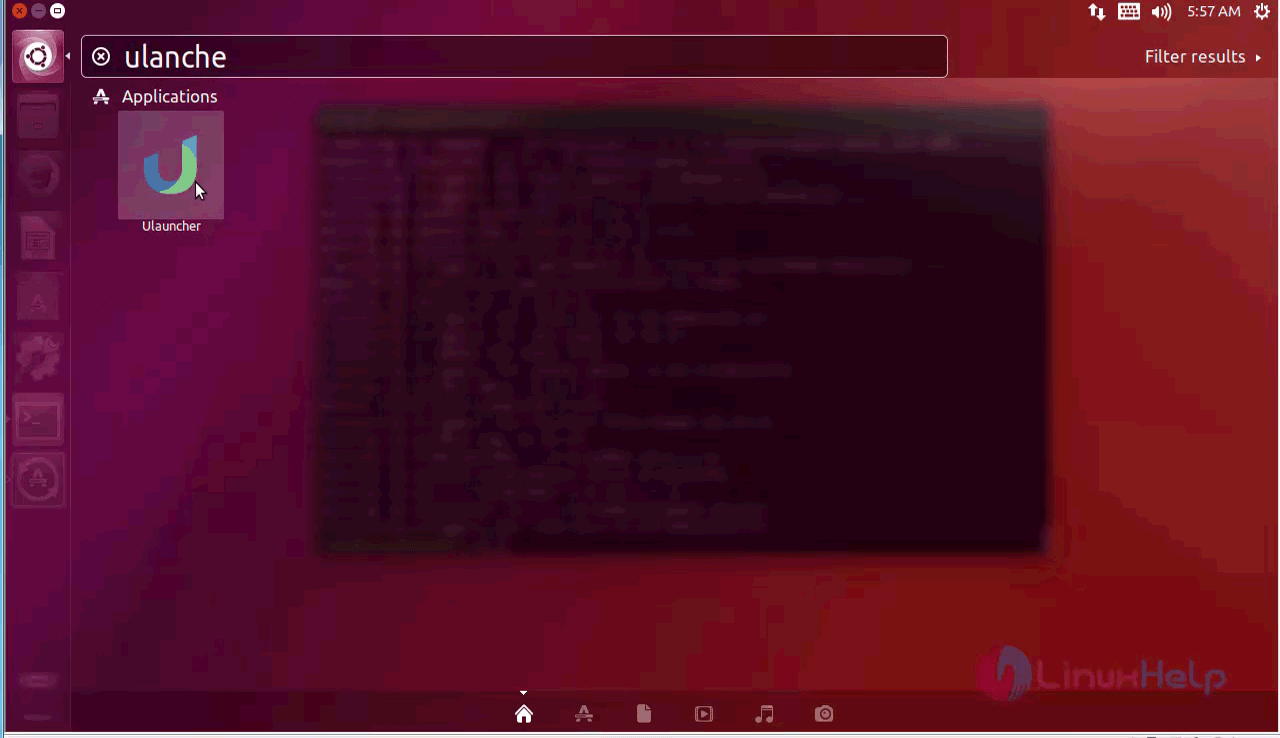
search

The Ulauncher program appears on your screen.

search

With this, the installation process of Ulauncher on Ubuntu is complete.

Tags:
mason
Author: 

Comments ( 0 )

No comments available

Add a comment
{{postCtrl.cmtErrMsg}}

Frequently asked questions ( 5 )

Q

Can you provide me for official page link For ulauncher?

A

Use the link as follow to get the official page link For ulauncher
"https://ulauncher.io/"

Q

How to install ulauncher on fedora?

A

use the following steps to install ulauncher on fedora

1. Download rpm package
# wget https://github.com/Ulauncher/Ulauncher/releases/download/4.3.1.r4/ulauncher_4.3.1.r4_fedora.rpm

2. Install ulauncher
# sudo dnf install packagename.rpm

Q

What are the dependency package for ulauncher on ubuntu?

A

Following are dependency package for ulauncher on ubuntu

libkeybinder-3.0-0 \
libgtk-3-0 \
gir1.2-gtk-3.0 \
gir1.2-keybinder-3.0 \
gir1.2-webkit2-4.0 \
gir1.2-glib-2.0 \
gir1.2-notify-0.7 \
gir1.2-gdkpixbuf-2.0 \
gir1.2-appindicator3-0.1 \
python-dbus \
python-levenshtein \
python-pyinotify \
python-pysqlite2 \
python-websocket \
python-xdg \
python-distutils-extra

Q

What are the color theme available on ulancher?

A

check the following link to get color theme of ulancher

"https://gist.github.com/gornostal/02a232e6e560da7946c053555ced6cce"

Q

How to install ulauncher on opensuse?

A

use the following steps to install ulauncher on OpenSuse

1. Download rpm package
# wget https://github.com/Ulauncher/Ulauncher/releases/download/4.3.1.r4/ulauncher_4.3.1.r4_suse.rpm

2. Install ulauncher
# sudo zypper in packagename.rpm

Back To Top!
Rank
User
Points

Top Contributers

userNamenaveelansari
135850

Top Contributers

userNameayanbhatti
92510

Top Contributers

userNamehamzaahmed
32150

Top Contributers

1
userNamelinuxhelp
31040

Top Contributers

userNamemuhammadali
24500
Can you help Sebastian ?
How to change non required to required field in SuiteCRM Custom/Default Modules

How to change not required to the required field in SuiteCRM Custom/Default Modules?

Networking
  • Routing
  • trunk
  • Netmask
  • Packet Capture
  • domain
  • HTTP Proxy
Server Setup
  • NFS
  • KVM
  • Memory
  • Sendmail
  • WebDAV
  • LXC
Shell Commands
  • Cloud commander
  • Command line archive tools
  • last command
  • Shell
  • terminal
  • Throttle
Desktop Application
  • Linux app
  • Pithos
  • Retrospect
  • Scribe
  • TortoiseHg
  • 4Images
Monitoring Tool
  • Monit
  • Apache Server Monitoring
  • EtherApe 
  • Arpwatch Tool
  • Auditd
  • Barman
Web Application
  • Nutch
  • Amazon VPC
  • FarmWarDeployer
  • Rukovoditel
  • Mirror site
  • Chef
Contact Us | Terms of Use| Privacy Policy| Disclaimer
© 2025 LinuxHelp.com All rights reserved. Linux™ is the registered trademark of Linus Torvalds. This site is not affiliated with linus torvalds in any way.