• Categories
    Category
    {{ postCtrl.tags }}
    • {{ category.tag_type }}

      • {{tag.tag_name}}
      • View more
  • Categories
    Category
    {{ postCtrl.tags }}
    • {{ category.tag_type }}

      • {{tag.tag_name}}
      • View more
  • News
  • Tutorials
  • Forums
  • Tags
  • Users
Tutorial News Comments FAQ Related Articles

How to Install Ultra Text Edit on Linuxmint 18.03

{{postValue.id}}

To Install Ultra Edit on Linux mint 18.03
Ultra Edit is a commercial text editor for Microsoft Windows, Linux, and Mac OS.ultra Edit allows you to write and edit for HTML, PHP and other programming languages. In this tutorial, we will cover the installation of Ultra Edit on Linux mint 18.03.

Installation
Download the Ultra text editor package from the browser using the following URL https://www.ultraedit.com/downloads/uex.html


linuxhelp ~ # cd /home/user/Downloads/
linuxhelp Downloads # ls
uex\_16.1.0.22\_amd64.deb

Install the UltraEdit application.


linuxhelp Downloads # gdebi uex\_16.1.0.22\_amd64.deb 
Reading package lists... Done
Building dependency tree        
Reading state information... Done

UltraEdit is a text, hex, and programming language editor
 Features:
    \* Code Folding
    \* Supports 64-bit file handling
    \* Unicode support
    \* Disk based text editing and large file handling - supports files in
      excess of 4GB, minimum RAM used even for multi-megabyte files
    \* Multiline find and replace dialogs for all searches (Find, Replace,
      Find in Files, Replace in Files)
    \* Syntax highlighting - configurable, pre-configured for C/C++, VB, HTML,
      Java, and Perl, multiple wordfiles available for download
    \* Project/workspace support
    \* Integrated scripting language to automate tasks
    \* Configurable keyboard mapping
    \* Column/block mode editing
    \* Hexadecimal editor allows editing of any binary file, shows binary
      and ASCII view
Do you want to install the software package? \[y/N\]:y
Selecting previously unselected package uex.
(Reading database ... 230148 files and directories currently installed.)
Preparing to unpack uex\_16.1.0.22\_amd64.deb ...
Unpacking uex (16.1.0.22) ...
Setting up uex (16.1.0.22) ...
Processing triggers for desktop-file-utils (0.22+linuxmint1) ...
Processing triggers for mime-support (3.59ubuntu1) ...
Processing triggers for man-db (2.7.5-1) ...

Once Installation is done you can access the application from the Menu as shown here
linuxmint_menu

Now, you can able to use the UltraEdit application.
ultra edit
ultar edit_application

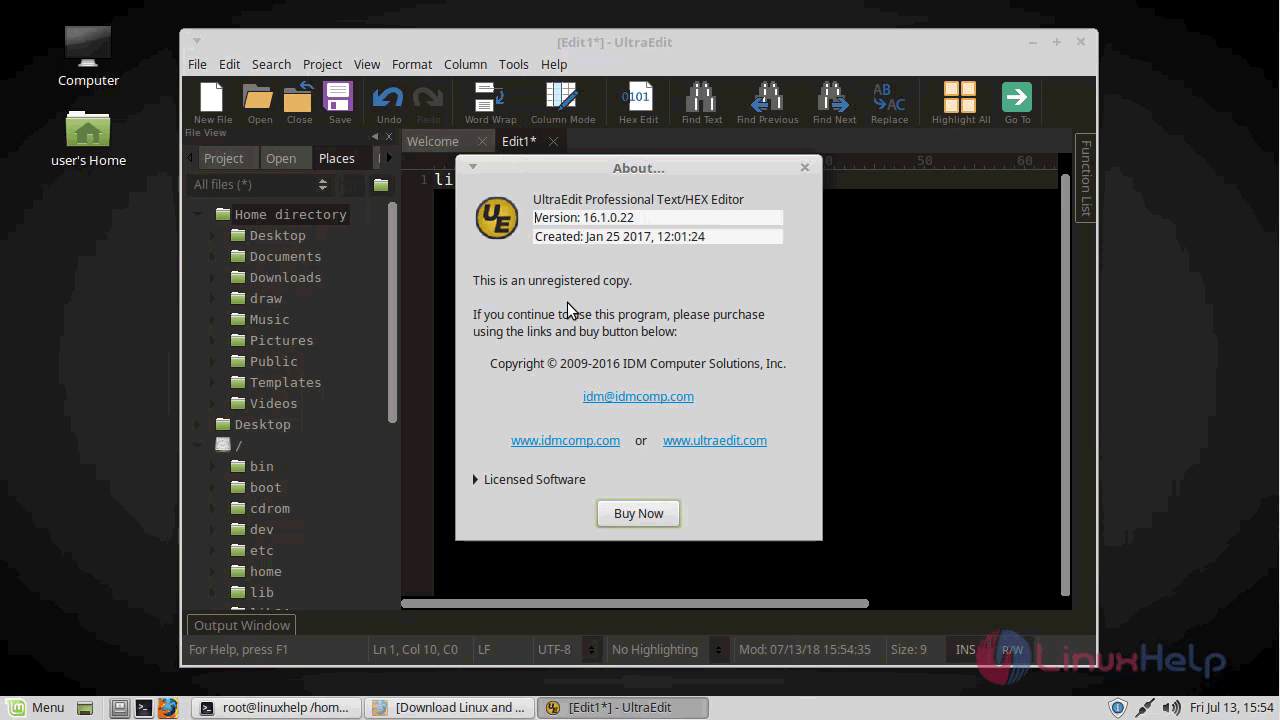
The version of UltraEdit.
version
With this, the method to install Ultra Edit on Linux mint-18.03 comes to an end.

Tags:
mason
Author: 

Comments ( 0 )

No comments available

Add a comment
{{postCtrl.cmtErrMsg}}

Frequently asked questions ( 5 )

Q

Can ConTEXT edit binary files? What about hex editor?

A

At the moment, ConTEXT can edit any file not containing 0x00 char. There are plans for an integrated hex editor in v1.0.

Q

How can I add my own keywords to existing built-in syntax highlighter?

A

You can't, However you can build your own custom syntax highlighters. For more details about it, check the sample highlighter in the Highlighters\ subdirectory of your ConTEXT directory.

Q

what is Ultra text Edit?

A

Ultra Edit is a commercial text editor for Microsoft Windows, Linux, and Mac OS.ultra Edit allows you to write and edit for HTML, PHP and other programming languages.

Q

How to Install the UltraEdit application on Linuxmint?

A

Run the following commnad:
# gdebi uex_16.1.0.22_amd64.deb

Q

Is there any alternatives for Ultra Text Edit?

A

Notepad++ Notepad++ is a free source code editor and Notepad replacement that supports several languages. ...
Atom. A hackable text editor for the 21st Century. ...
Sublime Text. ...
Visual Studio Code. ...
Vim. ...
Eclipse. ...
NetBeans. ...

Back To Top!
Rank
User
Points

Top Contributers

userNamenaveelansari
135850

Top Contributers

userNameayanbhatti
92510

Top Contributers

userNamehamzaahmed
32150

Top Contributers

1
userNamelinuxhelp
31040

Top Contributers

userNamemuhammadali
24500
Can you help Ganesh Konka ?
Zentya 6.1 http proxy configuration

please send link for creating zentyal 6.1 for http proxy and firewall as gateway.

Networking
  • Routing
  • trunk
  • Netmask
  • Packet Capture
  • domain
  • HTTP Proxy
Server Setup
  • NFS
  • KVM
  • Memory
  • Sendmail
  • WebDAV
  • LXC
Shell Commands
  • Cloud commander
  • Command line archive tools
  • last command
  • Shell
  • terminal
  • Throttle
Desktop Application
  • Linux app
  • Pithos
  • Retrospect
  • Scribe
  • TortoiseHg
  • 4Images
Monitoring Tool
  • Monit
  • Apache Server Monitoring
  • EtherApe 
  • Arpwatch Tool
  • Auditd
  • Barman
Web Application
  • Nutch
  • Amazon VPC
  • FarmWarDeployer
  • Rukovoditel
  • Mirror site
  • Chef
Contact Us | Terms of Use| Privacy Policy| Disclaimer
© 2025 LinuxHelp.com All rights reserved. Linux™ is the registered trademark of Linus Torvalds. This site is not affiliated with linus torvalds in any way.