How to install Usermin on CentOS 7
To install Usermin on Centos 7
Usermin is a free and open source Web based Control Panel tool used for configuring Linux application for system administration. By using this tool internal system configuration like HTTP, DNS, PHP or MySQL, and file sharing can be easily managed. This article clearly explains the installation process involved with the installation of Usermin.
To install Usermin
First we need to install and enable the EPEL Repository.
[root@node1 ~]# yum install epel-release -y
Loaded plugins: fastestmirror, langpacks
Repodata is over 2 weeks old. Install yum-cron? Or run: yum makecache fast
base
* base: centos.excellmedia.net
 * extras: centos.excellmedia.net
 * updates: centos.excellmedia.net
Resolving Dependencies
-->  Running transaction check
--->  Package epel-release.noarch 0:7-6 will be installed
-->  Finished Dependency Resolution

Dependencies Resolved
.
.
.
Running transaction test
Transaction test succeeded
Running transaction
  Installing : epel-release-7-6.noarch                                                                                                                                                  1/1
  Verifying  : epel-release-7-6.noarch                                                                                                                                                  1/1

Installed:
  epel-release.noarch 0:7-6

Complete!
Usermin requires prior installation of certain packages. Use the following command for the same purpose.
[root@node1 ~]# yum install perl-Net-SSLeay -y
Loaded plugins: fastestmirror, langpacks
* base: centos.excellmedia.net
 * epel: epel.excellmedia.net
 * extras: centos.excellmedia.net
 * updates: centos.excellmedia.net
Resolving Dependencies
-->  Running transaction check
--->  Package perl-Net-SSLeay.x86_64 0:1.55-4.el7 will be installed
-->  Finished Dependency Resolution
.
.
.
Running transaction check
Running transaction test
Transaction test succeeded
Running transaction
  Installing : perl-Net-SSLeay-1.55-4.el7.x86_64                                                                                                                                        1/1
  Verifying  : perl-Net-SSLeay-1.55-4.el7.x86_64                                                                                                                                        1/1

Installed:
  perl-Net-SSLeay.x86_64 0:1.55-4.el7

Complete!
After it is done, install another package as follows.
[root@node1 ~]# yum install perl-Authen-PAM -y
Loaded plugins: fastestmirror, langpacks
Loading mirror speeds from cached hostfile
 * base: centos.excellmedia.net
 * epel: epel.mirror.net.in
 * extras: centos.excellmedia.net
 * updates: centos.excellmedia.net
Resolving Dependencies
-->  Running transaction check
--->  Package perl-Authen-PAM.x86_64 0:0.16-16.el7 will be installed
-->  Finished Dependency Resolution

Dependencies Resolved
.
.
.
Running transaction check
Running transaction test
Transaction test succeeded
Running transaction
  Installing : perl-Authen-PAM-0.16-16.el7.x86_64                                                                                                                                       1/1
  Verifying  : perl-Authen-PAM-0.16-16.el7.x86_64                                                                                                                                       1/1

Installed:
  perl-Authen-PAM.x86_64 0:0.16-16.el7

Complete!
Now install the package for Usermin using the below command.
[root@node1 ~]# yum install http://download.webmin.com/download/yum/usermin-1.661-1.noarch.rpm -y
Loaded plugins: fastestmirror, langpacks
usermin-1.661-1.noarch.rpm                                                                                                                                           |  14 MB  00:02:46
Examining /var/tmp/yum-root-ZeTCnZ/usermin-1.661-1.noarch.rpm: usermin-1.661-1.noarch
Marking /var/tmp/yum-root-ZeTCnZ/usermin-1.661-1.noarch.rpm to be installed
Resolving Dependencies
-->  Running transaction check
--->  Package usermin.noarch 0:1.661-1 will be installed
-->  Finished Dependency Resolution
.
.
.
Running transaction check
Running transaction test
Transaction test succeeded
Running transaction
Operating system is CentOS Linux
  Installing : usermin-1.661-1.noarch                                                                                                                                                   1/1
Usermin install complete. You can now login to https://node1.example.com:20000/
as any user on your system.
  Verifying  : usermin-1.661-1.noarch                                                                                                                                                   1/1

Installed:
  usermin.noarch 0:1.661-1

Complete!
Once the package is installed, edit miniserv.conf file.
[root@node1 ~]# vim /etc/usermin/miniserv.conf
Now add the below line in the end of that configuration file.
allow=127.0.0.1 192.168.5.141
Next start and enable the service for Usermin and allow the default port 20000 on firewall.
[root@node1 ~]# service usermin start
[root@node1 ~]# chkconfig usermin on
[root@node1 ~]# firewall-cmd --permanent --add-port=20000/tcp
success
[root@node1 ~]# firewall-cmd --reload
success
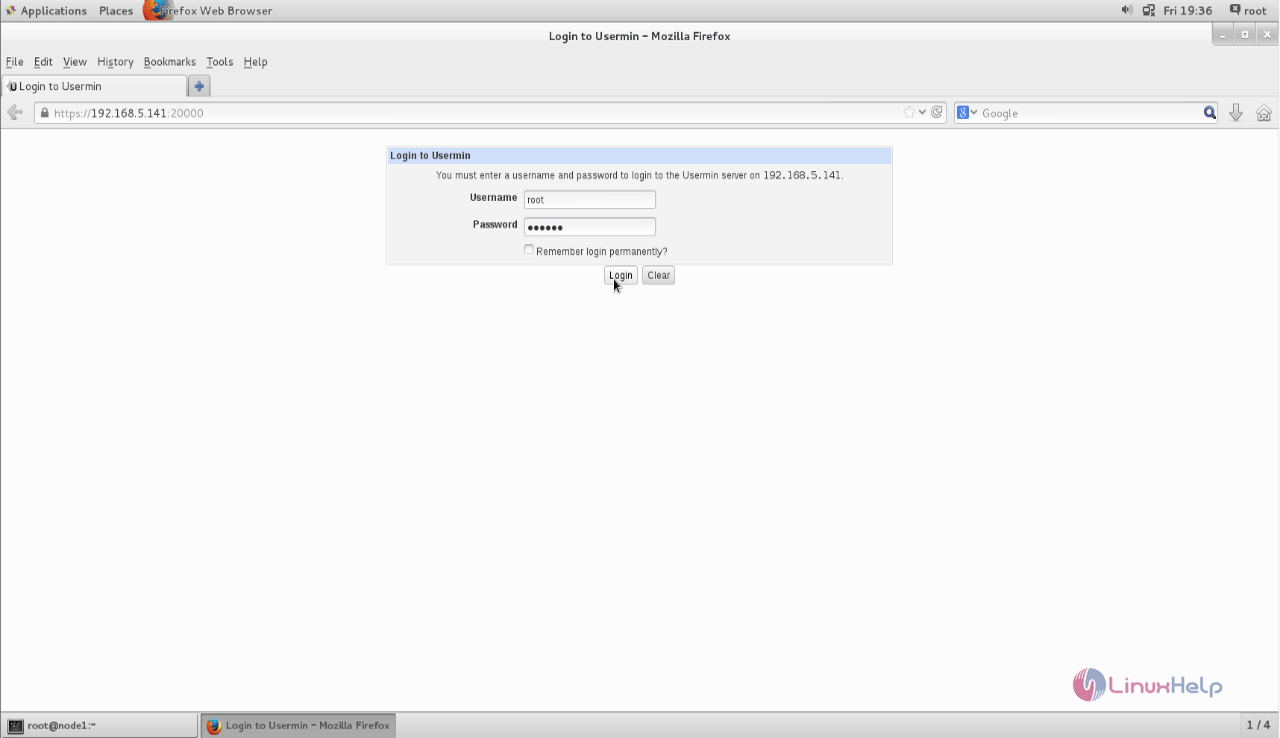
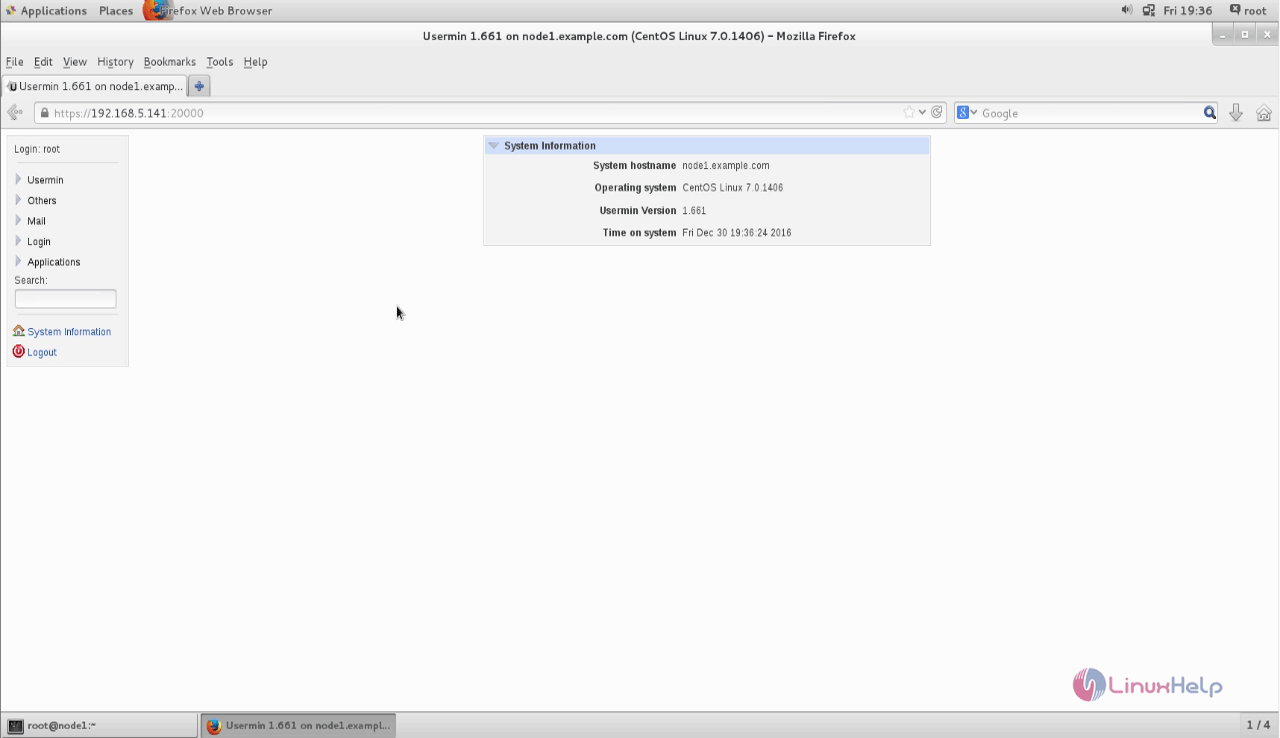
Once all the necessary steps are done for installing Usermin, we can open the web browser and call https://192.168.5.141:20000 to access Usermin control panel web user interface.
You need to replace with your ip address on that link.
Comments ( 0 )
No comments available