How to install uTox in Ubuntu
{{postValue.id}}
To install uTox in Ubuntu 16.04
uTox is an open source instant messaging client for Tox. It supports all the instant messenger feature with the encoded property. Installation of uTox is explained in this manual
Features
- Text chats
- File transfers
- Text-only group chats
- Add friends using Tox ID
- Used as a web service
- Audio and video calls
- Desktop sharing
To install uTox
Before installing utox, use the following command to add the repository.
root@linuxhelp1:~# echo " deb https://pkg.tox.chat/debian nightly $(lsb_release -cs)"  | sudo tee /etc/apt/sources.list.d/tee
/etc/apt/sources.list.d/: Is a directory
deb https://pkg.tox.chat/debian nightly xenial
Then append the key for utox by running the following command.
root@linuxhelp1:~# wget -qO - https://pkg.tox.chat/debian/pkg.gpg.key | sudo apt-key add -
OK
Run the following command to install the dependency package.
root@linuxhelp1:~# apt-get install apt-transport-https
Reading package lists... Done
Building dependency tree
Reading state information... Done
The following packages were automatically installed and are no longer required:
  libpango1.0-0 libpangox-1.0-0 linux-headers-4.4.0-21 linux-headers-4.4.0-21-generic linux-image-4.4.0-21-generic
  linux-image-extra-4.4.0-21-generic
Use ' sudo apt autoremove'  to remove them.
The following NEW packages will be installed:
  apt-transport-https
.
.
.
After this operation, 211 kB of additional disk space will be used.
Selecting previously unselected package apt-transport-https.
(Reading database ... 238751 files and directories currently installed.)
Preparing to unpack .../apt-transport-https_1.2.12~ubuntu16.04.1_amd64.deb ...
Unpacking apt-transport-https (1.2.12~ubuntu16.04.1) ...
Setting up apt-transport-https (1.2.12~ubuntu16.04.1) ...
Run the below command to apply the changes to the system.
root@linuxhelp1:~# apt-get update
Hit:1 http://security.ubuntu.com/ubuntu xenial-security InRelease
Hit:2 http://in.archive.ubuntu.com/ubuntu xenial InRelease
Hit:3 http://in.archive.ubuntu.com/ubuntu xenial-updates InRelease
Hit:4 http://in.archive.ubuntu.com/ubuntu xenial-backports InRelease
Reading package lists... Done
Now its time to install the utox, run the following command to install it.
root@linuxhelp1:~# sudo apt-get install utox -y
Reading package lists... Done
Building dependency tree
Reading state information... Done
The following packages were automatically installed and are no longer required:
  libpango1.0-0 libpangox-1.0-0 linux-headers-4.4.0-21 linux-headers-4.4.0-21-generic linux-image-4.4.0-21-generic
  linux-image-extra-4.4.0-21-generic
Use ' sudo apt autoremove'  to remove them.
The following additional packages will be installed:
  libfilteraudio0 libopenal-data libopenal1 libsodium18 libtoxav0 libtoxcore0 libtoxdns0 libtoxencryptsave0
The following NEW packages will be installed:
  libfilteraudio0 libopenal-data libopenal1 libsodium18 libtoxav0 libtoxcore0 libtoxdns0 libtoxencryptsave0 utox
0 upgraded, 9 newly installed, 0 to remove and 65 not upgraded.
Need to get 897 kB of archives.
After this operation, 2,367 kB of additional disk space will be used.
Get:1 http://in.archive.ubuntu.com/ubuntu xenial/universe amd64 libopenal-data all 1:1.16.0-3 [101 kB]
Get:2 http://in.archive.ubuntu.com/ubuntu xenial/universe amd64 libopenal1 amd64 1:1.16.0-3 [164 kB]
Get:3 http://in.archive.ubuntu.com/ubuntu xenial/universe amd64 libsodium18 amd64 1.0.8-5 [144 kB]
Get:4 https://pkg.tox.chat/debian nightly/xenial amd64 libfilteraudio0 amd64 0.1.93.2fc6695-1 [87.2 kB]
Get:5 https://pkg.tox.chat/debian nightly/xenial amd64 libtoxcore0 amd64 0.1.3760.755f084-1 [97.3 kB]
Get:6 https://pkg.tox.chat/debian nightly/xenial amd64 libtoxav0 amd64 0.1.3760.755f084-1 [19.0 kB]
Get:7 https://pkg.tox.chat/debian nightly/xenial amd64 libtoxdns0 amd64 0.1.3760.755f084-1 [4,754 B]
.
.
.
Setting up libopenal1:amd64 (1:1.16.0-3) ...
Setting up libfilteraudio0 (0.1.93.2fc6695-1) ...
Setting up libsodium18:amd64 (1.0.8-5) ...
Setting up libtoxcore0 (0.1.3760.755f084-1) ...
Setting up libtoxav0 (0.1.3760.755f084-1) ...
Setting up libtoxdns0 (0.1.3760.755f084-1) ...
Setting up libtoxencryptsave0 (0.1.3760.755f084-1) ...
Setting up utox (0.10.1-2) ...
Processing triggers for libc-bin (2.23-0ubuntu3) ...
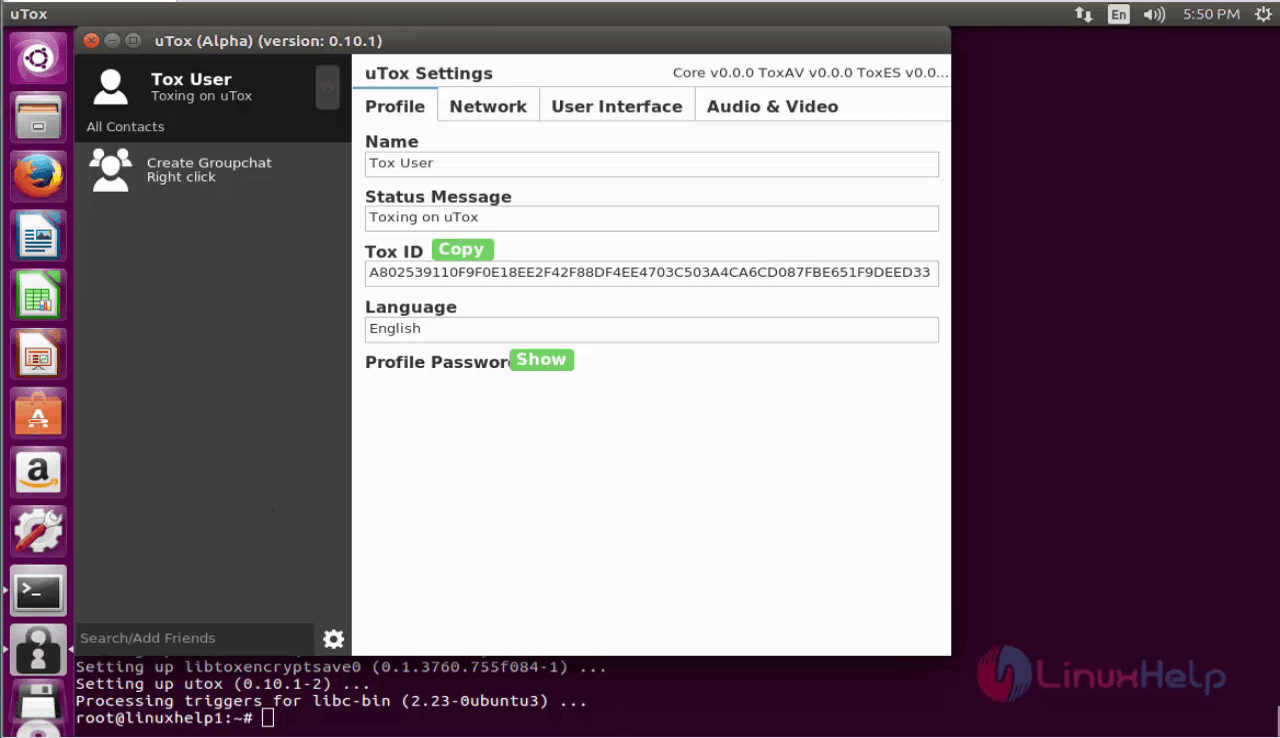
To launch uTox
search and open the uTox from the dashboard.

Now start use it!
Comments ( 0 )
No comments available