How to install VLC on Debian 12
{{postValue.id}}
To Install VLC On Debian 12
Introduction:
VLC is a cost-effective, cross-platform multimedia player and framework that supports playback of a wide range of multimedia files and streaming protocols.
Installation Steps:
Step 1: Check the OS version by using below command.
root@linuxhelp:~# cat /etc/os-release
PRETTY_NAME="Debian GNU/Linux 12 (bookworm)"
NAME="Debian GNU/Linux"
VERSION_ID="12"
VERSION="12 (bookworm)"
VERSION_CODENAME=bookworm
ID=debian
HOME_URL="https://www.debian.org/"
SUPPORT_URL="https://www.debian.org/support"
BUG_REPORT_URL="https://bugs.debian.org/"
Step 2: Install the VLC Media Player by using below command.
root@linuxhelp:~# apt install vlc -y
Reading package lists... Done
Building dependency tree... Done
Reading state information... Done
The following additional packages will be installed:
  fonts-freefont-ttf libaribb24-0 libcddb2 libdouble-conversion3 libdvbpsi10
  libebml5 libixml10 libldb2 libmad0 libmatroska7 libmd4c0 libnfs13
  libopenmpt-modplug1 libprotobuf-lite32 libproxy-tools libqt5core5a
  libqt5dbus5 libqt5gui5 libqt5network5 libqt5qml5 libqt5qmlmodels5
  libqt5quick5 libqt5svg5 libqt5waylandclient5 libqt5waylandcompositor5
  libqt5widgets5 libqt5x11extras5 libresid-builder0c2a libsdl-image1.2
  libsdl1.2debian libsidplay2 libsmbclient libspatialaudio0 libtalloc2
  libtevent0 libupnp13 libva-wayland2 libvlc-bin libvlc5 libvlccore9
  libvncclient1 libwbclient0 libxcb-composite0 libxcb-xinerama0 libxcb-xinput0
  qt5-gtk-platformtheme qttranslations5-l10n qtwayland5 samba-libs vlc-bin
  vlc-data vlc-l10n vlc-plugin-access-extra vlc-plugin-base vlc-plugin-notify
  vlc-plugin-qt vlc-plugin-samba vlc-plugin-skins2 vlc-plugin-video-output
  vlc-plugin-video-splitter vlc-plugin-visualization
Suggested packages:
  qgnomeplatform-qt5 qt5-image-formats-plugins qt5-qmltooling-plugins
  vlc-plugin-fluidsynth vlc-plugin-jack vlc-plugin-pipewire vlc-plugin-svg
  libdvdcss2
The following NEW packages will be installed:
  fonts-freefont-ttf libaribb24-0 libcddb2 libdouble-conversion3 libdvbpsi10
  libebml5 libixml10 libldb2 libmad0 libmatroska7 libmd4c0 libnfs13
  libopenmpt-modplug1 libprotobuf-lite32 libproxy-tools libqt5core5a
  libqt5dbus5 libqt5gui5 libqt5network5 libqt5qml5 libqt5qmlmodels5
  libqt5quick5 libqt5svg5 libqt5waylandclient5 libqt5waylandcompositor5
  libqt5widgets5 libqt5x11extras5 libresid-builder0c2a libsdl-image1.2
  libsdl1.2debian libsidplay2 libsmbclient libspatialaudio0 libtalloc2
  libtevent0 libupnp13 libva-wayland2 libvlc-bin libvlc5 libvlccore9
  libvncclient1 libwbclient0 libxcb-composite0 libxcb-xinerama0 libxcb-xinput0
  qt5-gtk-platformtheme qttranslations5-l10n qtwayland5 samba-libs vlc vlc-bin
  vlc-data vlc-l10n vlc-plugin-access-extra vlc-plugin-base vlc-plugin-notify
  vlc-plugin-qt vlc-plugin-samba vlc-plugin-skins2 vlc-plugin-video-output
  vlc-plugin-video-splitter vlc-plugin-visualization
0 upgraded, 62 newly installed, 0 to remove and 131 not upgraded.
Need to get 32.1 MB/38.1 MB of archives.
Setting up vlc-bin (3.0.20-0+deb12u1) ...
Setting up libqt5widgets5:amd64 (5.15.8+dfsg-11) ...
Setting up qt5-gtk-platformtheme:amd64 (5.15.8+dfsg-11) ...
Setting up libqt5waylandclient5:amd64 (5.15.8-2) ...
Setting up libqt5quick5:amd64 (5.15.8+dfsg-3) ...
Setting up libqt5x11extras5:amd64 (5.15.8-2) ...
Setting up libqt5svg5:amd64 (5.15.8-3) ...
Setting up libqt5waylandcompositor5:amd64 (5.15.8-2) ...
Setting up vlc-plugin-qt:amd64 (3.0.20-0+deb12u1) ...
Setting up vlc (3.0.20-0+deb12u1) ...
Setting up vlc-plugin-skins2:amd64 (3.0.20-0+deb12u1) ...
Setting up qtwayland5:amd64 (5.15.8-2) ...
Processing triggers for man-db (2.11.2-2) ...
Processing triggers for mailcap (3.70+nmu1) ...
Processing triggers for fontconfig (2.14.1-4) ...
Processing triggers for desktop-file-utils (0.26-1) ...
Processing triggers for hicolor-icon-theme (0.17-2) ...
Processing triggers for gnome-menus (3.36.0-1.1) ...
Processing triggers for libc-bin (2.36-9+deb12u3) ...
Processing triggers for libvlc-bin:amd64 (3.0.20-0+deb12u1) ...
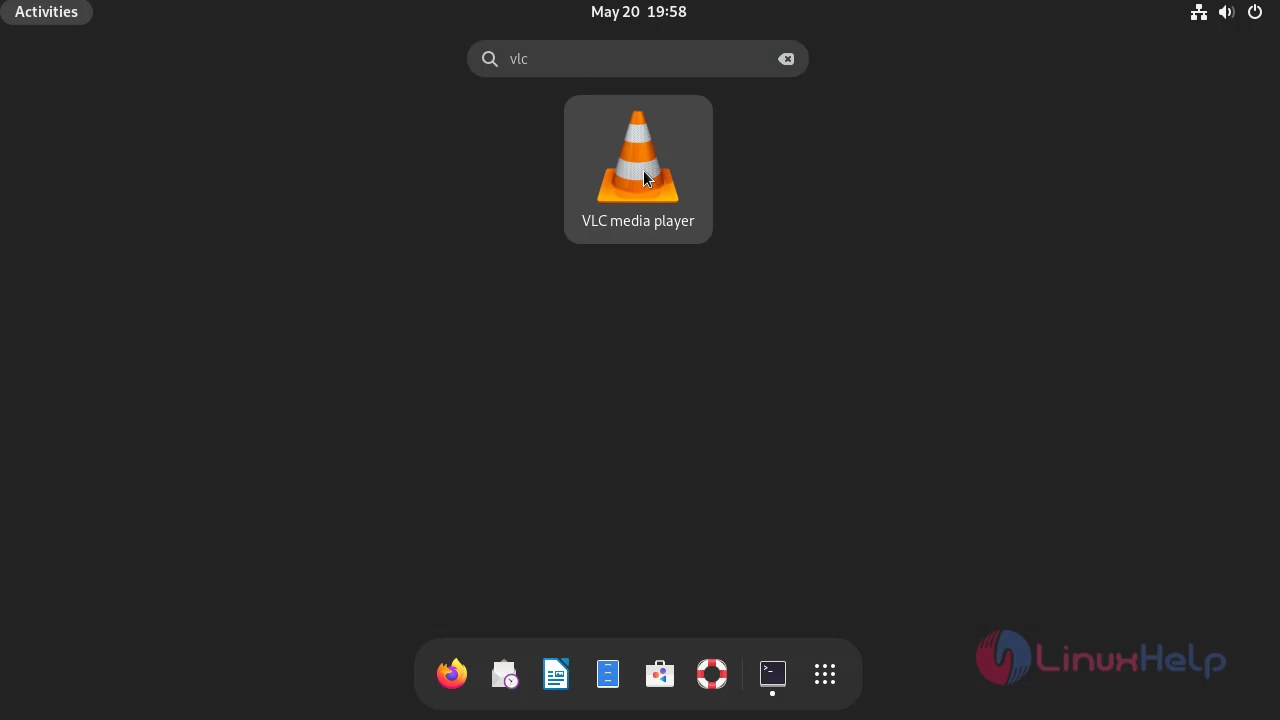
Step 3: Goto Open VLC as shown in below image.
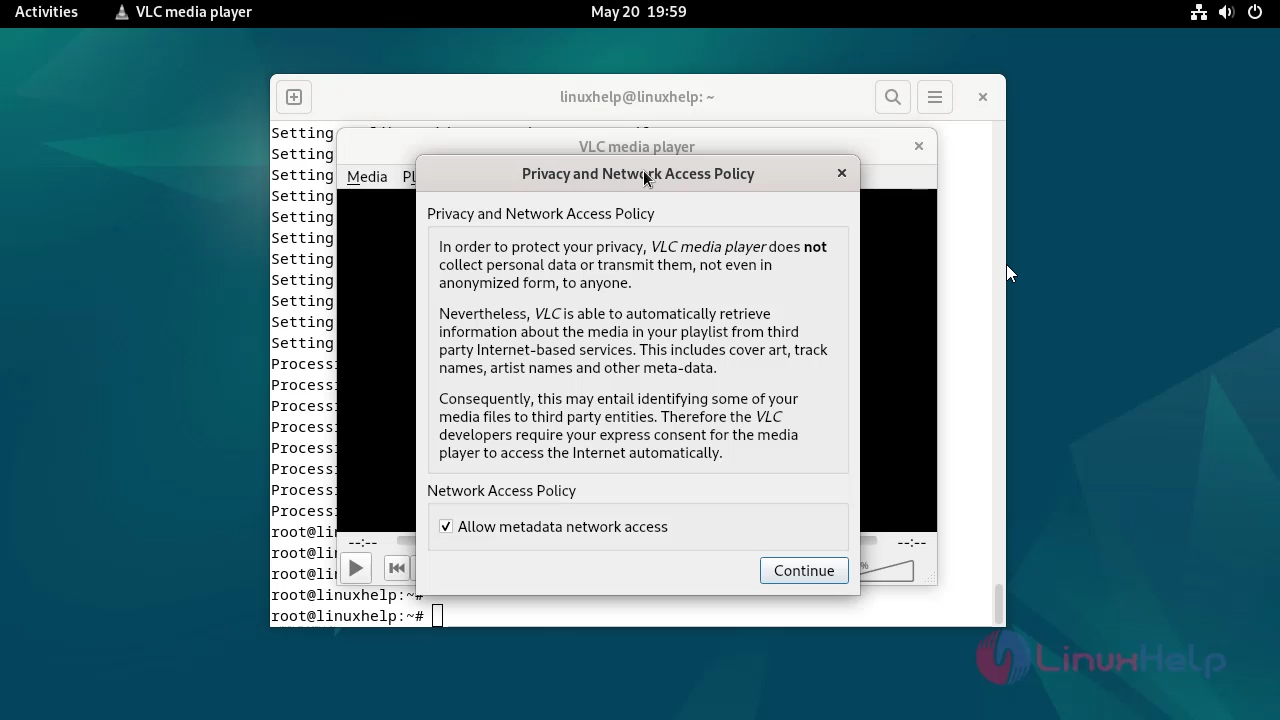
Step 4: Click continue as shown in below image.
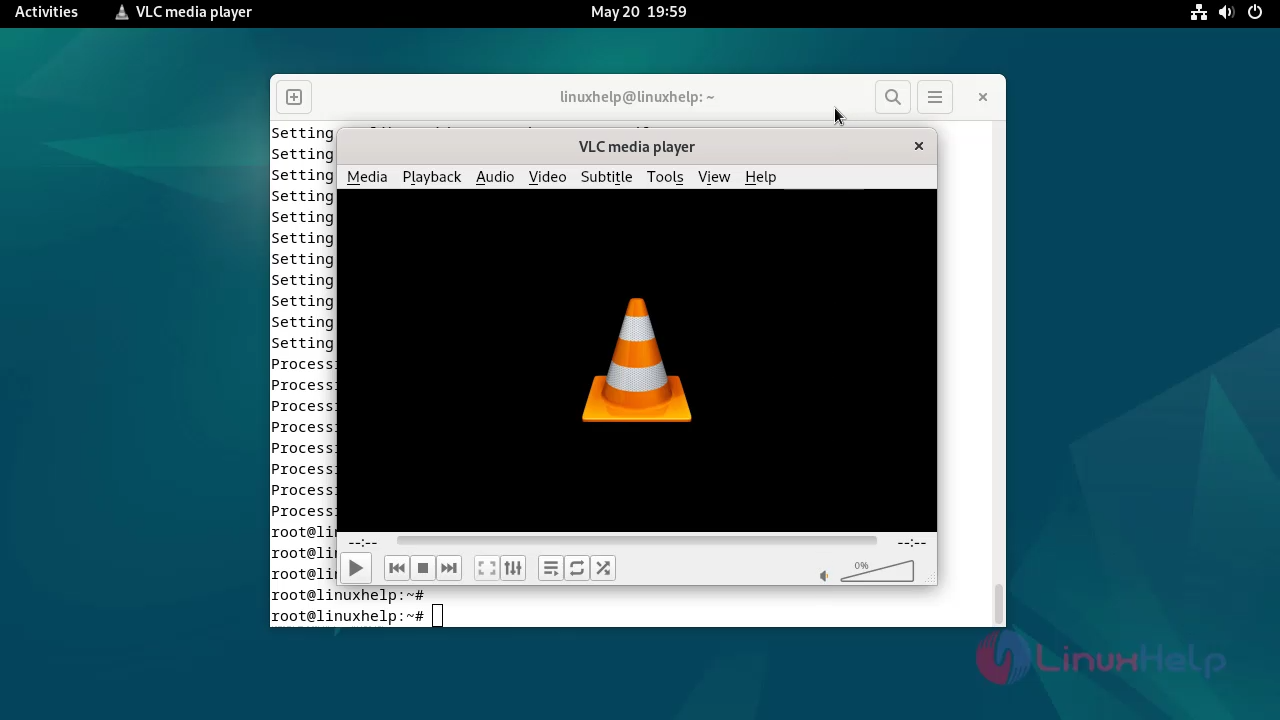
Step 5: This is the dashboard of VLC media player.
Conclusion:
We have reached the end of this article. In this guide, we have walked you through the steps required to install VLC on Debian 12. Your feedback is much welcome.
Comments ( 0 )
No comments available