How to Install Vnstat in CentOS
To Install Vnstat in CentOS
Vnstat is a network traffic monitor tool used for Linux based systems. It allows the users to maintain a log of network traffic for the selected interfaces. In this Vnstat tool, the interface bandwidth will reduce automatically. This article explains installation process of the Vnstat in CentOS.
Features
- Multiple output options
- Generate png graphic output
- Consumes lite portion of system resources
- Monitor multiple network interfaces at same time
- Sort the data by month, week, hour and day
- Low CPU usage
Installation of Vnstat
First install epel package with the following command.
[root@linuxhelp Desktop]# yum -y install epel-release
Loaded plugins: fastestmirror, langpacks
base                                                     | 3.6 kB     00:00
extras                                                   | 3.4 kB     00:00
updates                                                  | 3.4 kB     00:00
Loading mirror speeds from cached hostfile
 * base: mirrors.vinahost.vn
 * extras: mirrors.vinahost.vn
 * updates: mirrors.vinahost.vn
.
.
.
Running transaction
  Installing : epel-release-7-6.noarch                                      1/1
  Verifying  : epel-release-7-6.noarch                                      1/1
Installed:
  epel-release.noarch 0:7-6
Complete!
Now its time to install Vnstat package.
[root@linuxhelp Desktop]# yum -y install vnstat
Loaded plugins: fastestmirror, langpacks
epel/x86_64/metalink                                     | 4.6 kB     00:00
epel                                                     | 4.3 kB     00:00
.
.
.
Running transaction
  Installing : vnstat-1.15-2.el7.x86_64                                     1/1
  Verifying  : vnstat-1.15-2.el7.x86_64                                     1/1
Installed:
  vnstat.x86_64 0:1.15-2.el7
Complete!
Start and enable the Vnstat service.
[root@linuxhelp Desktop]# systemctl start vnstat
[root@linuxhelp Desktop]# systemctl enable vnstat
Also start Vnstat at run-level.
[root@linuxhelp Desktop]# chkconfig vnstat on
Commands Usage
Run the vnstat command without any option to view the network bandwidth details.
[root@linuxhelp Desktop]# vnstat
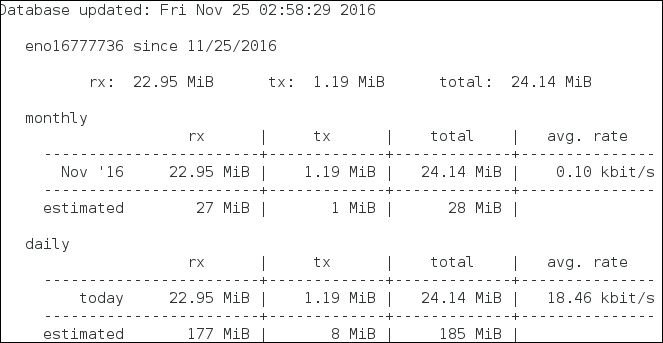
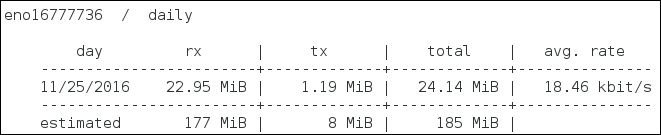
The ' d' option is used to view the daily report of network usage statics.
[root@linuxhelp Desktop]# vnstat -d
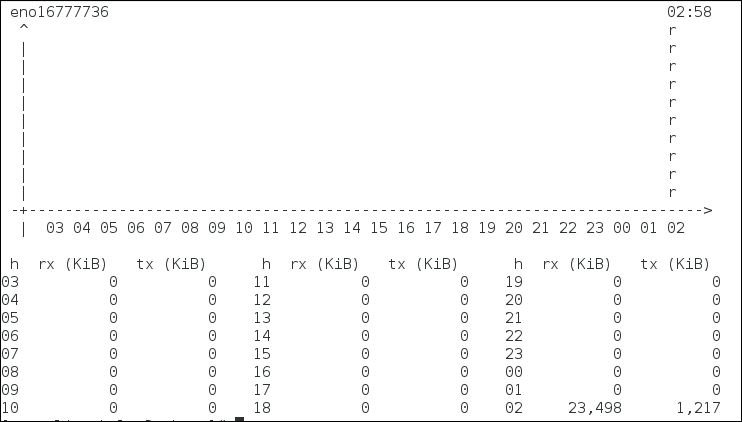
The ' h' option helps you to view the hour report of network usage statics.
[root@linuxhelp Desktop]# vnstat -h
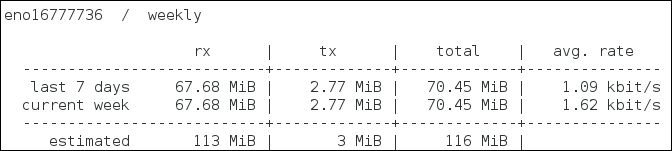
The ' w' option used to view the weekly report of network usage statics.
[root@linuxhelp Desktop]# vnstat -w
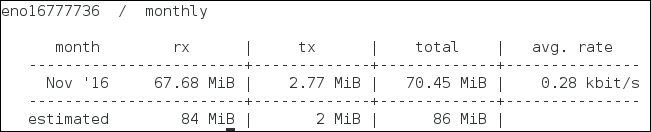
The ' m' option views the monthly report of network usage statics.
[root@linuxhelp Desktop]# vnstat -m
The ' s' option helps you to view the network statics report at short.
[root@linuxhelp Desktop]# vnstat -s

The ' t' option views the top 10 network log reports.
[root@linuxhelp Desktop]# vnstat -t

The ' iflist' command used to view the network interface details.
[root@linuxhelp Desktop]# vnstat --iflist
Available interfaces: eno16777736 (1000 Mbit) lo
The ' u' option used to update the Vnstat.
[root@linuxhelp Desktop]# vnstat -u
The ' v' used to check the version of vnstat.
[root@linuxhelp Desktop]# vnstat -v
vnStat 1.15 by Teemu Toivola
To know more information about vnstat use following option.
[root@linuxhelp Desktop]# vnstat --help
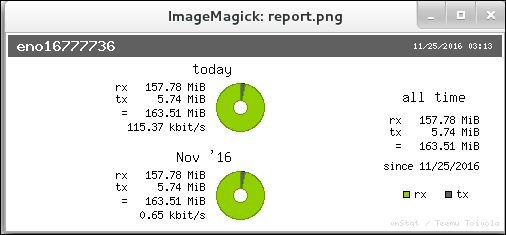
Use the following command to convert the network bandwidth report in image format.
[root@linuxhelp Desktop]# vnstati -s -i eno16777736 -o /root/Desktop/report.png
[root@linuxhelp Desktop]# display report.png
Comments ( 0 )
No comments available