How to install Webmin in Ubuntu 17.04
To install Webmin in Ubuntu 17.04
Webmin is a free, open-source, modern, web based control panel for any Linux or other UNIX like servers. Its simple interface allows its users to administer your server in an easy manner. When you use Webmin, you can change the settings of common packages in a breeze. In this tutorial, you' ll learn the method to install Webmin on Ubuntu 17.04. machine.
Installing Webmin
In order to install Webmin, you are required to add the necessary repo on your source list file. So, run the following command to open that file.
root@linuxhelp:~# nano /etc/apt/sources.list
Once the file gets opened, add the following lines at the bottom of the file. Save it and exit once done.
deb http://download.webmin.com/download/repository sarge contrib
deb http://webmin.mirror.somersettechsolutions.co.uk/repository sarge contrib
After that, you should download the repository key file with the help of the following command.
root@linuxhelp:~# wget http://www.webmin.com/jcameron-key.asc
--2017-08-18 00:01:27--  http://www.webmin.com/jcameron-key.asc
Resolving www.webmin.com (www.webmin.com)... 216.34.181.97
Connecting to www.webmin.com (www.webmin.com)|216.34.181.97|:80... connected.
HTTP request sent, awaiting response... 200 OK
Length: 1320 (1.3K) [text/plain]
Saving to: ‘ jcameron-key.asc’

jcameron-key.asc    100%[===================> ]   1.29K  --.-KB/s    in 0.002s

2017-08-18 00:01:28 (761 KB/s) - ‘ jcameron-key.asc’  saved [1320/1320]
Next, add the repo key by using " apt-key add" command as follows.
root@linuxhelp:~# apt-key add jcameron-key.asc
OK
Once done, update the apt source by invoking the following command.
root@linuxhelp:~# apt-get update
Hit:1 http://security.ubuntu.com/ubuntu zesty-security InRelease
Hit:2 http://in.archive.ubuntu.com/ubuntu zesty InRelease
Hit:3 http://in.archive.ubuntu.com/ubuntu zesty-updates InRelease
Hit:4 http://in.archive.ubuntu.com/ubuntu zesty-backports InRelease
Ign:5 http://webmin.mirror.somersettechsolutions.co.uk/repository sarge InRelease
Get:6 http://webmin.mirror.somersettechsolutions.co.uk/repository sarge Release [14.9 kB]
Get:7 http://webmin.mirror.somersettechsolutions.co.uk/repository sarge Release.gpg [173 B]
Get:8 http://webmin.mirror.somersettechsolutions.co.uk/repository sarge/contrib i386 Packages [1,383 B]
Get:9 http://webmin.mirror.somersettechsolutions.co.uk/repository sarge/contrib amd64 Packages [1,383 B]
Ign:10 http://download.webmin.com/download/repository sarge InRelease
Get:11 http://download.webmin.com/download/repository sarge Release [14.9 kB]
Get:12 http://download.webmin.com/download/repository sarge Release.gpg [173 B]
Get:13 http://download.webmin.com/download/repository sarge/contrib amd64 Packages [1,383 B]
Get:14 http://download.webmin.com/download/repository sarge/contrib i386 Packages [1,383 B]
Fetched 35.8 kB in 5s (6,053 B/s)
Reading package lists... Done
All is set for the installation of Webmin. Trigger its installation by executing the following command.
root@linuxhelp:~# apt-get install webmin
Reading package lists... Done
Building dependency tree
Reading state information... Done
The following additional packages will be installed:
  apt-show-versions libauthen-pam-perl
The following NEW packages will be installed:
  apt-show-versions libauthen-pam-perl webmin
0 upgraded, 3 newly installed, 0 to remove and 237 not upgraded.
Need to get 15.5 MB of archives.
After this operation, 162 MB of additional disk space will be used.
Do you want to continue? [Y/n] y
Get:1 http://in.archive.ubuntu.com/ubuntu zesty/universe amd64 libauthen-pam-perl amd64 0.16-3build3 [24.2 kB]
Get:2 http://in.archive.ubuntu.com/ubuntu zesty/universe amd64 apt-show-versions all 0.22.7ubuntu1 [28.6 kB]
Get:3 http://download.webmin.com/download/repository sarge/contrib amd64 webmin all 1.850 [15.5 MB]
Fetched 15.5 MB in 17s (871 kB/s)
Selecting previously unselected package libauthen-pam-perl.
(Reading database ... 179812 files and directories currently installed.)
Preparing to unpack .../libauthen-pam-perl_0.16-3build3_amd64.deb ...
Unpacking libauthen-pam-perl (0.16-3build3) ...
Selecting previously unselected package apt-show-versions.
Preparing to unpack .../apt-show-versions_0.22.7ubuntu1_all.deb ...
Unpacking apt-show-versions (0.22.7ubuntu1) ...
Selecting previously unselected package webmin.
Preparing to unpack .../archives/webmin_1.850_all.deb ...
Unpacking webmin (1.850) ...
Setting up libauthen-pam-perl (0.16-3build3) ...
Setting up apt-show-versions (0.22.7ubuntu1) ...
** initializing cache. This may take a while **
Processing triggers for ureadahead (0.100.0-19) ...
Setting up webmin (1.850) ...
Webmin install complete. You can now login to https://linuxhelp.com:10000/
as root with your root password, or as any user who can use sudo
to run commands as root.
Processing triggers for systemd (232-21ubuntu2) ...
Processing triggers for man-db (2.7.6.1-2) ...
Processing triggers for ureadahead (0.100.0-19) ...
The installation is now over, you can access the Webmin port from your ubuntu firewall by using the following command.
root@linuxhelp:~# ufw allow 10000
Rules updated
Rules updated (v6)
root@linuxhelp:~# ufw allow 80
Rules updated
Rules updated (v6)
You can now open the browser, use the syntax: https://< your ip address> :10000 on your URL search bar. Here it is https://192.168.7.193:10000
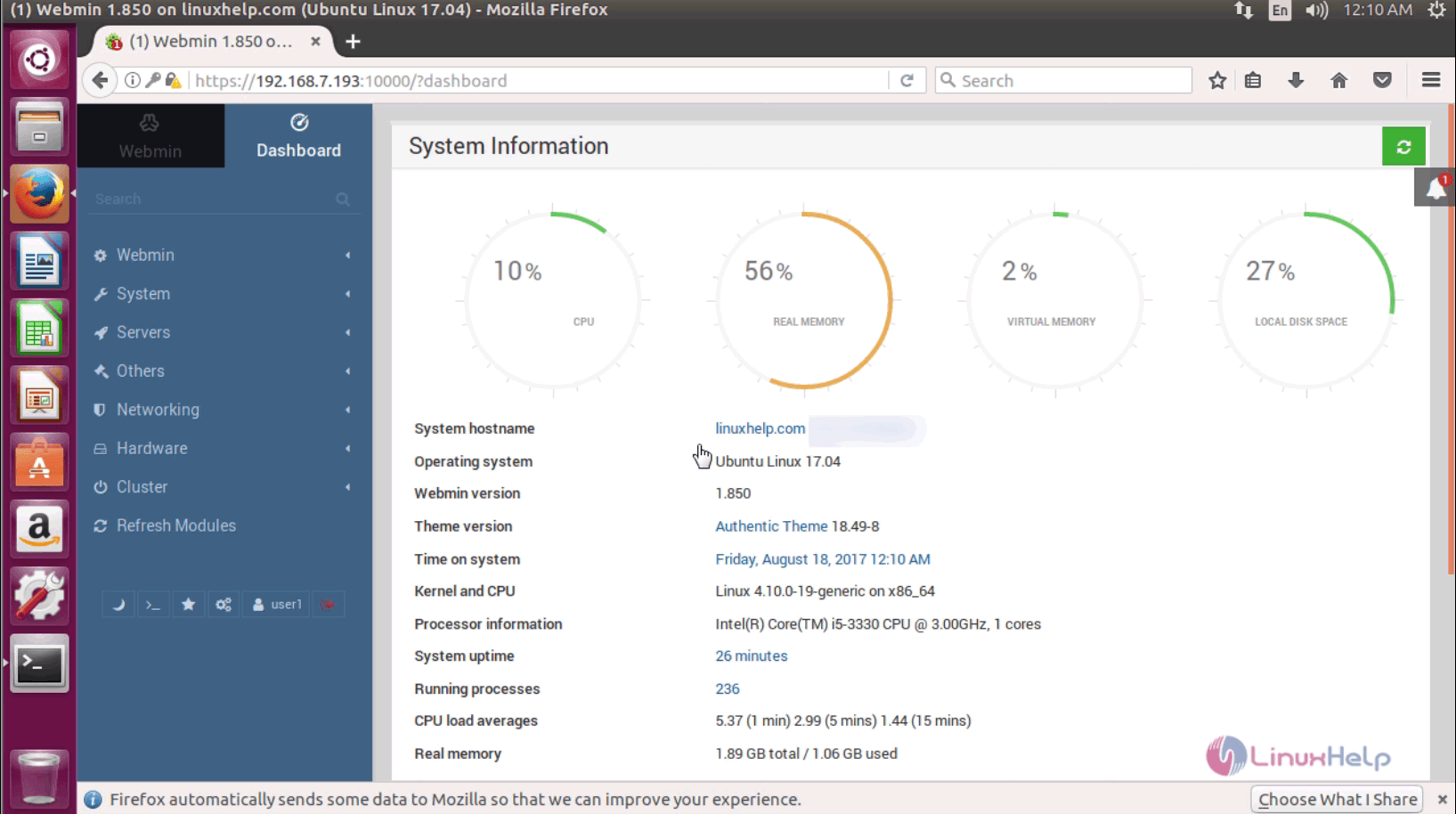
With this, the process to install Webmin on Ubuntu 17.04. is now complete.
Comments ( 0 )
No comments available