How to install Zend Studio on Ubuntu
To install Zend Studio on Ubuntu:
Zend Studio is an Code Editor IDE based application designed for business solutions. Zend studio is a simple-to-install tool, and this article covers the installation of Zend Studio on Ubuntu.
Installing Zend Studio
Download the Zend package from its official site. Once it is downloaded, go to downloads folder and extract it with tar command as follows.
root@linuxhelp1:~# cd Downloads/
root@linuxhelp1:~/Downloads# ls
ZendStudio-13.5.1-linux.gtk.x86_64.tar.gz
root@linuxhelp1:~/Downloads# tar -xzvf ZendStudio-13.5.1-linux.gtk.x86_64.tar.gz
ZendStudio/
ZendStudio/p2/
ZendStudio/p2/org.eclipse.equinox.p2.engine/
ZendStudio/p2/org.eclipse.equinox.p2.engine/profileRegistry/
ZendStudio/p2/org.eclipse.equinox.p2.engine/profileRegistry/DefaultProfile.profile/
ZendStudio/p2/org.eclipse.equinox.p2.engine/profileRegistry/DefaultProfile.profile/1467717605430.profile.gz
ZendStudio/p2/org.eclipse.equinox.p2.engine/profileRegistry/DefaultProfile.profile/.lock
ZendStudio/p2/org.eclipse.equinox.p2.engine/profileRegistry/DefaultProfile.profile/.data/
ZendStudio/p2/org.eclipse.equinox.p2.engine/profileRegistry/DefaultProfile.profile/.data/.settings/
ZendStudio/p2/org.eclipse.equinox.p2.engine/profileRegistry/DefaultProfile.profile/.data/.settings/org.eclipse.equinox.p2.metadata.repository.prefs
ZendStudio/p2/org.eclipse.equinox.p2.engine/profileRegistry/DefaultProfile.profile/.data/.settings/org.eclipse.equinox.p2.artifact.repository.prefs
ZendStudio/p2/org.eclipse.equinox.p2.engine/profileRegistry/DefaultProfile.profile/.data/org.eclipse.equinox.internal.p2.touchpoint.eclipse.actions/
ZendStudio/p2/org.eclipse.equinox.p2.engine/profileRegistry/DefaultProfile.profile/.data/org.eclipse.equinox.internal.p2.touchpoint.eclipse.actions/jvmargs
ZendStudio/p2/org.eclipse.equinox.p2.engine/profileRegistry/DefaultProfile.profile/1467717605693.profile.gz
ZendStudio/p2/org.eclipse.equinox.p2.engine/profileRegistry/DefaultProfile.profile/1467717703630.profile.gz
ZendStudio/p2/org.eclipse.equinox.p2.engine/profileRegistry/DefaultProfile.profile/1467717712459.profile.gz
ZendStudio/p2/org.eclipse.equinox.p2.engine/.settings/
ZendStudio/p2/org.eclipse.equinox.p2.engine/.settings/org.eclipse.equinox.p2.artifact.repository.prefs
ZendStudio/p2/org.eclipse.equinox.p2.engine/.settings/org.eclipse.equinox.p2.metadata.repository.prefs
ZendStudio/p2/org.eclipse.equinox.p2.core/
.
.
.
ZendStudio/jre/lib/fontconfig.properties.src
ZendStudio/jre/lib/psfont.properties.ja
ZendStudio/jre/lib/fontconfig.Turbo.properties.src
ZendStudio/jre/lib/jce.jar
ZendStudio/jre/lib/flavormap.properties
ZendStudio/jre/lib/jfxswt.jar
ZendStudio/jre/lib/fontconfig.SuSE.10.properties.src
ZendStudio/jre/lib/fontconfig.SuSE.11.bfc
ZendStudio/jre/COPYRIGHT
ZendStudio/jre/THIRDPARTYLICENSEREADME-JAVAFX.txt
ZendStudio/jre/Welcome.html
ZendStudio/jre/README
ZendStudio/jre/release
root@linuxhelp1:~/Downloads# ls
ZendStudio  ZendStudio-13.5.1-linux.gtk.x86_64.tar.gz
Once the package is extracted, you can find a new directory called “ ZendStudio” under your current location.
root@linuxhelp1:~/Downloads# cd ZendStudio/
root@linuxhelp1:~/Downloads/ZendStudio# ls
artifacts.xml  configuration  epl-v10.html  features  icon.xpm  jre  notice.html  p2  plugins  readme  ZendStudio  ZendStudio.ini
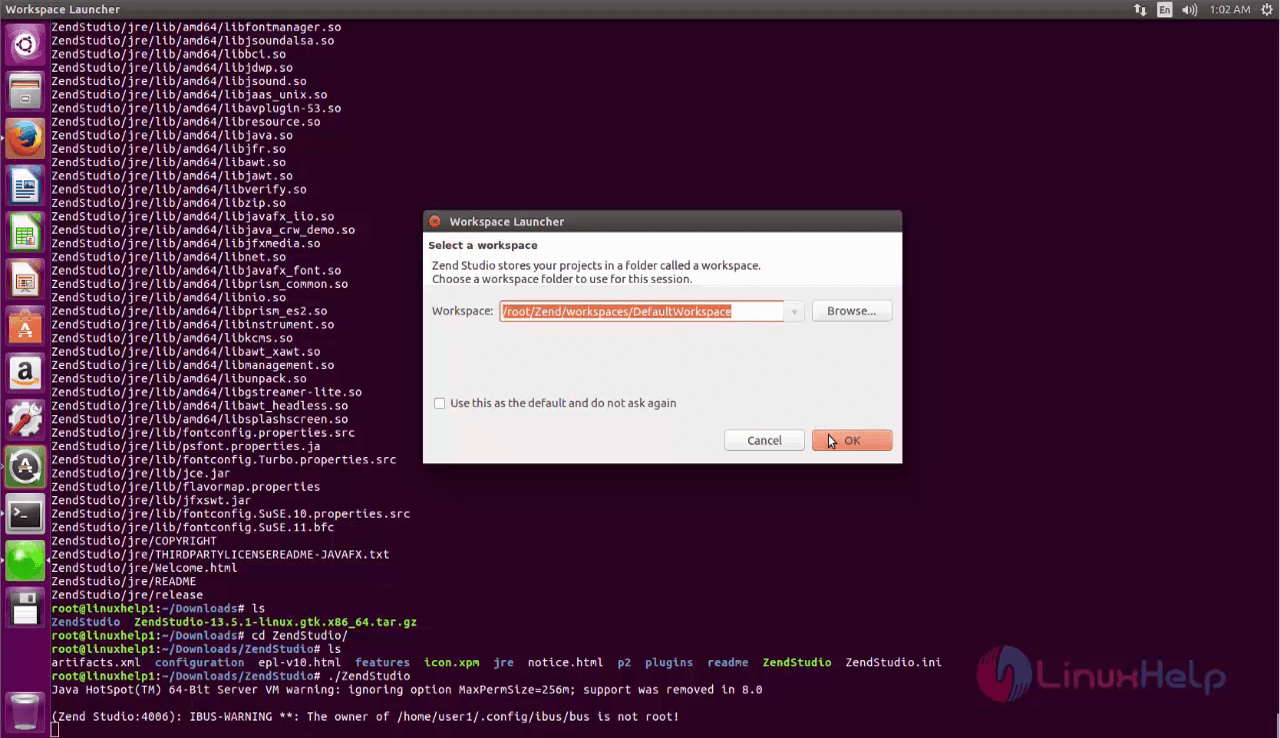
Move to zendstudio directory, in which you can find a script file named ‘ ZendStudio’ . Run it as follows. A graphical launcher appears on your screen.
root@linuxhelp1:~/Downloads/ZendStudio# ./ZendStudio
Java HotSpot(TM) 64-Bit Server VM warning: ignoring option MaxPermSize=256m  support was removed in 8.0
(Zend Studio:4006): IBUS-WARNING **: The owner of /home/user1/.config/ibus/bus is not root!
Choose the Workspace from the Workspace Launcher.
ZendStudio appears on your screen as follows.
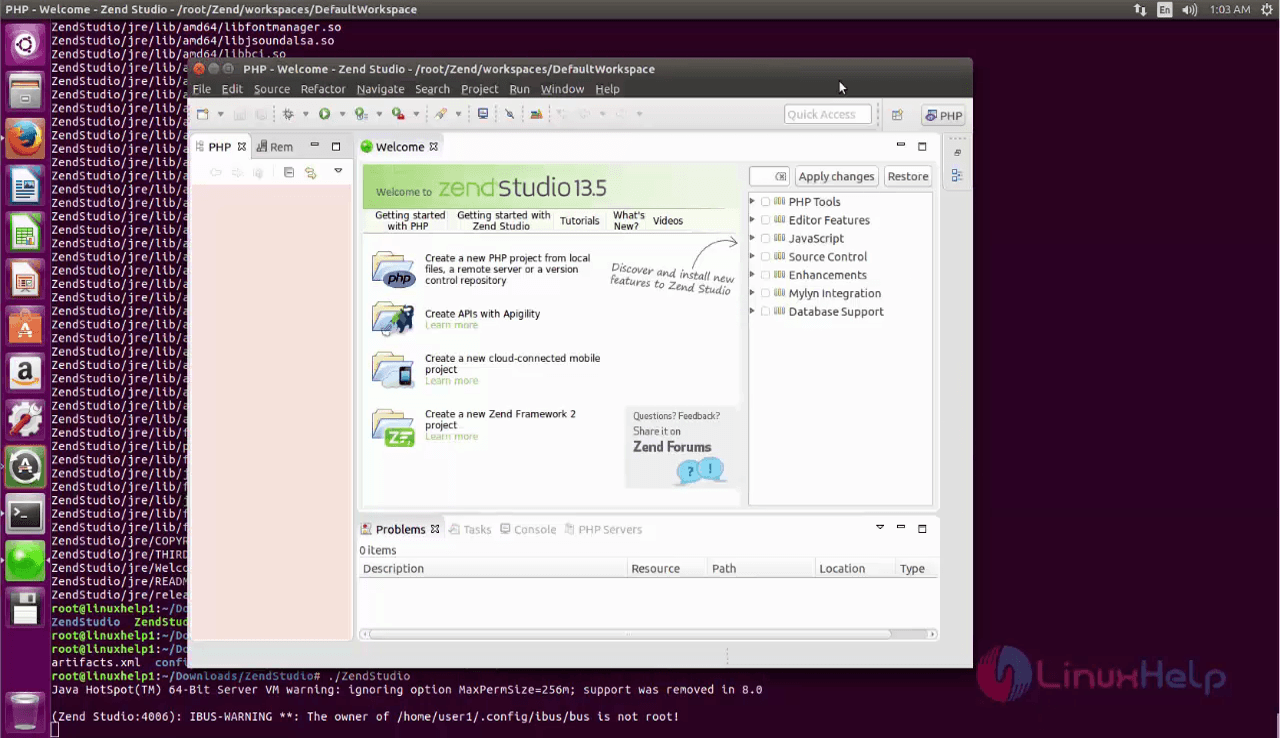
Simple to install, wasn' t it? Zend Studio is a powerful code editor and is 3X faster to write codes. Also, it debug the codes easily. Enjoy working on ZendStudio.
Comments ( 0 )
No comments available