• Categories
    Category
    {{ postCtrl.tags }}
    • {{ category.tag_type }}

      • {{tag.tag_name}}
      • View more
  • Categories
    Category
    {{ postCtrl.tags }}
    • {{ category.tag_type }}

      • {{tag.tag_name}}
      • View more
  • News
  • Tutorials
  • Forums
  • Tags
  • Users
Tutorial News Comments FAQ Related Articles

How to Monitor Linux Clients Using Shinken monitoring framework

{{postValue.id}}

To monitor Linux Clients Using Shinken monitoring framework

In this article we will learn how to monitor Linux Clients using Shinken monitoring framework.

Switch to the shinken user using the following command.

root@linuxhelp:~# su shinken  
shinken@linuxhelp:/root$ shinken install ssh
Grabbing : ssh
OK ssh


Create host file configuration for Client as shown below.

shinken@linuxhelp:/root$ nano /etc/shinken/hosts/client.cfg  


Add the following lines.

define host{
   use             linux,ssh
   host_name       sk
   address         192.168.7.158
   _SNMPCOMMUNITY  password
}

Save and close the file.


Switch to root user and restart the shinken service.

shinken@linuxhelp:/root$ exit
exit

root@linuxhelp:~# service shinken restart  
Restarting scheduler
   ...done.
Restarting poller
   ...done.
Restarting reactionner
   ...done.
Restarting broker
   ...done.
Restarting receiver
   ...done.
Restarting arbiter
Doing config check
   ...done.
   ...done.


Configuring the Client system

Run the following command to install SSH & SNMPD package.

root@server2:/home/user1# apt-get install ssh snmpd 
Reading package lists... Done
Building dependency tree       
&hellip 
&hellip 
Processing triggers for ureadahead (0.100.0-16) ...
Setting up ssh (1:6.6p1-2ubuntu2.8) ...
Processing triggers for libc-bin (2.19-0ubuntu6.7) ...


Open the snmpd.conf file by running the following command.

root@server2:/home/user1# nano /etc/snmp/snmpd.conf 


Comment the following line

#agentAddress  udp:127.0.0.1:161
Uncomment the following line:
agentAddress udp:161,udp6:[::1]:161
Find the following line, and set the password for the client system. You should use the same password as defined in the shinken server.
rocommunity  password  default    -V systemonly


Save and restart the snmpd service.

root@server2:/home/user1# service snmpd restart 
 * Restarting network management services:  


Navigate to the Shinken web interface and check the status of the client. You can see that the client is successfully added. Click on the client1 to view the Client status.
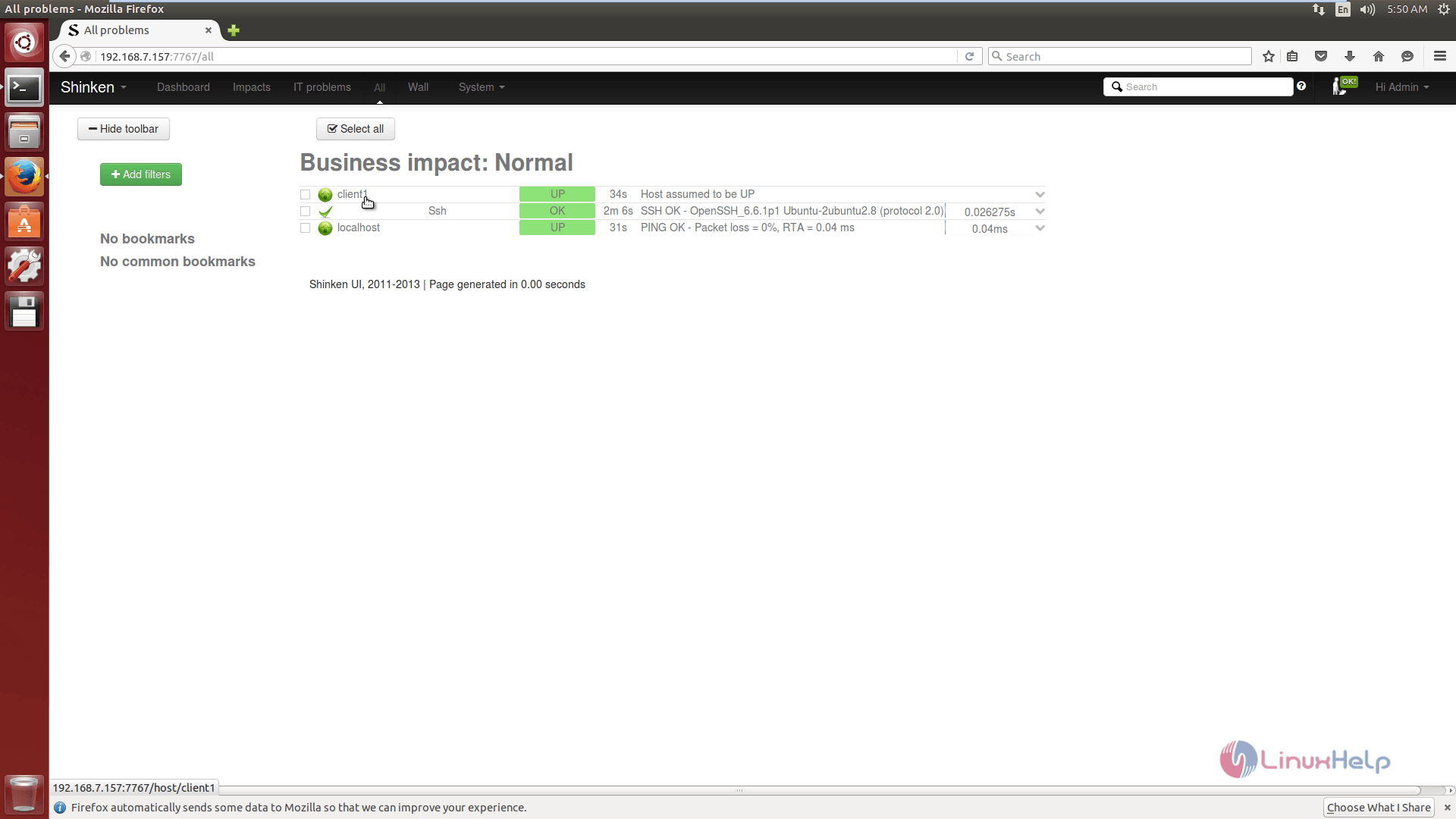
1
SSH Service status of the client machine.
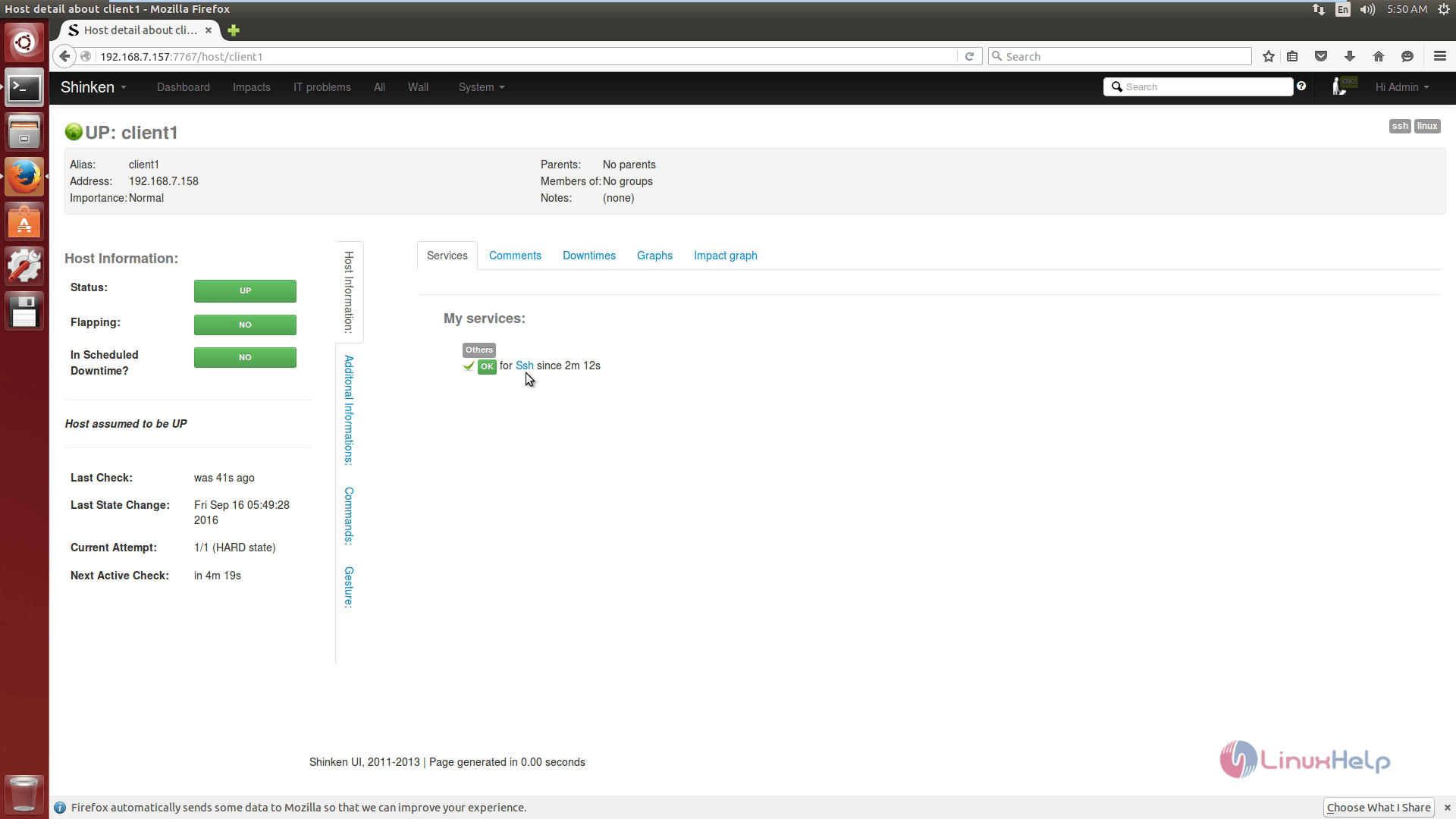
2

Tags:
jackson
Author: 

Comments ( 0 )

No comments available

Add a comment
{{postCtrl.cmtErrMsg}}

Frequently asked questions ( 5 )

Q

What is the Construction Time for a Shinken?

A

Construction Times For Authentic Japanese Shinken:

From the time that the commission is accepted to shipment typically takes from 4 to 6 months.

Q

I got a bug, how to launch the daemons in debug mode?

A

You only need to launch:

/etc/init.d/shinken -d start

Q

I switched from Nagios, do I need to change my existing Nagios configuration?

A

No, there is no need to change the existing configuration - unless you want to add some new hosts and services. Once you are comfortable with Shinken you can start to use its unique and powerful features.

Q

What is Shinken monitoring framework?

A

Shinken is a modern, Nagios compatible monitoring framework, written in Python. Its main goal is to give users a flexible architecture for their monitoring system that is designed to scale to large environments.

Q

Where are the logs in the Shinken monitoring framework?

A

Logs are in /var/log/shinken (what did you expect?)

Back To Top!
Rank
User
Points

Top Contributers

userNamenaveelansari
135850

Top Contributers

userNameayanbhatti
92510

Top Contributers

userNamehamzaahmed
32150

Top Contributers

1
userNamelinuxhelp
31040

Top Contributers

userNamemuhammadali
24500
Can you help Luke ?
workbench for debian

I am using workbench in CentOS whereas now I need to use Debian Operating system so could you please help to install and use in Debian?

Networking
  • Routing
  • trunk
  • Netmask
  • Packet Capture
  • domain
  • HTTP Proxy
Server Setup
  • NFS
  • KVM
  • Memory
  • Sendmail
  • WebDAV
  • LXC
Shell Commands
  • Cloud commander
  • Command line archive tools
  • last command
  • Shell
  • terminal
  • Throttle
Desktop Application
  • Linux app
  • Pithos
  • Retrospect
  • Scribe
  • TortoiseHg
  • 4Images
Monitoring Tool
  • Monit
  • Apache Server Monitoring
  • EtherApe 
  • Arpwatch Tool
  • Auditd
  • Barman
Web Application
  • Nutch
  • Amazon VPC
  • FarmWarDeployer
  • Rukovoditel
  • Mirror site
  • Chef
Contact Us | Terms of Use| Privacy Policy| Disclaimer
© 2025 LinuxHelp.com All rights reserved. Linux™ is the registered trademark of Linus Torvalds. This site is not affiliated with linus torvalds in any way.