• Categories
    Category
    {{ postCtrl.tags }}
    • {{ category.tag_type }}

      • {{tag.tag_name}}
      • View more
  • Categories
    Category
    {{ postCtrl.tags }}
    • {{ category.tag_type }}

      • {{tag.tag_name}}
      • View more
  • News
  • Tutorials
  • Forums
  • Tags
  • Users
Tutorial News Comments FAQ Related Articles

How To Reset Root Password in single user mode

{{postValue.id}}

To Reset Root Password in RHEL/CentOS and Fedora

In this article, we will learn some simple steps to reset forgotten root password in RHEL, CentOS and Fedora Linux. There are various ways to reset root password and we are going to follow Booting into single user mode to reset the password.

Take backup of your data before start the password resetting.

STEP 1:

Boot your Computer and Interrupt while booting at GRUB stage hitting arrow keys or space bar.
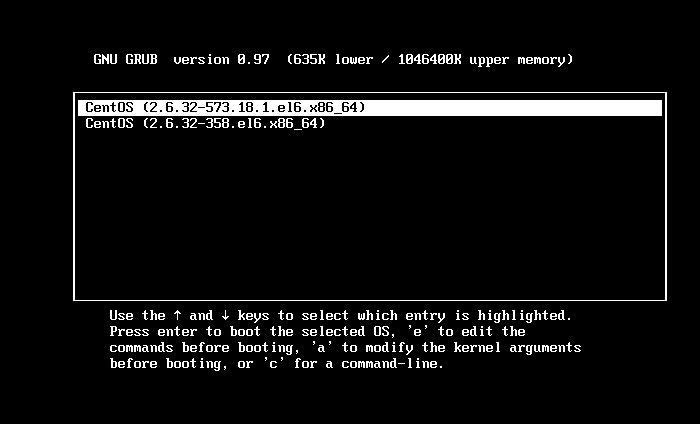
boot the system

STEP 2:

Type ‘ a’ to modify kernel argument and you can cancel it by typing ESC key.

kernel argument

STEP 3:

Type command runlevel to know your run level. In this 1 S state that you are in a single user mode.

runlevel

STEP 4:

Type passwd command without username and press Enter. Now enter the new root password and re-type. User has now reset the password successfully.

psswd command

After the password is changed, type the following command to switch to GUI.

[root@linuxhelp /]# init 5

STEP 5:
Now login by entering the username root and type the newly created password, now your machine will be successfully logged in.
login username
login password

Tags:
connor
Author: 

Comments ( 0 )

No comments available

Add a comment
{{postCtrl.cmtErrMsg}}

Frequently asked questions ( 5 )

Q

Where the password has been stored in the Linux system?

A

The password has been stored in the following path
"/etc/shadow"

Q

Where we can see the user list in the Linux to reset the password?

A

In /etc/passwd you can see the user list to reset the password for the user use passwd command.

Q

If I enable password reset for a group and then decide to enable it for everyone are my users required re-register?

A

No. Users who have populated authentication data are not required to re-register.

Q

Can my users register data in such a way that other users can't see this data?

A

Yes. When users register data by using the password reset registration portal, the data is saved into private authentication fields that are visible only to global administrators and the user.

Q

There is any other method to reset the root account password in a Container?

A

Enter the container and changing the password
" lxc-attach -n enter "
"passwd "
"exit"
When using OpenVZ containers (up to PVE 3.4) use
"vzctl enter

Back To Top!
Rank
User
Points

Top Contributers

userNamenaveelansari
135850

Top Contributers

userNameayanbhatti
92510

Top Contributers

userNamehamzaahmed
32150

Top Contributers

1
userNamelinuxhelp
31040

Top Contributers

userNamemuhammadali
24500
Can you help Jayce ?
What are the types of table used in IPtables

What are the various types of table used in IPtables and how to use that for my server security?

Networking
  • Routing
  • trunk
  • Netmask
  • Packet Capture
  • domain
  • HTTP Proxy
Server Setup
  • NFS
  • KVM
  • Memory
  • Sendmail
  • WebDAV
  • LXC
Shell Commands
  • Cloud commander
  • Command line archive tools
  • last command
  • Shell
  • terminal
  • Throttle
Desktop Application
  • Linux app
  • Pithos
  • Retrospect
  • Scribe
  • TortoiseHg
  • 4Images
Monitoring Tool
  • Monit
  • Apache Server Monitoring
  • EtherApe 
  • Arpwatch Tool
  • Auditd
  • Barman
Web Application
  • Nutch
  • Amazon VPC
  • FarmWarDeployer
  • Rukovoditel
  • Mirror site
  • Chef
Contact Us | Terms of Use| Privacy Policy| Disclaimer
© 2025 LinuxHelp.com All rights reserved. Linux™ is the registered trademark of Linus Torvalds. This site is not affiliated with linus torvalds in any way.