• Categories
    Category
    {{ postCtrl.tags }}
    • {{ category.tag_type }}

      • {{tag.tag_name}}
      • View more
  • Categories
    Category
    {{ postCtrl.tags }}
    • {{ category.tag_type }}

      • {{tag.tag_name}}
      • View more
  • News
  • Tutorials
  • Forums
  • Tags
  • Users
Tutorial News Comments FAQ Related Articles

How To Set Email Alerts for SSH Root Login In Linux

{{postValue.id}}

To Set Email Alerts for SSH Root Login In Linux

While configuring Linux server, make sure that you should get a notification if any unauthorised login into root user. The server admin should get all email alerts from server. The procedure to set email alerts for SSH root login in Linux is explained.

Install the mailx package

Execute the following command to install mailx package.

[root@linuxhelp ~]# yum install mailx
Loaded plugins: aliases, changelog, fastestmirror, kabi, presto, refresh-packagekit, security, tmprepo,
              : verify, versionlock
Loading support for CentOS kernel ABI
Setting up Install Process
Loading mirror speeds from cached hostfile
 * base: centos.webwerks.com
 * epel: epel.mirror.net.in
.
.
.
Installing : mailx-12.4-8.el6_6.x86_64                                    1/1 
Verifying  : mailx-12.4-8.el6_6.x86_64                                    1/1 

Installed:
  mailx.x86_64 0:12.4-8.el6_6                                                   

Complete!

Go to /root directory and add the following statements in .bashrc file.

[root@linuxhelp ~]# vim .bashrc 

echo ' ALERT - Root Shell Access linuxhelp.com on:'  `date` `who` | mail -s " Alert: Root Access"   corbyarun@gmail.com
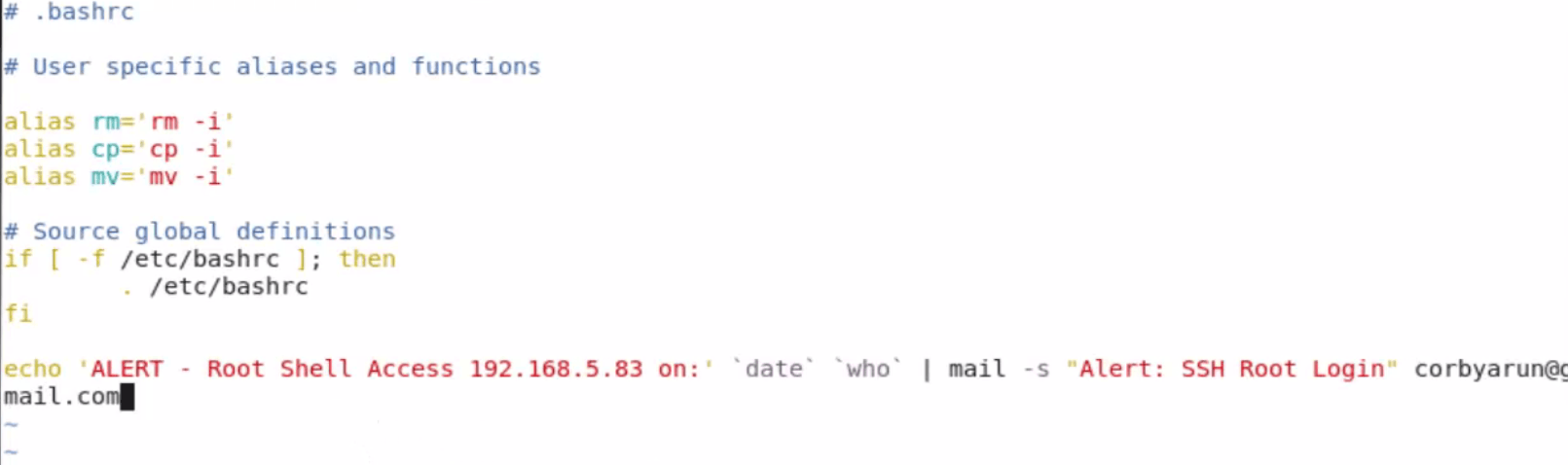
.bashrc file


Enter your own server IP or Hostname and enter your valid mail-id.

Using ssh command, login to the configured server in terminal as root user.

root@linuxhelp:/home/user1# ssh root@192.168.5.83
root@192.168.5.83' s password: 
Last login: Tue Jun 21 15:54:47 2016 from 192.168.5.137

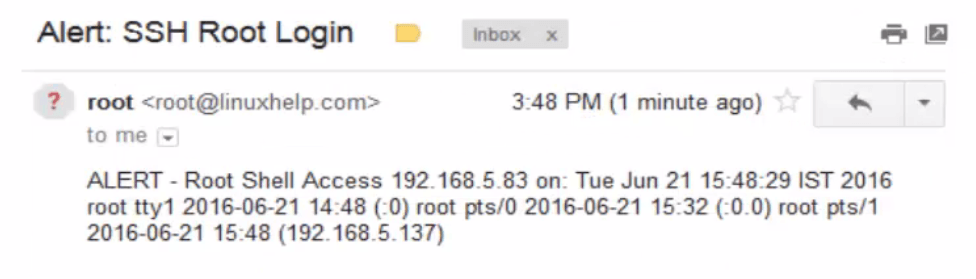
A mail alert is sent to the respective mail-id, after the successful login.

mail alert

alert
To receive mail alert for multiple mail id' s, add the following lines in the .bashrc file.

[root@linuxhelp ~]# vim .bashrc

echo ' ALERT - Root Shell Access linuxhelp.com on:'  `date` `who` | mail -s " Alert: Root Access"   corbyarun@gmail.com, arunkumarece@gmail.com
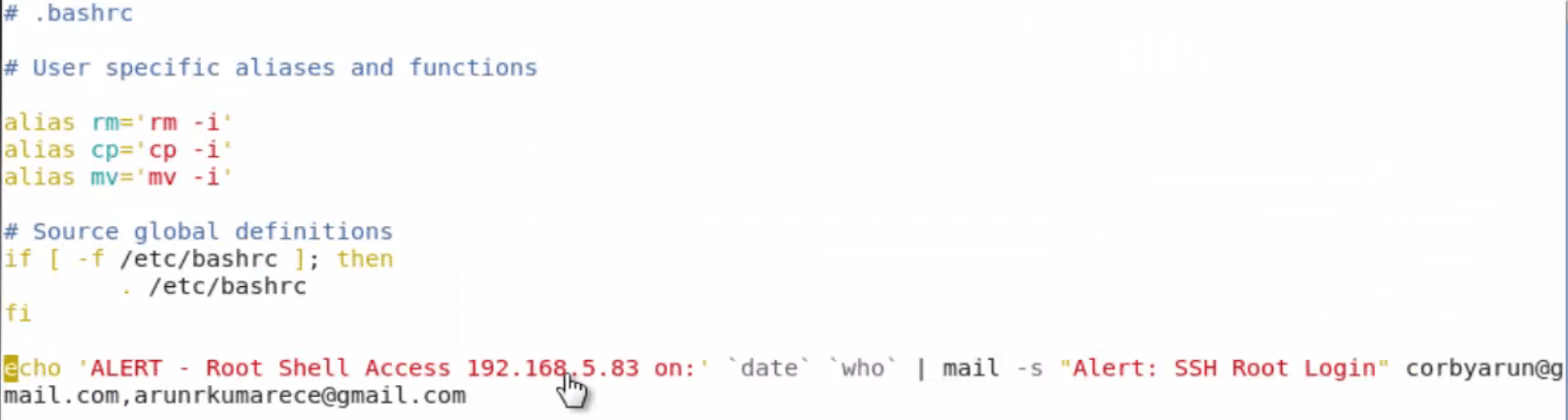
.bashrc

Again login to the server through ssh command.

root@linuxhelp:/home/user1# ssh root@192.168.5.83
root@192.168.5.83' s password: 
Last login: Tue Jun 21 15:56:47 2016 from 192.168.5.137

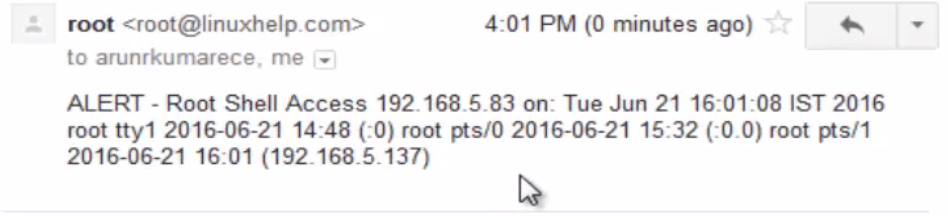
Open the mail and check the alert

mail

alert

root mail

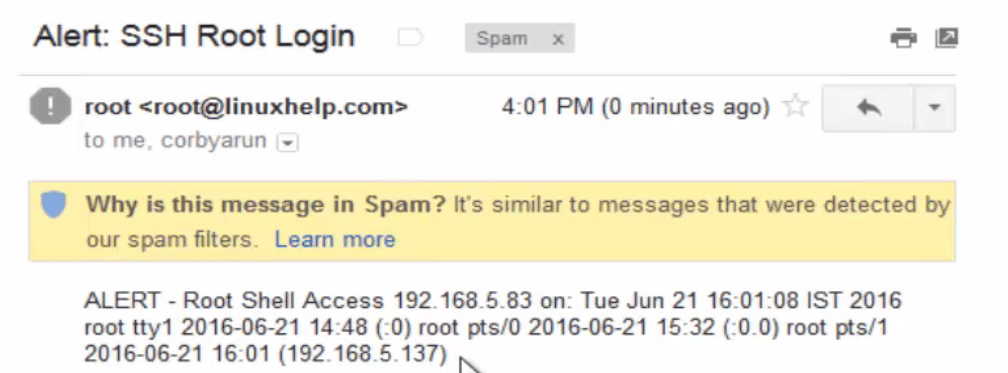
alert message

Sometimes the mail will be stored in Spam.

To create alert for User login

Login as normal user. Go to user’ s home directory and open the .bashrc file.

[root@linuxhelp ~]# cd /home/user1/
[root@linuxhelp user1]# vim .bashrc
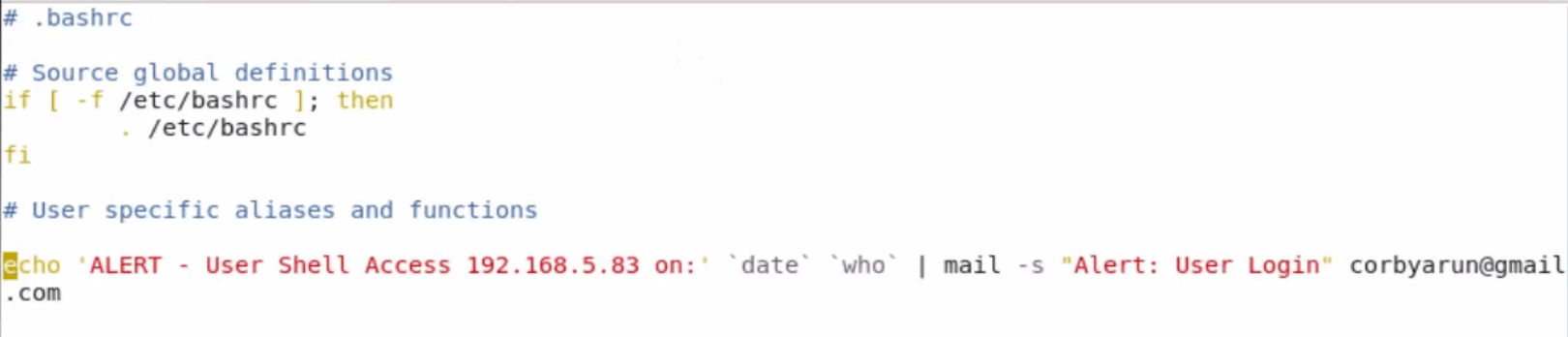

.bashrc file
Once the configuration is done, logout that user and again login to check the mail alert.

user login mail
Alert message

Tags:
ethan
Author: 

Comments ( 0 )

No comments available

Add a comment
{{postCtrl.cmtErrMsg}}

Frequently asked questions ( 5 )

Q

How do to get email alert for SSH root login?

A

To get email alert for SSH root login follow the procedures

1. Login to your server as root user


2. Open file '.bash_profile'


root#rbdc:~ vi .bash_profile


3. Add following lines in script..


echo 'ALERT - Root Shell Access on:' `date` `who` | mail -s "Alert: Root Access from `who | awk '{print $6}'`" mail@mailaddress.com

Q

How do I set up an email alert when a ssh login is successful?

A

TO set up an email alert when a ssh login follow the procedure

Modify or create /etc/ssh/sshrc with the following contents:


ip=`echo $SSH_CONNECTION | cut -d " " -f 1`


logger -t ssh-wrapper $USER login from $ip

echo "User $USER just logged in from $ip" | sendemail -q -u "SSH Login" -f "Originator " -t "Your Name " -s smtp.server.com &

Q

How to connect Email Alert on SSH and SFTP Connection?

A

To connect Email Alert on SSH and SFTP Connection follow the procedure

.bashrc, belongs to root


# trigger mail here

[ -f "~/.bashrc_priv" ] && . ~/.bashrc_priv


.bashrc_priv, belongs to $USER


# Whatever you want in your users' bashrc ; they can edit this file.


As I recall, SFTP triggers the bash login process.

Q

if is it Set SSH All User Login Email Alerts?

A

TO Set SSH All User Login Email Alerts use the following procedure

# vi /etc/bashrc

echo 'ALERT - Root Shell Access (ServerName) on:' `date` `who` | mail -s "Alert: Root Access from `who | cut -d'(' -f2 | cut -d')' -f1`" example@gmail.com

Q

How to set email notification when someone login Plesk ?

A

TO get email notification when someone login Plesk
Connect to the server via SSH and create a helper file:


Create a helper file /home/mail.sh:


# echo 'echo ${NEW_CONTACT_NAME} | mail -s "a user Logged in" jdoe@example.com' > /home/mail.sh


Check that is created correctly:


# cat /home/mail.sh

echo ${NEW_CONTACT_NAME} | mail -s "a user Logged in" jdoe@example.com


Note: jdoe@example.com is a placeholder for the email address where to notifications should be sent and have to be replaced with a valid one

Set executable permissions to the file:


# chmod +x /home/mail.sh

Navigate to Plesk > Tools and Settings > Event Manager > Add Event Handler and set the following parameters:

Event : Plesk user logged in

Priority : 0 (might be any)

User : root

Command : /home/mail.sh

Press OK .

Back To Top!
Rank
User
Points

Top Contributers

userNamenaveelansari
135850

Top Contributers

userNameayanbhatti
92510

Top Contributers

userNamehamzaahmed
32150

Top Contributers

1
userNamelinuxhelp
31040

Top Contributers

userNamemuhammadali
24500
Can you help keel johnston ?
Unhide the folders on windows Explorer

Give any solutions to unhide folder using command prompt?

forum3

Networking
  • Routing
  • trunk
  • Netmask
  • Packet Capture
  • domain
  • HTTP Proxy
Server Setup
  • NFS
  • KVM
  • Memory
  • Sendmail
  • WebDAV
  • LXC
Shell Commands
  • Cloud commander
  • Command line archive tools
  • last command
  • Shell
  • terminal
  • Throttle
Desktop Application
  • Linux app
  • Pithos
  • Retrospect
  • Scribe
  • TortoiseHg
  • 4Images
Monitoring Tool
  • Monit
  • Apache Server Monitoring
  • EtherApe 
  • Arpwatch Tool
  • Auditd
  • Barman
Web Application
  • Nutch
  • Amazon VPC
  • FarmWarDeployer
  • Rukovoditel
  • Mirror site
  • Chef
Contact Us | Terms of Use| Privacy Policy| Disclaimer
© 2025 LinuxHelp.com All rights reserved. Linux™ is the registered trademark of Linus Torvalds. This site is not affiliated with linus torvalds in any way.