How to set up Guacamole Tool to Access Remote Linux/Windows Machines
To Set Up Web-Based Guacamole Tool to Access Remote Linux/Windows Machines
Guacamole is an open source Clientless Remote Desktop solution, which can supports standard protocols like VNC, RDP and SSH to connect the client machines via a HTML5 supported Web browser. The procedure to set up Guacamole Tool to Access Remote Linux/Windows Machines is explained in this article.
Requirements
| Guacamole Server | Ubuntu 15.10 | IP 192.168.5.222 |
| RDP Client | Windows 7 | IP 192.168.5.17 |
| SSH Client | CentOS 7 | IP 192.168.5.88 |
To install Guacamole
Enable the firewall and ports required for guacamole in Debian based Distributions. If you are using Redhat Based system, allow the firewall through “ firewall-cmd” command or “ iptables” command.
root@linuxhelp:~# ufw enable
Firewall is active and enable on system startup
root@linuxhelp:~# ufw allow 22
Rule added
Rule added (v6)
root@linuxhelp:~# ufw allow 8080
Rule added
Rule added (v6)
Update your repositories and then install the required packages for guacamole.
root@linuxhelp:~# apt-get update
Hit http://in.archive.ubuntu.com wily InRelease
Get:1 http://in.archive.ubuntu.com wily-updates InRelease [65.9 kB]
Get:2 http://security.ubuntu.com wily-security InRelease [65.9 kB]
Get:3 http://in.archive.ubuntu.com wily-backports InRelease [65.9 kB]
Hit http://in.archive.ubuntu.com wily/main Sources
Get:4 http://security.ubuntu.com wily-security/main Sources [51.4 kB]
.
.
.
Hit http://in.archive.ubuntu.com wily/universe amd64 Packages
Hit http://in.archive.ubuntu.com wily/multiverse amd64 Packages
Hit http://in.archive.ubuntu.com wily/main i386 Packages
Hit http://in.archive.ubuntu.com wily/restricted i386 Packages
Hit http://in.archive.ubuntu.com wily/universe i386 Packages
Fetched 1,348 kB in 23s (57.7 kB/s)
Reading package lists... Done
root@linuxhelp:~# apt-get install fail2ban build-essential htop libcairo2-dev libjpeg62-dev libpng12-dev libossp-uuid-dev tomcat7 -y
Reading package lists... Done
Building dependency tree
Reading state information... Done
build-essential is already the newest version.
build-essential set to manually installed.
The following packages were automatically installed and are no longer required:
  libavahi-client-dev libavahi-common-dev libavahi-compat-libdnssd1
  libdbus-1-dev libjs-jquery libruby2.1 libyaml-0-2 ruby2.1
  rubygems-integration
.
.
.
Processing triggers for libc-bin (2.21-0ubuntu4) ...
Processing triggers for ureadahead (0.100.0-19) ...
Processing triggers for systemd (225-1ubuntu9) ...
Processing triggers for ca-certificates (20150426ubuntu1) ...
Updating certificates in /etc/ssl/certs...
0 added, 0 removed  done.
Running hooks in /etc/ca-certificates/update.d...

done.
done.
root@linuxhelp:~# apt-get install libfreerdp-dev libpango1.0-dev libssh2-1-dev libtelnet-dev libvncserver-dev libpulse-dev libssl-dev libvorbis-dev -y
Reading package lists... Done
Building dependency tree
Reading state information... Done
The following packages were automatically installed and are no longer required:
  libavahi-compat-libdnssd1 libjpeg62 libjs-jquery libruby2.1 libyaml-0-2
  ruby2.1 rubygems-integration
.
.
.
Setting up libssl-doc (1.0.2d-0ubuntu1.5) ...
Setting up libtelnet2 (0.21-4) ...
Setting up libtelnet-dev (0.21-4) ...
Setting up libvncserver1:amd64 (0.9.10+dfsg-3) ...
Setting up libvncserver-config (0.9.10+dfsg-3) ...
Setting up libvncserver-dev:amd64 (0.9.10+dfsg-3) ...
Setting up libvorbis-dev:amd64 (1.3.4-2) ...
Setting up libtasn1-doc (4.5-2ubuntu0.1) ...
Processing triggers for libc-bin (2.21-0ubuntu4) ...
To Download guacamole server package run the following command.
root@linuxhelp:~# wget http://sourceforge.net/projects/guacamole/files/current/source/guacamole-server-0.9.8.tar.gz
--2016-06-27 12:14:35--  http://sourceforge.net/projects/guacamole/files/current/source/guacamole-server-0.9.8.tar.gz
Resolving sourceforge.net (sourceforge.net)... 216.34.181.60
Connecting to sourceforge.net (sourceforge.net)|216.34.181.60|:80... connected.
HTTP request sent, awaiting response... 200 OK
Length: 691627 (675K) [application/x-gzip]
Saving to: ‘ guacamole-server-0.9.8.tar.gz’

guacamole-server-0. 100%[=====================> ] 675.42K   132KB/s   in 5.8s
2016-06-27 12:14:45 (117 KB/s) - ‘ guacamole-server-0.9.8.tar.gz’  saved [691627/691627]
After downloading the package, extract it by using the following command.
root@linuxhelp:~# ls
Desktop    Downloads         guacamole-server-0.9.8.tar.gz  Pictures  Templates
Documents  examples.desktop  Music                          Public    Videos
root@linuxhelp:~# tar -xzf guacamole-server-0.9.8.tar.gz
root@linuxhelp:~# ls
Desktop examples.desktop Music Templates
Documents guacamole-server-0.9.8 Pictures Videos
Downloads guacamole-server-0.9.8.tar.gz Public
Go to the extracted directory and run the below command.
root@linuxhelp:~# cd guacamole-server-0.9.8/
root@linuxhelp:~/guacamole-server-0.9.8# ./configure --with-init-dir=/etc/init.d & &  make & &  make install
checking for a BSD-compatible install... /usr/bin/install -c
checking whether build environment is sane... yes
checking for a thread-safe mkdir -p... /bin/mkdir -p
checking for gawk... no
checking for mawk... mawk
checking whether make sets $(MAKE)... yes
checking whether make supports nested variables... yes
checking whether make supports nested variables... (cached) yes
checking build system type... x86_64-unknown-linux-gnu
.
.
.
------------------------------------------------
guacamole-server version 0.9.8
------------------------------------------------

   Library status:

     freerdp ............. yes
     pango ............... yes
     libssh2 ............. yes
     libssl .............. yes
     libtelnet ........... yes
     libVNCServer ........ yes
     libvorbis ........... yes
     libpulse ............ yes

   Protocol support:

      RDP ....... yes
      SSH ....... yes
      Telnet .... yes
      VNC ....... yes

   Init scripts: /etc/init.d
.
.
.
See any operating system documentation about shared libraries for
more information, such as the ld(1) and ld.so(8) manual pages.
----------------------------------------------------------------------
make[2]: Nothing to be done for ' install-data-am' .
make[2]: Leaving directory ' /home/user1/guacamole-server-0.9.8/src/protocols/vnc'
make[1]: Leaving directory ' /home/user1/guacamole-server-0.9.8/src/protocols/vnc'
make[1]: Entering directory ' /home/user1/guacamole-server-0.9.8'
make[2]: Entering directory ' /home/user1/guacamole-server-0.9.8'
make[2]: Nothing to be done for ' install-exec-am' .
make[2]: Nothing to be done for ' install-data-am' .
make[2]: Leaving directory ' /home/user1/guacamole-server-0.9.8'
make[1]: Leaving directory ' /home/user1/guacamole-server-0.9.8'
Update the library cache and scripts to start it on bootup.
root@linuxhelp:~/guacamole-server-0.9.8# ldconfig & & update-rc.d guacd defaults
Create guacamole configuration files as follows.
root@linuxhelp:~/guacamole-server-0.9.8# mkdir /etc/guacamole
root@linuxhelp:~/guacamole-server-0.9.8# vim /etc/guacamole/guacamole.properties
Now add the entry in the guacamole’ s main configuration.
# Hostname and port of guacamole proxy
guacd-hostname: localhost
guacd-port: 4822

# Location to read extra .jar' s from
lib-directory: /var/lib/tomcat7/webapps/guacamole/WEB-INF/classes

# Authentication provider class
auth-provider: net.sourceforge.guacamole.net.basic.BasicFileAuthenticationProvider

# Properties used by BasicFileAuthenticationProvider
basic-user-mapping: /etc/guacamole/user-mapping.xml
Create “ user-mapping.xml” file to create username, password and remote connections for guacamole. Here, we are going to connect to a windows machine using “ RDP” Remote Desktop Protocol and a linux machine using “ SSH” Protocol.
root@linuxhelp:~/guacamole-server-0.9.8# vim /etc/guacamole/user-mapping.xml
Now add the below entry
< user-mapping>
< authorize username=" linuxhelp"  password=" password" >
< connection name=" RDP Connection" >
< protocol> rdp< /protocol>
< param name=" hostname" > 192.168.5.17< /param>
< param name=" port" > 3389< /param>
< /connection>
< connection name=" SSH Connection" >
< protocol> ssh< /protocol>
< param name=" hostname" > 192.168.5.88< /param>
< param name=" port" > 22< /param>
< /connection>
< /authorize>
< /user-mapping>
If you are connecting to windows client make sure that the client machine allows remote connection.

Now update the user authentication files to tomcat by creating a soft link.
root@linuxhelp:~/guacamole-server-0.9.8# mkdir /usr/share/tomcat7/.guacamole
root@linuxhelp:~/guacamole-server-0.9.8# ln -s /etc/guacamole/guacamole.properties /usr/share/tomcat7/.guacamole
root@linuxhelp:~/guacamole-server-0.9.8# cd
root@linuxhelp:~# wget http://sourceforge.net/projects/guacamole/files/current/binary/guacamole-0.9.8.war
--2016-06-27 12:24:09--  http://sourceforge.net/projects/guacamole/files/current/binary/guacamole-0.9.8.war
Resolving sourceforge.net (sourceforge.net)... 216.34.181.60
Connecting to sourceforge.net (sourceforge.net)|216.34.181.60|:80... connected.
HTTP request sent, awaiting response... 200 OK
Length: 7208755 (6.9M) [application/octet-stream]
Saving to: ‘ guacamole-0.9.8.war.1’
guacamole-0.9.8.war 100%[=====================> ]   6.87M   428KB/s   in 13s
2016-06-27 13:47:57 (552 KB/s) - ‘ guacamole-0.9.8.war.1’  saved [7208755/7208755]
root@linuxhelp:~# mv guacamole-0.9.8.war /var/lib/tomcat7/webapps/guacamole.war
Now start the services for tomcat and guacamole.
root@linuxhelp:~# service guacd start & & service tomcat7 start
Now open your browser and point to http://localhost:8080/guacamole

Login with the guacamole username and password.

You can view the connections, that we have created in the configuration file. Let’ s connect to windows client by clicking RDP connection.


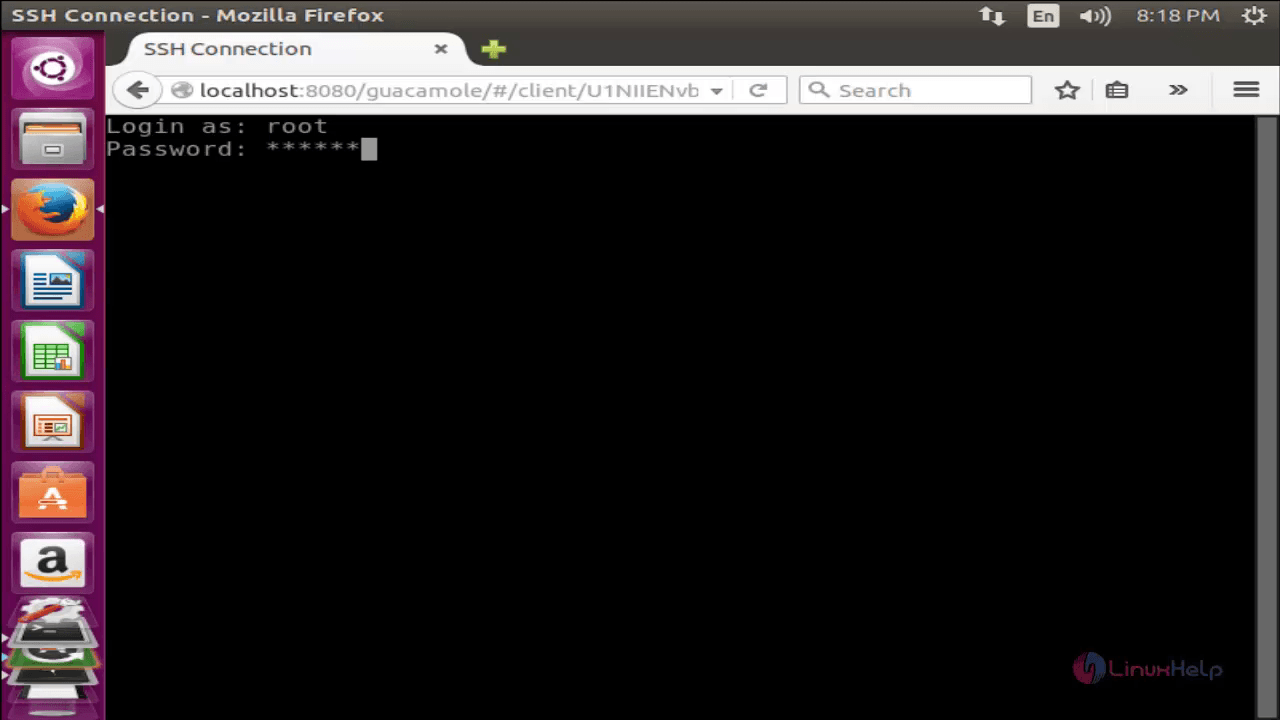
Click on SSH connection for linux clients.


Comments ( 4 )
ERROR o.g.g.w.GuacamoleWebSocketTunnelEndpoint - Creation of WebSocket tunnel to guacd failed: End of stream while waiting for "args".