How to Setup NTP Server (Network Time Protocol)
To Setup NTP Server (Network Time Protocol)
NTP Server &ndash Network Time Protocol allows systems to synchronize time over networks in an accurate time because it is having port 123 UDP at Transport Layer. This tutorial shows the setup of the NTP server.
Requirements
- RHEL 7 Installation Procedure
- CentOS 7 Installation Procedure
Additional Requirements
- Configure Static IP Address on Centos/Rhel 7
- Register and Enable RHEL 7 Subscription for Updates
- Disable and Remove Unwanted Services in Centos/RHEL 7
This guideline explains how to install and configure NTP server on CentOS/RHEL 7 by using NTP Public Pool Time Servers List.
Installation and configuration NTP daemon
The NTP Server Package is default from CentOS/ RHEL 7 repositories.This package can be installed using this command.
[root@linuxhelp ~]# yum install ntp
Loaded plugins: fastestmirror, langpacks
Loading mirror speeds from cached hostfile
 * base: centosmirror.go4hosting.in
 * epel: ftp.cuhk.edu.hk
 * extras: centosmirror.go4hosting.in
 * nux-dextop: li.nux.ro
 * updates: centosmirror.go4hosting.in
Resolving Dependencies
-->  Running transaction check
--->  Package ntp.x86_64 0:4.2.6p5-22.el7.centos.1 will be installed
-->  Finished Dependency Resolution

Dependencies Resolved

=========================================================================================
 Package      Arch            Version                             Repository        Size
=========================================================================================
Installing:
 ntp          x86_64          4.2.6p5-22.el7.centos.1             updates          543 k

Transaction Summary
=========================================================================================
Install  1 Package
....      .....     .......
....      .....     .......
....      .....     .......
Installed:
  ntp.x86_64 0:4.2.6p5-22.el7.centos.1

Complete!
Now the installation of NTP daemon is completed.
After server installation, go to NTP Public Pool Time Servers. Then select your Continent area where the server is located physically. Then search for your country location, list of NTP server is shown.

For editing purpose open NTP daemon main configuration file, the default Public Servers list pool.ntp.org project is there. The list needs to be replaced like in the screenshot below.
[root@linuxhelp ~]# vim /etc/ntp.conf
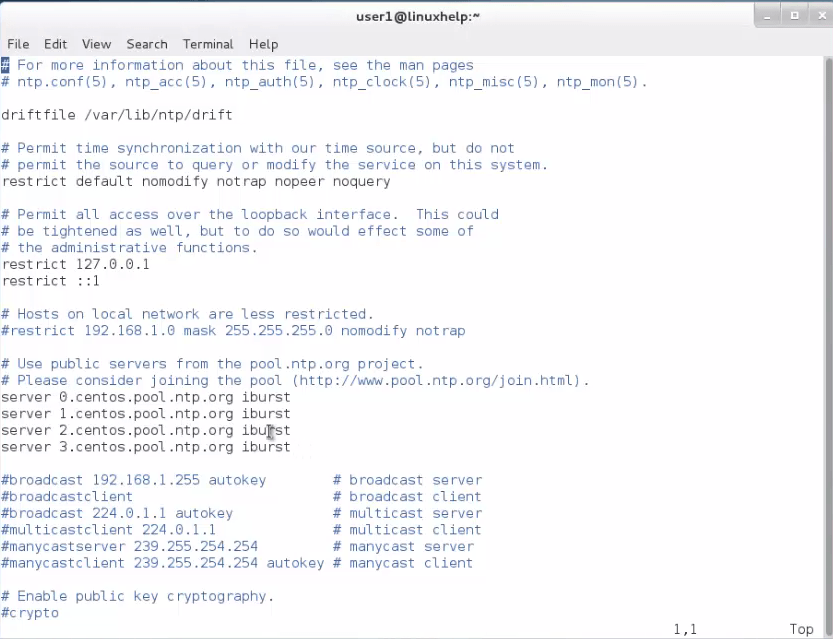
We need to allow clients to synchronize time. For this, add the NTP configuration file, restrict statement controls are allowing the network to sync time. After that network IPs are replaced.
restrict 192.168.1.0 netmask 255.255.255.0 nomodify notrap
NoModify notrap statements are not allowing the clients to configure the server.
Suppose if there is any problem in NTP daemon, add a log file statement it will record all NTP server problems into a one log file.
logfile /var/log/ntp.log
File editing is done with the help of all configuration explained above. Then save the file and close ntp.conf file. Final configuration is shown in the screenshot below.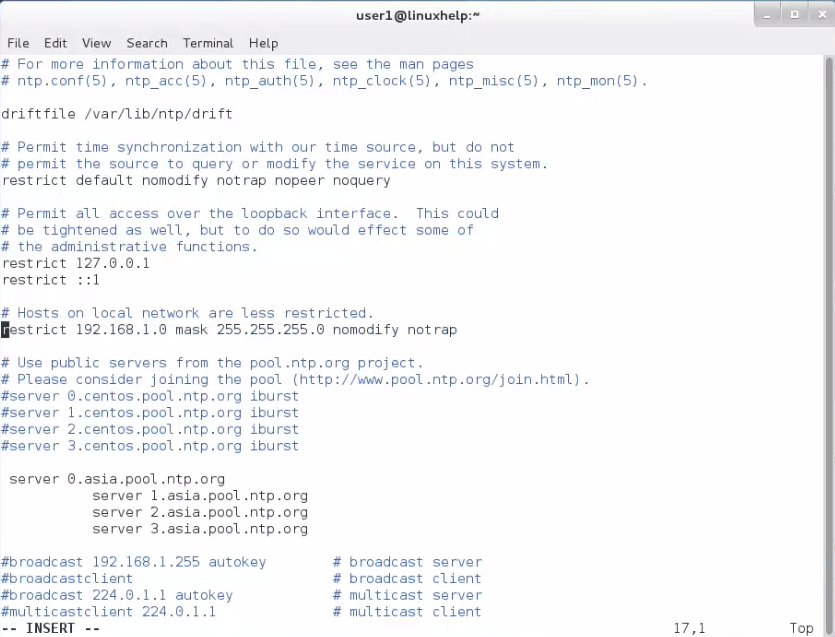
Adding Firewall Rules and Start NTP Daemon
NTP is used to resist effects of latency.UDP port 123 on OSI transport layer (layer 4) service is used for NTP.To open this port on RHEL/CentOS 7, firewalld service commands needs to be run.
[root@linuxhelp ~]# firewall-cmd --add-service=ntp --permanent
success
[root@linuxhelp ~]# firewall-cmd --reload
success
Open firewall port 123, start NTP server and check you enable it in system wide or not.
[root@linuxhelp ~]# systemctl start ntpd
[root@linuxhelp ~]# systemctl enable ntpd
Created symlink from /etc/systemd/system/multi-user.target.wants/ntpd.service to /usr/lib/systemd/system/ntpd.service.
[root@linuxhelp ~]# systemctl status ntpd
? ntpd.service - Network Time Service
   Loaded: loaded (/usr/lib/systemd/system/ntpd.service  enabled  vendor preset: disabled)
   Active: active (running) since Fri 2016-03-25 18:46:18 EDT  46s ago
 Main PID: 5880 (ntpd)
   CGroup: /system.slice/ntpd.service
           ??5880 /usr/sbin/ntpd -u ntp:ntp -g

Mar 25 18:46:18 linuxhelp systemd[1]: Starting Network Time Service...
Mar 25 18:46:18 linuxhelp systemd[1]: Started Network Time Service.
Mar 25 18:46:18 linuxhelp ntpd[5880]: proto: precision = 0.041 usec
Mar 25 18:46:18 linuxhelp ntpd[5880]: 0.0.0.0 c01d 0d kern kernel time sync enabled
Verifying Server Time Synch
After NTP daemon starts, wait a few seconds for the server to synchronize time. Then run the commands for verifying NTP peers synchronization status.
[root@linuxhelp ~]# ntpq -p
     remote           refid      st t when poll reach   delay   offset  jitter
==============================================================================
*srv146.personal 80.96.120.251    2 u    2   64   17  291.786  -68.717  15.128
-94-53-216-184.n 93.190.144.19    3 u    8   64   17  189.416   33.324  19.331
+ntp0.chroot.ro  194.29.130.252   2 u    3   64   17  303.698  -78.520  14.779
+89.149.54.18    80.96.120.252    2 u    2   64   17  411.143    6.987  39.716
[root@linuxhelp ~]# date -R
Fri, 25 Mar 2016 18:50:38 -0400
For query and synchronization, use ntpdate command,used by the servers addresses, given in the command line example.
[root@linuxhelp ~]# ntpdate -q 0.ro.pool.ntp.org  1.ro.pool.ntp.org
server 89.149.54.18, stratum 2, offset 0.033032, delay 0.44189
server 80.96.120.253, stratum 1, offset 0.045323, delay 0.22517
server 89.149.54.30, stratum 2, offset 0.040842, delay 0.45105
server 91.216.151.61, stratum 2, offset -0.006199, delay 0.32443
server 80.96.120.252, stratum 1, offset 0.040745, delay 0.21921
server 89.36.93.8, stratum 2, offset -0.019764, delay 0.33069
server 78.96.7.8, stratum 2, offset 0.038885, delay 0.20006
server 93.190.144.19, stratum 2, offset 0.042758, delay 0.21886
25 Mar 18:53:32 ntpdate[5997]: adjust time server 80.96.120.252 offset 0.040745 sec
Windows Setup NTP Client
For windows set up you have to follow these steps.
Right side of Task bar -> Change Date and Time Settings -> Internet Time tab -> Change Settings -> Check Synchronize with an Internet time server -> put your server’ s IP or FQDN on Server file -> Update now -> OK.


Finally NTP server suggests that all clients and servers are taking the same time, in case there is an internet connectivity failure.
Comments ( 1 )