How to Setup Teampass Password Manager on Ubuntu 16.04
How to Setup Teampass Password Manager on Ubuntu 16.04
Teampass is a dedicated password manager for storing/accessing passwords securely in MySQL database. It is especially designed for business, enterprise environment and provides team manager, a powerful tool for customizing passwords access depending on users role. This tutorial covers how to setup Teampass on Ubuntu 16.04 with Apache and Mysql.
Install the apache package
root@linuxhelp1:~# apt-get install apache2 -y
Reading package lists... Done
Building dependency tree
Reading state information... Done
The following additional packages will be installed:
  apache2-bin apache2-data apache2-utils libapr1 libaprutil1 libaprutil1-dbd-sqlite3 libaprutil1-ldap liblua5.1-0
Suggested packages:
  apache2-doc apache2-suexec-pristine | apache2-suexec-custom
The following NEW packages will be installed
  apache2 apache2-bin apache2-data apache2-utils libapr1 libaprutil1 libaprutil1-dbd-sqlite3 libaprutil1-ldap liblua5.1-0
0 upgraded, 9 newly installed, 0 to remove and 455 not upgraded.
Need to get 1,537 kB of archives.
After this operation, 6,350 kB of additional disk space will be used.
Get:1 http://in.archive.ubuntu.com/ubuntu xenial/main amd64 libapr1 amd64 1.5.2-3 [86.0 kB]
Get:2 http://in.archive.ubuntu.com/ubuntu xenial/main amd64 libaprutil1 amd64 1.5.4-1build1 [77.1 kB]
Fetched 1,537 kB in 6s (237 kB/s)
.
.
.
Enabling module authz_user.
Enabling module alias.
Enabling module dir.
Enabling conf security.
Enabling conf serve-cgi-bin.
Enabling site 000-default.
Processing triggers for libc-bin (2.23-0ubuntu3) ...
Processing triggers for ureadahead (0.100.0-19) ...
Processing triggers for systemd (229-4ubuntu4) ...
Processing triggers for ufw (0.35-0ubuntu2) ...
Install the mysql package
root@linuxhelp1:~# apt-get install mysql-server -y Reading package lists... Done Building dependency tree Reading state information... Done The following additional packages will be installed: libaio1 libevent-core-2.0-5 libhtml-template-perl mysql-client-5.7 mysql-client-core-5.7 mysql-common mysql-server-5.7 mysql-server-core-5.7 Suggested packages: libipc-sharedcache-perl mailx tinyca The following NEW packages will be installed: libaio1 libevent-core-2.0-5 libhtml-template-perl mysql-client-5.7 mysql-client-core-5.7 mysql-common mysql-server mysql-server-5.7 mysql-server-core-5.7 0 upgraded, 9 newly installed, 0 to remove and 455 not upgraded. Need to get 18.8 MB of archives. After this operation, 161 MB of additional disk space will be used. Get:1 http://in.archive.ubuntu.com/ubuntu xenial/main amd64 libevent-core-2.0-5 amd64 2.0.21-stable-2 [69.4 kB] Get:2 http://in.archive.ubuntu.com/ubuntu xenial-updates/main amd64 mysql-common all 5.7.17-0ubuntu0.16.04.1 [15.1 kB] Get:3 http://in.archive.ubuntu.com/ubuntu xenial/main amd64 libaio1 amd64 0.3.110-2 [6,356 B] Get:4 http://in.archive.ubuntu.com/ubuntu xenial-updates/main amd64 mysql-client-core-5.7 amd64 5.7.17-0ubuntu0.16.04.1 [6,325 kB] Get:5 http://in.archive.ubuntu.com/ubuntu xenial-updates/main amd64 mysql-client-5.7 amd64 5.7.17-0ubuntu0.16.04.1 [1,762 kB] Get:6 http://in.archive.ubuntu.com/ubuntu xenial-updates/main amd64 mysql-server-core-5.7 amd64 5.7.17-0ubuntu0.16.04.1 [7,728 kB] Get:7 http://in.archive.ubuntu.com/ubuntu xenial-updates/main amd64 mysql-server-5.7 amd64 5.7.17-0ubuntu0.16.04.1 [2,856 kB] Get:8 http://in.archive.ubuntu.com/ubuntu xenial/main amd64 libhtml-template-perl all 2.95-2 [60.4 kB] Get:9 http://in.archive.ubuntu.com/ubuntu xenial-updates/main amd64 mysql-server all 5.7.17-0ubuntu0.16.04.1 [10.1 kB] Fetched 18.8 MB in 3min 4s (102 kB/s) Preconfiguring packages ... Selecting previously unselected package libevent-core-2.0-5:amd64. (Reading database ... 172809 files and directories currently installed.) Preparing to unpack .../libevent-core-2.0-5_2.0.21-stable-2_amd64.deb ... Unpacking libevent-core-2.0-5:amd64 (2.0.21-stable-2) ... Selecting previously unselected package mysql-common. Preparing to unpack .../mysql-common_5.7.17-0ubuntu0.16.04.1_all.deb ... Unpacking mysql-common (5.7.17-0ubuntu0.16.04.1) ... . . .. . Setting up mysql-server-core-5.7 (5.7.17-0ubuntu0.16.04.1) ... Setting up mysql-server-5.7 (5.7.17-0ubuntu0.16.04.1) ... update-alternatives: using /etc/mysql/mysql.cnf to provide /etc/mysql/my.cnf (my.cnf) in auto mode Renaming removed key_buffer and myisam-recover options (if present) Setting up libhtml-template-perl (2.95-2) ... Setting up mysql-server (5.7.17-0ubuntu0.16.04.1) ... Processing triggers for libc-bin (2.23-0ubuntu3) ... Processing triggers for ureadahead (0.100.0-19) ... Processing triggers for systemd (229-4ubuntu4) ...
Now install the php7 and apache2 modules.
root@linuxhelp1:~# apt-get install php libapache2-mod-php -y
Reading package lists... Done
Building dependency tree
Reading state information... Done
The following additional packages will be installed:
  libapache2-mod-php7.0 php-common php7.0 php7.0-cli php7.0-common php7.0-json php7.0-opcache php7.0-readline
Suggested packages:
  php-pear
The following NEW packages will be installed:
  libapache2-mod-php libapache2-mod-php7.0 php php-common php7.0 php7.0-cli php7.0-common php7.0-json php7.0-opcache
  php7.0-readline
0 upgraded, 10 newly installed, 0 to remove and 455 not upgraded.
Need to get 3,463 kB of archives.
After this operation, 13.9 MB of additional disk space will be used.
Get:1 http://in.archive.ubuntu.com/ubuntu xenial/main amd64 php-common all 1:35ubuntu6 [10.8 kB]
Get:2 http://in.archive.ubuntu.com/ubuntu xenial-updates/main amd64 php7.0-common amd64 7.0.13-0ubuntu0.16.04.1 [833 kB]
Get:3 http://in.archive.ubuntu.com/ubuntu xenial-updates/main amd64 php7.0-json amd64 7.0.13-0ubuntu0.16.04.1 [16.9 kB]
Get:4 http://in.archive.ubuntu.com/ubuntu xenial-updates/main amd64 php7.0-opcache amd64 7.0.13-0ubuntu0.16.04.1 [76.1 kB]
Get:5 http://in.archive.ubuntu.com/ubuntu xenial-updates/main amd64 php7.0-readline amd64 7.0.13-0ubuntu0.16.04.1 [12.9 kB]
.
.
.
Creating config file /etc/php/7.0/mods-available/readline.ini with new version
Setting up php7.0-cli (7.0.13-0ubuntu0.16.04.1) ...
update-alternatives: using /usr/bin/php7.0 to provide /usr/bin/php (php) in auto mode
update-alternatives: using /usr/bin/phar7.0 to provide /usr/bin/phar (phar) in auto mode
update-alternatives: using /usr/bin/phar.phar7.0 to provide /usr/bin/phar.phar (phar.phar) in auto mode
Creating config file /etc/php/7.0/cli/php.ini with new version
Setting up libapache2-mod-php7.0 (7.0.13-0ubuntu0.16.04.1) ...
Creating config file /etc/php/7.0/apache2/php.ini with new version
Module mpm_event disabled.
Enabling module mpm_prefork.
apache2_switch_mpm Switch to prefork
apache2_invoke: Enable module php7.0
Setting up libapache2-mod-php (1:7.0+35ubuntu6) ...
Setting up php7.0 (7.0.13-0ubuntu0.16.04.1) ...
Setting up php (1:7.0+35ubuntu6) ...
Install all the php extensions required for teampass
root@linuxhelp1:~# apt-get install php-mcrypt php-mysql php-opcache php-mbstring php-ldap php-bcmath php-gd php-xml php-common php-mysqlnd -y
Reading package lists... Done
Building dependency tree
Reading state information... Done
Note, selecting ' php7.0-opcache'  instead of ' php-opcache'
Note, selecting ' php7.0-mysql'  instead of ' php-mysqlnd'
php-common is already the newest version (1:35ubuntu6).
php-common set to manually installed.
php7.0-opcache is already the newest version (7.0.13-0ubuntu0.16.04.1).
php7.0-opcache set to manually installed.
The following additional packages will be installed:
  libmcrypt4 php7.0-bcmath php7.0-gd php7.0-ldap php7.0-mbstring php7.0-mcrypt php7.0-xml
Suggested packages:
  libmcrypt-dev mcrypt
The following NEW packages will be installed:
  libmcrypt4 php-bcmath php-gd php-ldap php-mbstring php-mcrypt php-mysql php-xml php7.0-bcmath php7.0-gd php7.0-ldap
  php7.0-mbstring php7.0-mcrypt php7.0-mysql php7.0-xml
0 upgraded, 15 newly installed, 0 to remove and 455 not upgraded.
Need to get 854 kB of archives.
After this operation, 3,114 kB of additional disk space will be used.
Get:1 http://in.archive.ubuntu.com/ubuntu xenial/universe amd64 libmcrypt4 amd64 2.5.8-3.3 [63.0 kB]
Get:2 http://in.archive.ubuntu.com/ubuntu xenial-updates/universe amd64 php7.0-bcmath amd64 7.0.13-0ubuntu0.16.04.1 [15.7 kB]
Get:3 http://in.archive.ubuntu.com/ubuntu xenial/universe amd64 php-bcmath all 1:7.0+35ubuntu6 [1,934 B]
Get:4 http://in.archive.ubuntu.com/ubuntu xenial-updates/main amd64 php7.0-gd amd64 7.0.13-0ubuntu0.16.04.1 [27.4 kB]
Fetched 854 kB in 10s (84.2 kB/s)
.
.
.
Creating config file /etc/php/7.0/mods-available/mysqli.ini with new version
Creating config file /etc/php/7.0/mods-available/pdo_mysql.ini with new version
Setting up php-mysql (1:7.0+35ubuntu6) ...
Setting up php7.0-xml (7.0.13-0ubuntu0.16.04.1) ...
Creating config file /etc/php/7.0/mods-available/dom.ini with new version
Creating config file /etc/php/7.0/mods-available/simplexml.ini with new version
Creating config file /etc/php/7.0/mods-available/wddx.ini with new version
Creating config file /etc/php/7.0/mods-available/xml.ini with new version
Creating config file /etc/php/7.0/mods-available/xmlreader.ini with new version
Creating config file /etc/php/7.0/mods-available/xmlwriter.ini with new version
Creating config file /etc/php/7.0/mods-available/xsl.ini with new version
Setting up php-xml (1:7.0+35ubuntu6) ...
Processing triggers for libc-bin (2.23-0ubuntu3) ...
Processing triggers for libapache2-mod-php7.0 (7.0.13-0ubuntu0.16.04.1) ...
Now check the version of the php
root@linuxhelp1:~# php -v
PHP 7.0.13-0ubuntu0.16.04.1 (cli) ( NTS )
Copyright (c) 1997-2016 The PHP Group
Zend Engine v3.0.0, Copyright (c) 1998-2016 Zend Technologies with Zend OPcache v7.0.13-0ubuntu0.16.04.1, Copyright (c) 1999-2016, by Zend Technologies
Login into the mysql and create the user and database for the teampass.
root@linuxhelp1:~# mysql -u root -p
Enter password:
Welcome to the MySQL monitor.  Commands end with   or g.
Your MySQL connection id is 5
Server version: 5.7.17-0ubuntu0.16.04.1 (Ubuntu)
Copyright (c) 2000, 2016, Oracle and/or its affiliates. All rights reserved.
Oracle is a registered trademark of Oracle Corporation and/or its
affiliates. Other names may be trademarks of their respective owners.
Type ' help '  or ' h'  for help. Type ' c'  to clear the current input statement.
mysql>  create database teampass
Query OK, 1 row affected (0.03 sec)
mysql>  grant all privileges on teampass.* to user1@localhost identified by ' linuxc'
Query OK, 0 rows affected, 1 warning (0.00 sec)
mysql>  flush privileges
Query OK, 0 rows affected (0.00 sec)
For configuring the teampass, download it from github and unzip it in the website root folder /var/www/html.
root@linuxhelp1:~# cd /var/www/html/
root@linuxhelp1:/var/www/html# wget -q https://github.com/nilsteampassnet/TeamPass/archive/master.zip
root@linuxhelp1:/var/www/html# unzip master.zip
Archive:  master.zip
c172286ce341145c43542ce1d7b065c2a7944c5c
   creating: TeamPass-master/
   creating: TeamPass-master/.github/
  inflating: TeamPass-master/.github/ISSUE_TEMPLATE.md
 extracting: TeamPass-master/.gitignore
  inflating: TeamPass-master/Dockerfile
  inflating: TeamPass-master/admin.php
  inflating: TeamPass-master/admin.settings.load.php
  inflating: TeamPass-master/admin.settings.php
  inflating: TeamPass-master/admin.settings_api.php
  inflating: TeamPass-master/admin.settings_categories.php
  inflating: TeamPass-master/admin.settings_duo.php
  inflating: TeamPass-master/apache-default.conf
   creating: TeamPass-master/api/
.
.
.
  inflating: TeamPass-master/sources/kb.queries.categories.php
  inflating: TeamPass-master/sources/kb.queries.php
  inflating: TeamPass-master/sources/main.functions.php
  inflating: TeamPass-master/sources/main.queries.php
  inflating: TeamPass-master/sources/roles.queries.php
  inflating: TeamPass-master/sources/sessions.php
  inflating: TeamPass-master/sources/suggestion.queries.php
  inflating: TeamPass-master/sources/tree.php
   creating: TeamPass-master/sources/upload/
  inflating: TeamPass-master/sources/upload/upload.attachments.php
  inflating: TeamPass-master/sources/upload/upload.files.php
  inflating: TeamPass-master/sources/users.queries.php
  inflating: TeamPass-master/sources/utils.queries.php
  inflating: TeamPass-master/sources/views.queries.php
  inflating: TeamPass-master/ssh.php
  inflating: TeamPass-master/start.sh
  inflating: TeamPass-master/suggestion.load.php
  inflating: TeamPass-master/suggestion.php
   creating: TeamPass-master/upload/
  inflating: TeamPass-master/upload/.htaccess
 extracting: TeamPass-master/upload/empty_file.txt
  inflating: TeamPass-master/users.load.php
  inflating: TeamPass-master/users.php
  inflating: TeamPass-master/views.load.php
  inflating: TeamPass-master/views.php
  inflating: TeamPass-master/views_database.load.php
  inflating: TeamPass-master/views_database.php
  inflating: TeamPass-master/views_logs.load.php
  inflating: TeamPass-master/views_logs.php
Change the ownership of team-pass to www-data
root@linuxhelp1:/var/www/html# mv TeamPass-master teampass
root@linuxhelp1:/var/www/html# ls
index.html  master.zip  teampass
root@linuxhelp1:/var/www/html# chown -R www-data:www-data teampass/
Change maximum execution time of PHP to 120
root@linuxhelp1:/var/www/html# vim /etc/php/7.0/apache2/php.ini
max_execution_time = 120
Restart the apache service
root@linuxhelp1:/var/www/html# service apache2 restart
Create Team-pass keys directory inside /var/www/html/teampass and change permission and ownership.
root@linuxhelp1:/var/www/html# mkdir -p /var/www/html/teampass/keys
root@linuxhelp1:/var/www/html# chmod 755 /var/www/html/teampass/keys/
root@linuxhelp1:/var/www/html# chown -R www-data:www-data /var/www/html/teampass/keys/
For installing the teampass
Open your favorite browser and type http://IP-ADDRESS/teampass or http://domain-name/teampass in the address bar. You will be welcome by installation suggestions.

Click " Next"

Click " Launch" . If any error is found during server check, correct it and then click on " Restart" . Once all requirements/server check are passed successfully click " Next" .

Provide MySQL database information that we have created in step 3 and click " Launch" . The installer will validate the database information. On successful validation you will get the message " Connection is successful" .

Give a table prefix, generate encryption keys, give the path of teampass keys that we have created earlier. You also need to provide a admin password and then click the check-box " Send monthly anonymous statistics" (optional). Now click " Launch" .

Click " Launch" to proceed with next step.

Once database information is stored click " Next"

Click " Next" for finalizing installation.

Click " Next"

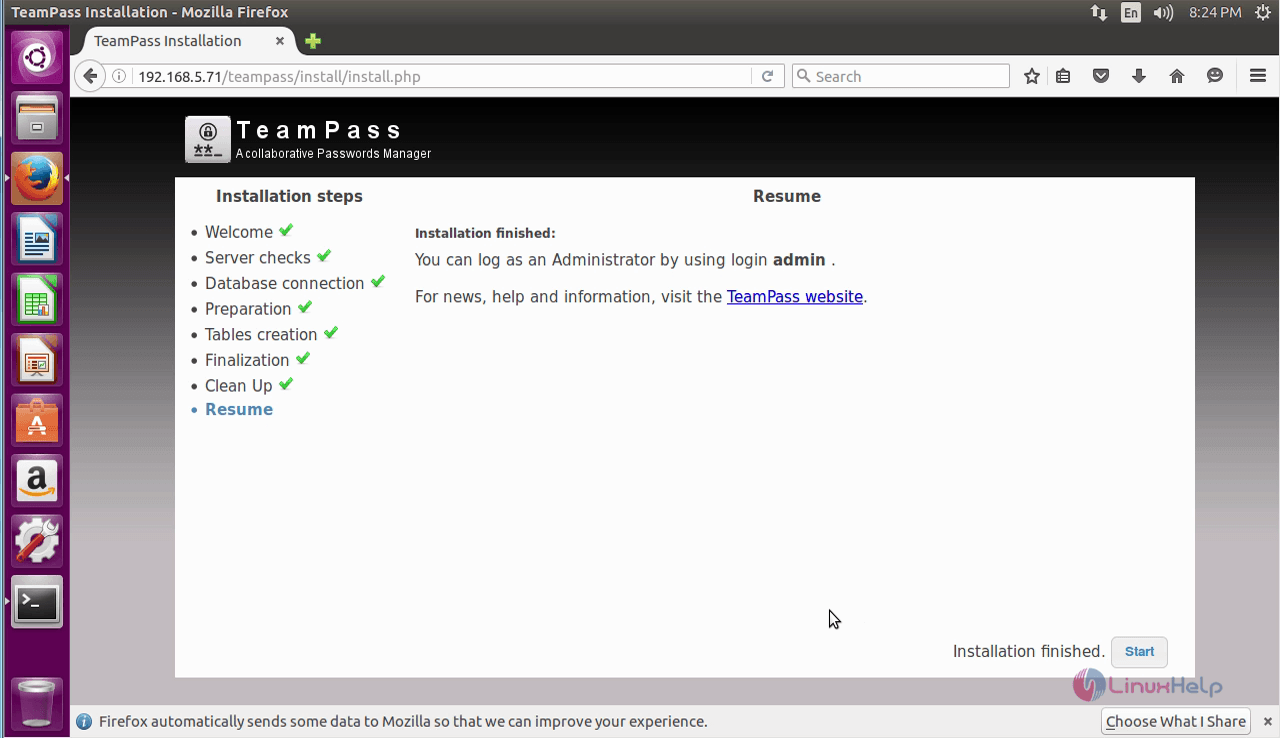
The teampass installation is finished, click " Start"
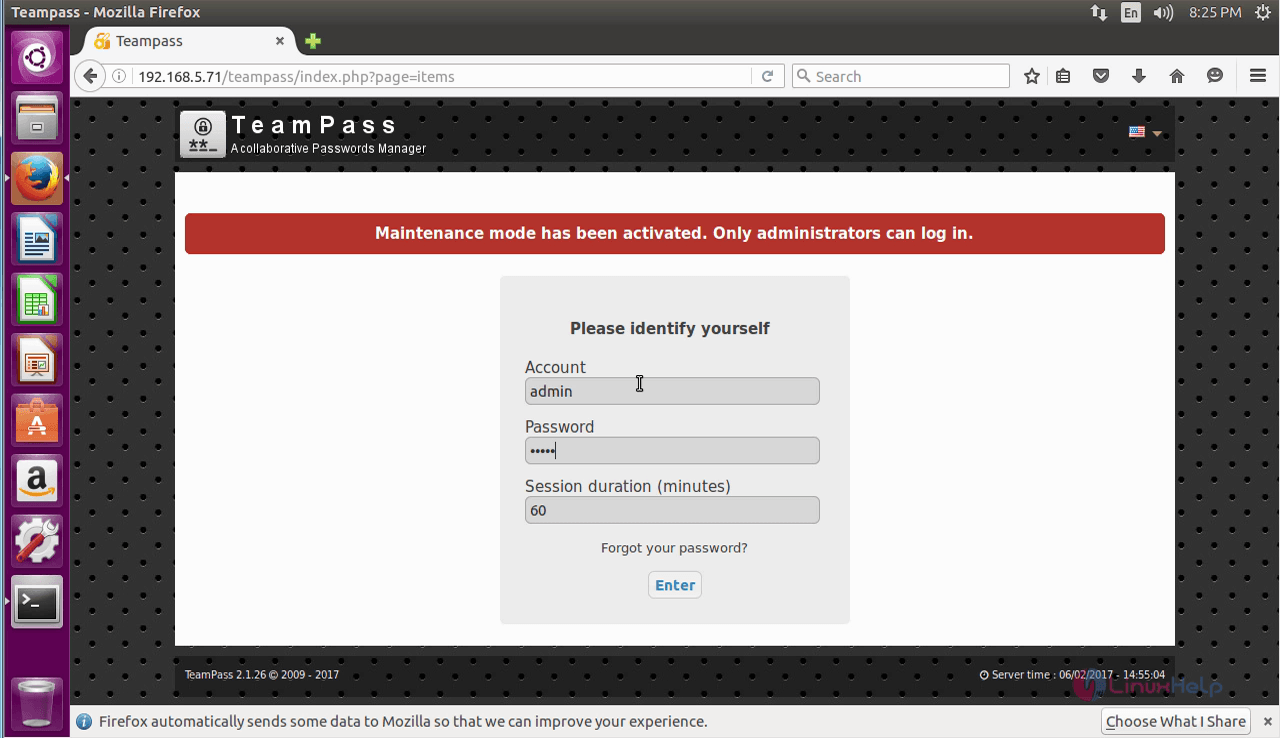
Login to teampass using admin account with your chosen password.
The main page describes about the components being used in teampass and other information' s.

Comments ( 0 )
No comments available