• Categories
    Category
    {{ postCtrl.tags }}
    • {{ category.tag_type }}

      • {{tag.tag_name}}
      • View more
  • Categories
    Category
    {{ postCtrl.tags }}
    • {{ category.tag_type }}

      • {{tag.tag_name}}
      • View more
  • News
  • Tutorials
  • Forums
  • Tags
  • Users
Tutorial News Comments FAQ Related Articles

How to upgrade to latest version of Ubuntu 15.10 from Ubuntu 15.04

{{postValue.id}}

To upgrade to latest version of Ubuntu 15.10 from Ubuntu 15.04

This article explains you to upgrade to latest version of Ubuntu 15.10 from Ubuntu 15.04. We can upgrade from Ubuntu 15.04 to Ubuntu 15.10 by using GUI method and through command line.

Take a backup of your important files and documents before starting a upgrade process.

To update your Update manager settings

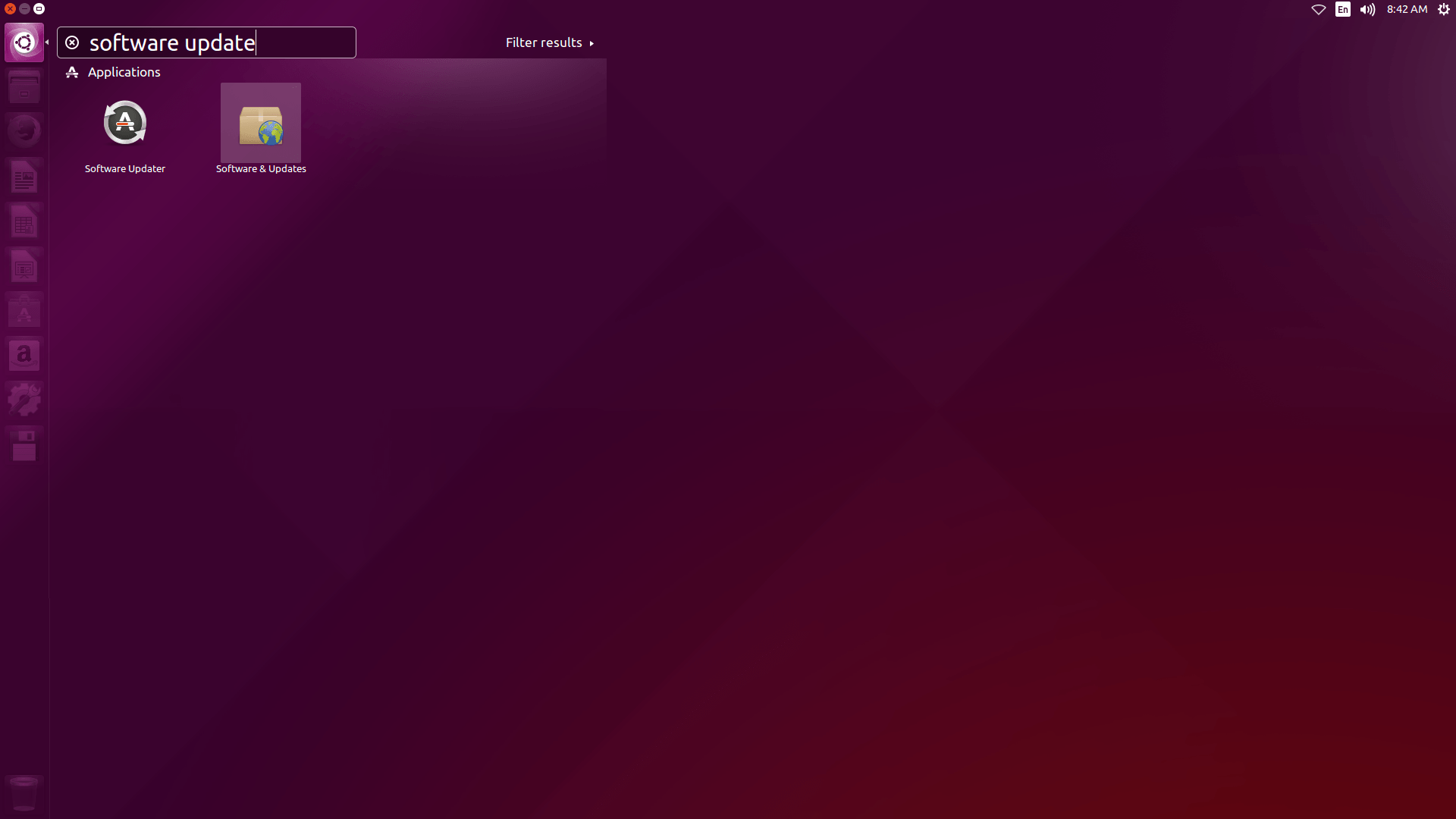
To start with the update process Go to Unity Dash -> Software Update

Click the unity dash and type software update and select software updater.
1

Once the Software updater is opened it will list the available install them and restart the computer. It shows the list of updates which is available for your computer, confirm if you install them and Restart the computer after installing updates.

2

Now reload the software updater and select updates tab,select the last option as notify me of any new version


3

4

To review the release notes for the new version

Click upgrade and type sudo user’ s password

5

To finish upgrade

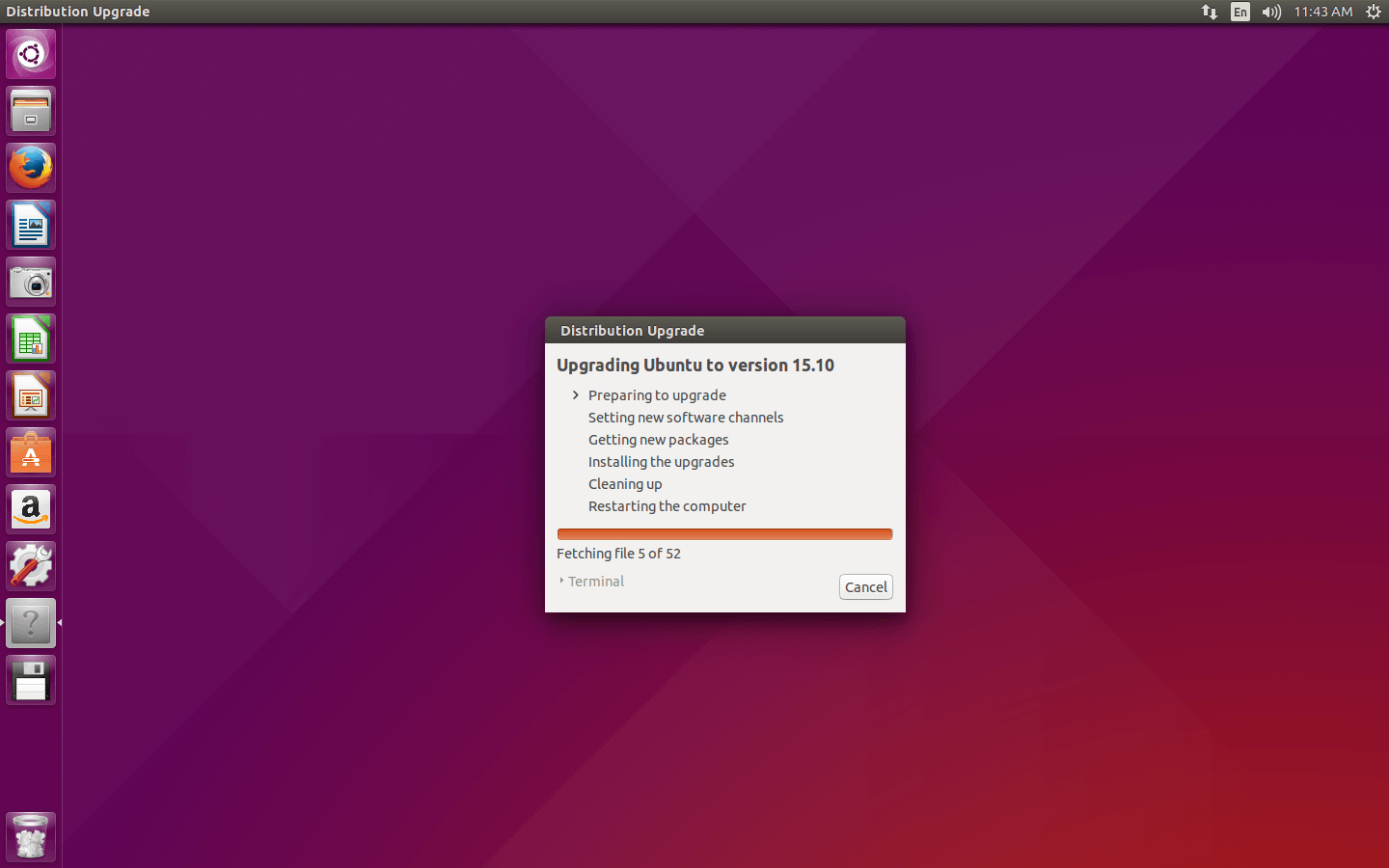
Click upgrade button,now the distribution upgrade download starts now

6

7

Note : Don' t turn off your system until the process is complete. once completed Reboot your system

8

To check if upgrade was successful

Restart your computer and click settings and now Ubuntu version will be updated to version 15.10.

9

Tags:
benjamin
Author: 

Comments ( 0 )

No comments available

Add a comment
{{postCtrl.cmtErrMsg}}

Frequently asked questions ( 5 )

Q

How to update o latest version of Ubuntu using command?

A

To update o latest version of Ubuntu using command
#sudo apt-get update && sudo apt-get dist-upgrade && sudo update-manager -d

Q

Is Ubuntu 15.04 is LTS ?

A

Yes as of now Ubuntu 15.04 is LTS.

Q

How to access software update application?

A

To access software update application simply search from dashboard

Q

Does updating the ubuntu afftect the system performance?

A

Ubdating the stable release doesn't affect the system Performance.

Q

What if updates were stopped at the middle due to power failure?

A

Untill restaring the machines updates dont take any effect on the machine

Back To Top!
Rank
User
Points

Top Contributers

userNamenaveelansari
135850

Top Contributers

userNameayanbhatti
92510

Top Contributers

userNamehamzaahmed
32150

Top Contributers

1
userNamelinuxhelp
31040

Top Contributers

userNamemuhammadali
24500
Can you help Gibbson ?
How do i run both nginx and apache in same instance on centos

Hi...,

my server is based centos operating system and my webserver is already running on Apache.... i need to run both apache and nginx on same instance ... please help me to implement this concept...

Networking
  • Routing
  • trunk
  • Netmask
  • Packet Capture
  • domain
  • HTTP Proxy
Server Setup
  • NFS
  • KVM
  • Memory
  • Sendmail
  • WebDAV
  • LXC
Shell Commands
  • Cloud commander
  • Command line archive tools
  • last command
  • Shell
  • terminal
  • Throttle
Desktop Application
  • Linux app
  • Pithos
  • Retrospect
  • Scribe
  • TortoiseHg
  • 4Images
Monitoring Tool
  • Monit
  • Apache Server Monitoring
  • EtherApe 
  • Arpwatch Tool
  • Auditd
  • Barman
Web Application
  • Nutch
  • Amazon VPC
  • FarmWarDeployer
  • Rukovoditel
  • Mirror site
  • Chef
Contact Us | Terms of Use| Privacy Policy| Disclaimer
© 2025 LinuxHelp.com All rights reserved. Linux™ is the registered trademark of Linus Torvalds. This site is not affiliated with linus torvalds in any way.