How to use cipher command line tool on CentOS 6
To use Cipher on CentOS 6
Over the last couple of years, we have covered several files on encryption and decryption, but cipher is a handy tool which can be seamlessly used by anyone who doesn' t have much knowledge on Linux. Cipher is a command line utility tool that makes it easy to perform aes-256-cbc encryption for files and directories. It is very simple to install Cipher and this article sheds some light on its installation on CentOS 6.
Installing Cipher
In order to install Cipher, it is very essential to for you to install Ash in your system. Make sure you run the following command for the same purpose.
[root@linuxhelp ~]# git clone --recursive https://github.com/ash-shell/ash.git
Initialized empty Git repository in /root/ash/.git/
remote: Counting objects: 384, done.
remote: Total 384 (delta 0), reused 0 (delta 0), pack-reused 384
Receiving objects: 100% (384/384), 54.85 KiB | 12 KiB/s, done.
Resolving deltas: 100% (163/163), done.
Submodule ' core_modules/github.com/ash-shell/apm'  (https://github.com/ash-shell/apm.git) registered for path ' core_modules/github.com/ash-shell/apm'
Submodule ' core_modules/github.com/ash-shell/env'  (https://github.com/ash-shell/env.git) registered for path ' core_modules/github.com/ash-shell/env'
.
.
.
.
remote: Counting objects: 58, done.
remote: Total 58 (delta 0), reused 0 (delta 0), pack-reused 58
Unpacking objects: 100% (58/58), done.
Submodule path ' core_modules/github.com/ash-shell/yaml-parse' : checked out ' 3f8465fa588a57f27f6ee0e84c0d3fe74531325f'

[root@linuxhelp ~]# cd ash/
[root@linuxhelp ash]# ls -l
total 44
-rwxr-xr-x. 1 root root 9561 Aug 11 06:21 ash
drwxr-xr-x. 3 root root 4096 Aug 11 06:21 core_modules
drwxr-xr-x. 2 root root 4096 Aug 11 06:21 global_modules
-rw-r--r--. 1 root root  793 Aug 11 06:21 HELP.txt
-rwxr-xr-x. 1 root root  353 Aug 11 06:21 install.sh
-rw-r--r--. 1 root root 1082 Aug 11 06:21 LICENSE.md
-rw-r--r--. 1 root root 9384 Aug 11 06:21 README.md
After that, run the script.
[root@linuxhelp ash]# sh install.sh
Initialized empty Git repository in /usr/local/ash/.git/
remote: Counting objects: 384, done.
remote: Total 384 (delta 0), reused 0 (delta 0), pack-reused 384
Receiving objects: 100% (384/384), 54.85 KiB, done.
Resolving deltas: 100% (163/163), done.
.
.
.
remote: Total 58 (delta 0), reused 0 (delta 0), pack-reused 58
Unpacking objects: 100% (58/58), done.
Submodule path ' core_modules/github.com/ash-shell/yaml-parse' : checked out ' 3f8465fa588a57f27f6ee0e84c0d3fe74531325f'
Ash successfully installed to /usr/local/ash
Ash has been installed. Now you can trigger the installation of Cipher by executing the following command.
[root@linuxhelp ~]# ash apm:install git@github.com:ash-shell/cipher.git
< <  apm > > : Installing git@github.com:ash-shell/cipher.git
Once we are through with the installation, run the following command to create an encrypt file.
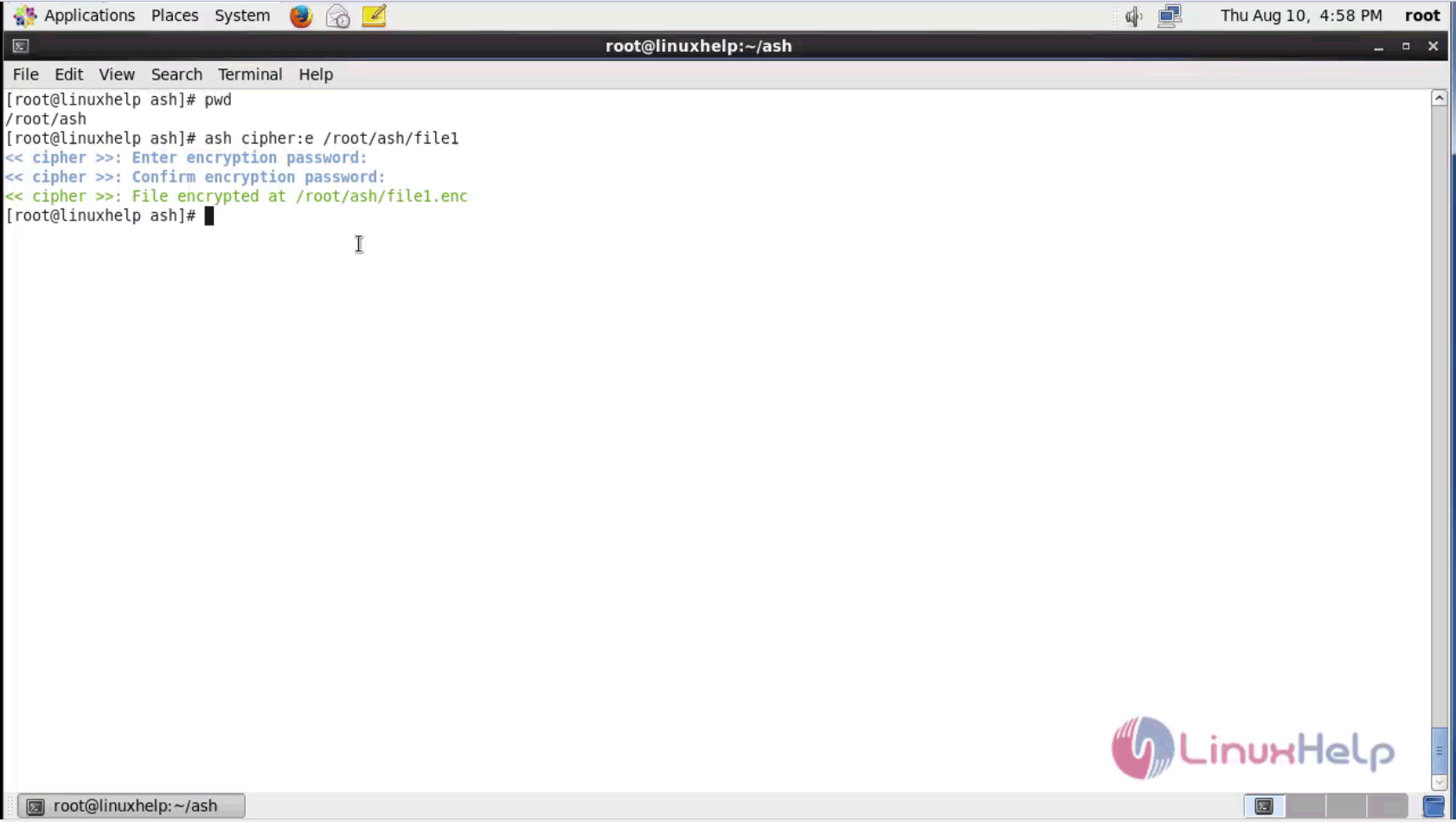
[root@linuxhelp ash]# cat > file1
This is the first file. Enter the credentials for encrypting.
Open the file.

You can view the encrypted content.

Decryption
You can decrypt the files by the following commands.

Open the file.

You can see the original content here.

With this, the installation and verification of Cipher on CentOS is complete. You can encrypt and decrypt files easily with Cipher.
Comments ( 0 )
No comments available