Overview of Ansible Copy Module Part-1
Overview of Copy Modules in Ansible
Introduction:
Ansible is an agentless computerization tool that can install on a control node. Applying the control node, Ansible runs machines and other devices remotely.
Ansible provides the functionality of copying the files and directories with the help of copy and fetch modules. The copy module is versatile. The copy module is used to copy files and folders from the local machine to the remote servers. And the fetch module to copy data from the remote machine to the local machine. This tutorial will cover the some functions of copy module.
By default ansible search for a file directory in search of any file hence Create a files directory under the ansible.
[root@linuxhelp ansible]# mkdir files
Move into the files directory.
[root@linuxhelp ansible]# cd files
Create the file which you want to copy to your remote location
[root@linuxhelp files]# vim test_files
[root@linuxhelp files]# cd ..
Create a playbook to copy file
[root@linuxhelp ansible]# vim play1.yml
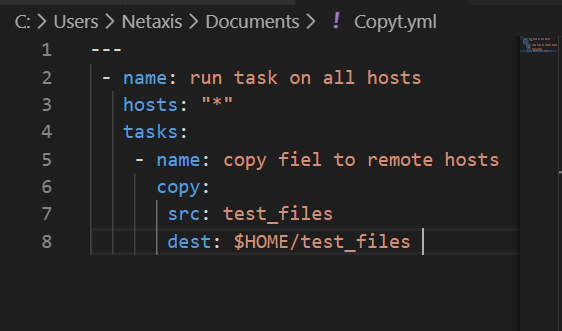
After completion of playbook lets run the playbook
[root@linuxhelp ansible]# ansible-playbook play1.yml
PLAY [run task on all hosts] ***************************************************************************************************************
TASK [Gathering Facts] *********************************************************************************************************************
ok: [192.168.6.112]
TASK [copy fiel to remote hosts] ***********************************************************************************************************
changed: [192.168.6.112]
PLAY RECAP *********************************************************************************************************************************
192.168.6.112              : ok=2    changed=1    unreachable=0    failed=0    skipped=0    rescued=0    ignored=0
Now go to your centos directory and then check file should be copied to that location.
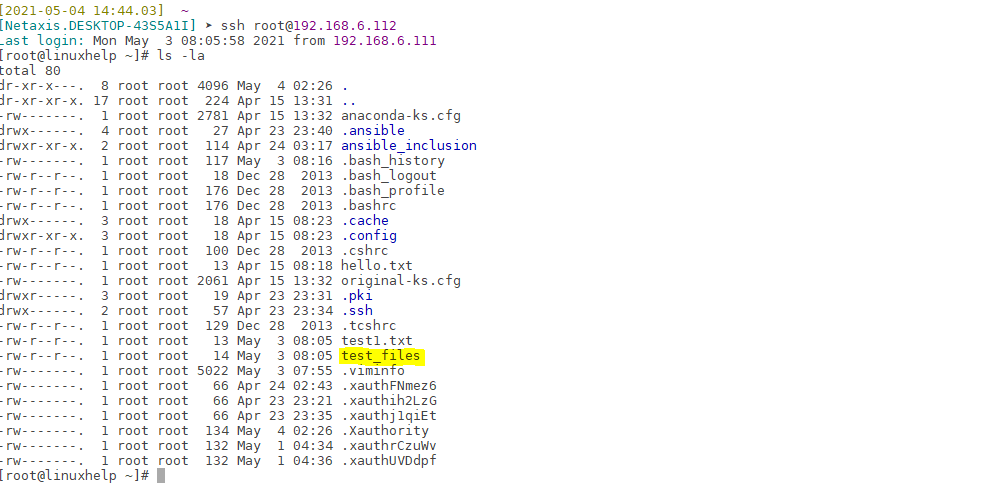 Now to copy multiple files to remote host
Create another file in files directory
[root@linuxhelp ansible]# cd files/
[root@linuxhelp files]# vim test1.txt
[root@linuxhelp files]# cd ..
Since we are creating multiple files copying to remote location so we will use loop in ansible
[root@linuxhelp ansible]# vim play1.yml
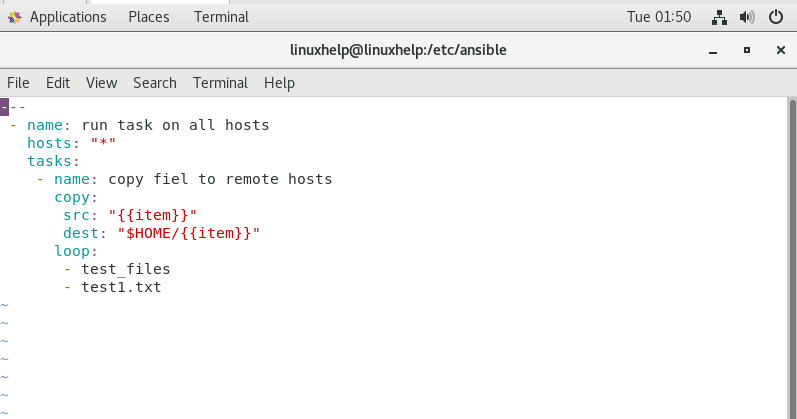
Now lets run the playbook
[root@linuxhelp ansible]# ansible-playbook play1.yml
changed: [192.168.6.112] => (item=test1.txt)
PLAY RECAP *********************************************************************************************************************************
192.168.6.112              : ok=1    changed=0    unreachable=0    failed=1    skipped=0    rescued=0    ignored=0
[root@linuxhelp ansible]# vim play1.yml
[root@linuxhelp ansible]# ansible-playbook play1.yml
PLAY [run task on all hosts] ***************************************************************************************************************
TASK [Gathering Facts] *********************************************************************************************************************
ok: [192.168.6.112]
TASK [copy fiel to remote hosts] ***********************************************************************************************************
changed: [192.168.6.112] => (item=test_files)
changed: [192.168.6.112] => (item=test1.txt)
PLAY RECAP *********************************************************************************************************************************
192.168.6.112              : ok=2    changed=1    unreachable=0    failed=0    skipped=0    rescued=0    ignored=0
After completion it should copy both file under the HOME directory of our remote location
Now go to the OS centos location and check, now check there should be two files which i copied to remote location
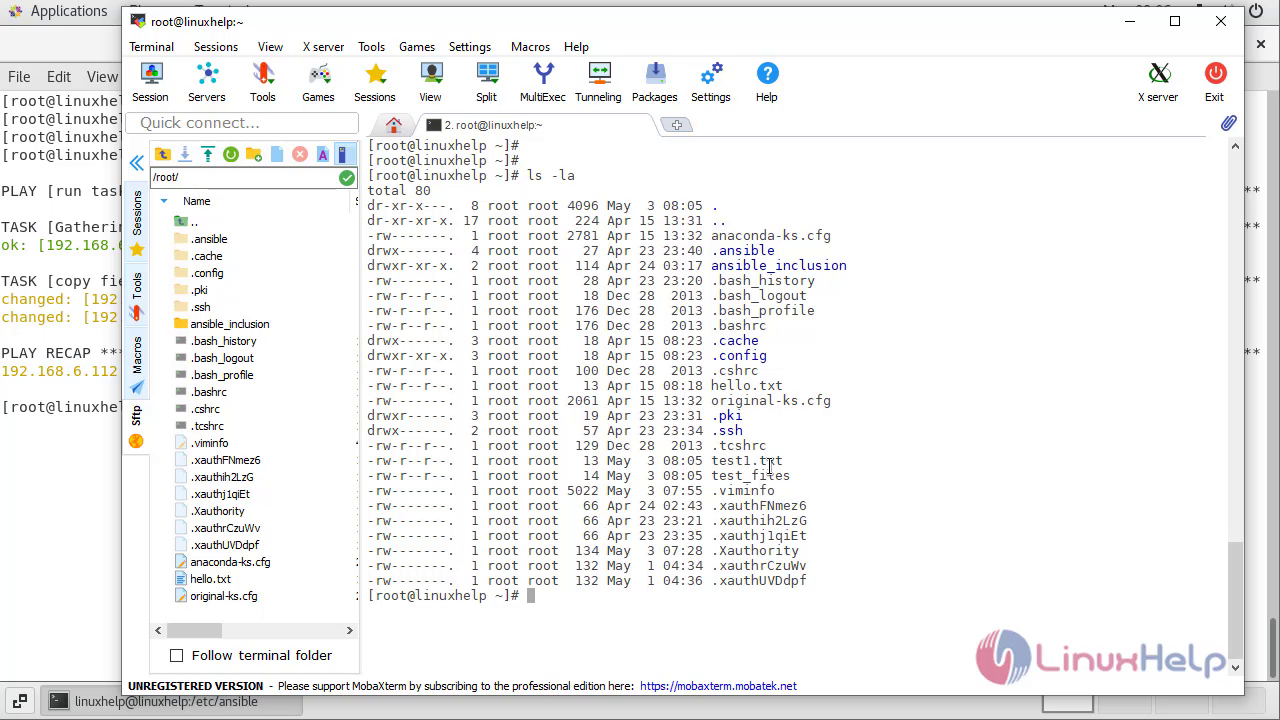 With this method overview of copy module comes to an end.
Comments ( 0 )
No comments available