To Install LAMP Stack on Rocky Linux 9.2
- 00:38 cat /etc/os-release
- 00:53 yum install httpd*
- 01:21 systemctl start httpd
- 01:31 yum install mariadb mariadb-server
- 02:21 systemctl start mariadb.service
- 02:39 mysql_secure_installation
- 03:50 yum install php php-mbstring php-gd php-mysqlnd
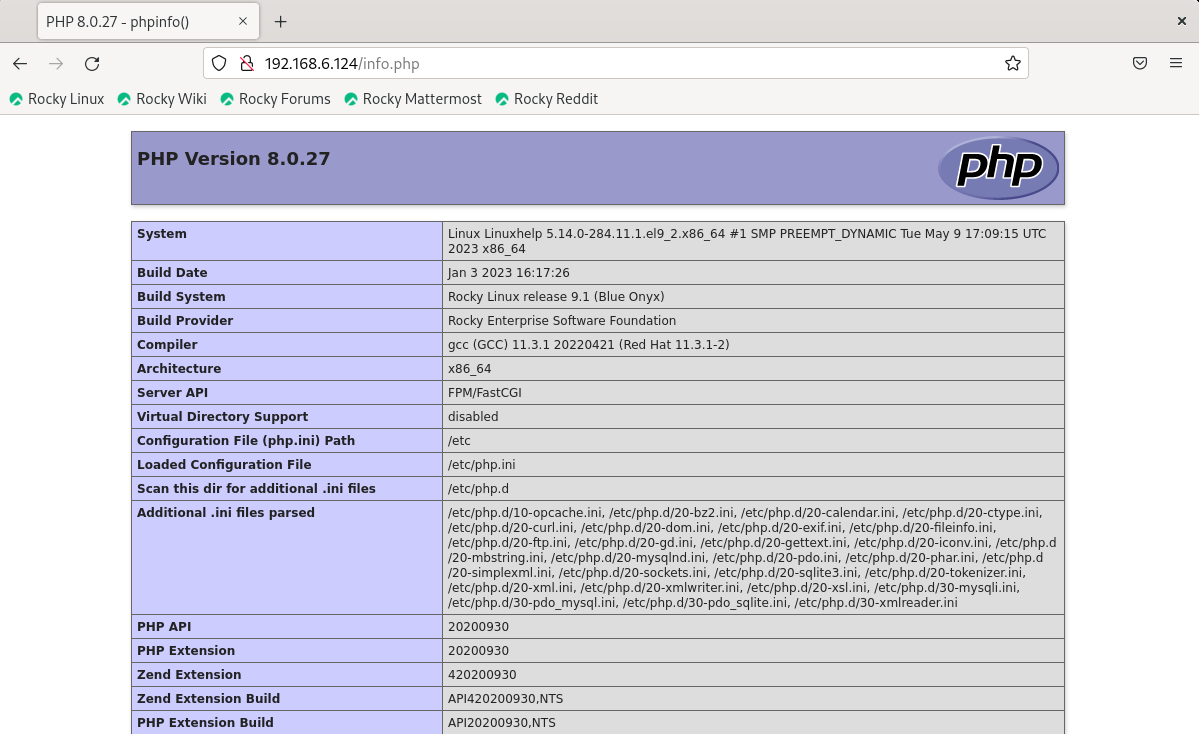
- 04:20 vim /var/www/html/info.php
- 04:38 systemctl restart httpd.service
To Install LAMP Stack on Rocky Linux 9.2
Introduction:
A LAMP stack is a group of open-source software that is typically installed together to enable a server to host dynamic websites and web apps. This term is actually an acronym which represents the Linux operating system, with the Apache web server.
Installation Procedure:
Step 1 : First check the version of OS by using the below command
[root@Linuxhelp ~]# cat /etc/os-release
NAME="Rocky Linux"
VERSION="9.2 (Blue Onyx)"
ID="rocky"
ID_LIKE="rhel centos fedora"
VERSION_ID="9.2"
PLATFORM_ID="platform:el9"
PRETTY_NAME="Rocky Linux 9.2 (Blue Onyx)"
ANSI_COLOR="0;32"
LOGO="fedora-logo-icon"
CPE_NAME="cpe:/o:rocky:rocky:9::baseos"
HOME_URL="https://rockylinux.org/"
BUG_REPORT_URL="https://bugs.rockylinux.org/"
SUPPORT_END="2032-05-31"
ROCKY_SUPPORT_PRODUCT="Rocky-Linux-9"
ROCKY_SUPPORT_PRODUCT_VERSION="9.2"
REDHAT_SUPPORT_PRODUCT="Rocky Linux"
REDHAT_SUPPORT_PRODUCT_VERSION="9.2"
STEP 2: Now Install Apache Server by using the below command
[root@Linuxhelp ~]# yum install httpd*
Last metadata expiration check: 0:13:47 ago on Saturday 10 June 2023 07:56:13 AM.
Dependencies resolved.
===================================================================================================
 Package                    Architecture    Version                       Repository          Size
===================================================================================================
Installing:
 httpd                      x86_64          2.4.53-11.el9_2.5             appstream           47 k
 httpd-core                 x86_64          2.4.53-11.el9_2.5             appstream          1.4 M
 httpd-devel                x86_64          2.4.53-11.el9_2.5             appstream          192 k
 httpd-filesystem           noarch          2.4.53-11.el9_2.5             appstream           14 k
 httpd-manual               noarch          2.4.53-11.el9_2.5             appstream          2.2 M
 httpd-tools                x86_64          2.4.53-11.el9_2.5             appstream           81 k
Installing dependencies:
 apr                        x86_64          1.7.0-11.el9                  appstream          123 k
 apr-devel                  x86_64          1.7.0-11.el9                  appstream          219 k
 apr-util                   x86_64          1.6.1-20.el9                  appstream           94 k
 apr-util-bdb               x86_64          1.6.1-20.el9                  appstream           13 k
 apr-util-devel             x86_64          1.6.1-20.el9                  appstream           70 k
 cyrus-sasl                 x86_64          2.1.27-21.el9                 baseos              71 k
 cyrus-sasl-devel           x86_64          2.1.27-21.el9                 appstream          102 k
 expat-devel                x86_64          2.5.0-1.el9                   appstream           53 k
 libdb-devel                x86_64          5.3.28-53.el9                 appstream           38 k
 openldap-devel             x86_64          2.6.2-3.el9                   appstream          685 k
 rocky-logos-httpd          noarch          90.14-1.el9                   appstream           24 k
Installing weak dependencies:
 apr-util-openssl           x86_64          1.6.1-20.el9                  appstream           15 k
 mod_http2                  x86_64          1.15.19-4.el9_2.4             appstream          149 k
 mod_lua                    x86_64          2.4.53-11.el9_2.5             appstream           61 k

Transaction Summary
===================================================================================================
Install  20 Packages

Total download size: 5.6 M
Installed size: 20 M
Is this ok [y/N]: y
Downloading Packages:
(1/20): rocky-logos-httpd-90.14-1.el9.noarch.rpm                    93 kB/s |  24 kB     00:00
(2/20): expat-devel-2.5.0-1.el9.x86_64.rpm                         186 kB/s |  53 kB     00:00
(3/20): mod_lua-2.4.53-11.el9_2.5.x86_64.rpm                       716 kB/s |  61 kB     00:00
(4/20): httpd-tools-2.4.53-11.el9_2.5.x86_64.rpm                   1.0 MB/s |  81 kB     00:00
(5/20): httpd-2.4.53-11.el9_2.5.x86_64.rpm                         1.1 MB/s |  47 kB     00:00
(6/20): httpd-devel-2.4.53-11.el9_2.5.x86_64.rpm                   1.3 MB/s | 192 kB     00:00
(7/20): cyrus-sasl-2.1.27-21.el9.x86_64.rpm                        141 kB/s |  71 kB     00:00
(8/20): httpd-filesystem-2.4.53-11.el9_2.5.noarch.rpm              147 kB/s |  14 kB     00:00
(9/20): apr-util-devel-1.6.1-20.el9.x86_64.rpm                     1.2 MB/s |  70 kB     00:00
(10/20): apr-util-openssl-1.6.1-20.el9.x86_64.rpm                   98 kB/s |  15 kB     00:00
(11/20): apr-util-bdb-1.6.1-20.el9.x86_64.rpm                      253 kB/s |  13 kB     00:00
(12/20): libdb-devel-5.3.28-53.el9.x86_64.rpm                      693 kB/s |  38 kB     00:00
(13/20): apr-util-1.6.1-20.el9.x86_64.rpm                          579 kB/s |  94 kB     00:00
(14/20): mod_http2-1.15.19-4.el9_2.4.x86_64.rpm                    1.4 MB/s | 149 kB     00:00
(15/20): httpd-manual-2.4.53-11.el9_2.5.noarch.rpm                 3.8 MB/s | 2.2 MB     00:00
(16/20): apr-1.7.0-11.el9.x86_64.rpm                               886 kB/s | 123 kB     00:00
(17/20): apr-devel-1.7.0-11.el9.x86_64.rpm                         973 kB/s | 219 kB     00:00
(18/20): openldap-devel-2.6.2-3.el9.x86_64.rpm                     5.0 MB/s | 685 kB     00:00
(19/20): cyrus-sasl-devel-2.1.27-21.el9.x86_64.rpm                 766 kB/s | 102 kB     00:00
(20/20): httpd-core-2.4.53-11.el9_2.5.x86_64.rpm                   5.2 MB/s | 1.4 MB     00:00
---------------------------------------------------------------------------------------------------
Total                                                              1.9 MB/s | 5.6 MB     00:02
Running transaction check
Transaction check succeeded.
Running transaction test
Transaction test succeeded.
Running transaction
  Preparing        :                                                                           1/1
  Installing       : apr-1.7.0-11.el9.x86_64                                                  1/20
  Installing       : apr-util-bdb-1.6.1-20.el9.x86_64                                         2/20
  Installing       : apr-util-1.6.1-20.el9.x86_64                                             3/20
  Installing       : apr-util-openssl-1.6.1-20.el9.x86_64                                     4/20
  Installing       : apr-devel-1.7.0-11.el9.x86_64                                            5/20
  Installing       : httpd-tools-2.4.53-11.el9_2.5.x86_64                                     6/20
  Installing       : libdb-devel-5.3.28-53.el9.x86_64                                         7/20
  Running scriptlet: httpd-filesystem-2.4.53-11.el9_2.5.noarch                                8/20
  Installing       : httpd-filesystem-2.4.53-11.el9_2.5.noarch                                8/20
  Installing       : httpd-core-2.4.53-11.el9_2.5.x86_64                                      9/20
  Installing       : mod_lua-2.4.53-11.el9_2.5.x86_64                                        10/20
  Installing       : mod_http2-1.15.19-4.el9_2.4.x86_64                                      11/20
  Installing       : expat-devel-2.5.0-1.el9.x86_64                                          12/20
  Installing       : rocky-logos-httpd-90.14-1.el9.noarch                                    13/20
  Running scriptlet: cyrus-sasl-2.1.27-21.el9.x86_64                                         14/20
  Installing       : cyrus-sasl-2.1.27-21.el9.x86_64                                         14/20
  Running scriptlet: cyrus-sasl-2.1.27-21.el9.x86_64                                         14/20
  Installing       : cyrus-sasl-devel-2.1.27-21.el9.x86_64                                   15/20
  Installing       : openldap-devel-2.6.2-3.el9.x86_64                                       16/20
  Installing       : apr-util-devel-1.6.1-20.el9.x86_64                                      17/20
  Installing       : httpd-devel-2.4.53-11.el9_2.5.x86_64                                    18/20
  Installing       : httpd-2.4.53-11.el9_2.5.x86_64                                          19/20
  Running scriptlet: httpd-2.4.53-11.el9_2.5.x86_64                                          19/20
  Installing       : httpd-manual-2.4.53-11.el9_2.5.noarch                                   20/20
  Running scriptlet: httpd-2.4.53-11.el9_2.5.x86_64                                          20/20
  Running scriptlet: httpd-manual-2.4.53-11.el9_2.5.noarch                                   20/20
  Verifying        : cyrus-sasl-2.1.27-21.el9.x86_64                                          1/20
  Verifying        : rocky-logos-httpd-90.14-1.el9.noarch                                     2/20
  Verifying        : expat-devel-2.5.0-1.el9.x86_64                                           3/20
  Verifying        : mod_lua-2.4.53-11.el9_2.5.x86_64                                         4/20
  Verifying        : httpd-tools-2.4.53-11.el9_2.5.x86_64                                     5/20
  Verifying        : httpd-devel-2.4.53-11.el9_2.5.x86_64                                     6/20
  Verifying        : httpd-2.4.53-11.el9_2.5.x86_64                                           7/20
  Verifying        : httpd-manual-2.4.53-11.el9_2.5.noarch                                    8/20
  Verifying        : httpd-filesystem-2.4.53-11.el9_2.5.noarch                                9/20
  Verifying        : apr-util-openssl-1.6.1-20.el9.x86_64                                    10/20
  Verifying        : apr-util-devel-1.6.1-20.el9.x86_64                                      11/20
  Verifying        : apr-util-bdb-1.6.1-20.el9.x86_64                                        12/20
  Verifying        : apr-util-1.6.1-20.el9.x86_64                                            13/20
  Verifying        : libdb-devel-5.3.28-53.el9.x86_64                                        14/20
  Verifying        : mod_http2-1.15.19-4.el9_2.4.x86_64                                      15/20
  Verifying        : apr-devel-1.7.0-11.el9.x86_64                                           16/20
  Verifying        : apr-1.7.0-11.el9.x86_64                                                 17/20
  Verifying        : openldap-devel-2.6.2-3.el9.x86_64                                       18/20
  Verifying        : cyrus-sasl-devel-2.1.27-21.el9.x86_64                                   19/20
  Verifying        : httpd-core-2.4.53-11.el9_2.5.x86_64                                     20/20

Installed:
  apr-1.7.0-11.el9.x86_64                            apr-devel-1.7.0-11.el9.x86_64
  apr-util-1.6.1-20.el9.x86_64                       apr-util-bdb-1.6.1-20.el9.x86_64
  apr-util-devel-1.6.1-20.el9.x86_64                 apr-util-openssl-1.6.1-20.el9.x86_64
  cyrus-sasl-2.1.27-21.el9.x86_64                    cyrus-sasl-devel-2.1.27-21.el9.x86_64
  expat-devel-2.5.0-1.el9.x86_64                     httpd-2.4.53-11.el9_2.5.x86_64
  httpd-core-2.4.53-11.el9_2.5.x86_64                httpd-devel-2.4.53-11.el9_2.5.x86_64
  httpd-filesystem-2.4.53-11.el9_2.5.noarch          httpd-manual-2.4.53-11.el9_2.5.noarch
  httpd-tools-2.4.53-11.el9_2.5.x86_64               libdb-devel-5.3.28-53.el9.x86_64
  mod_http2-1.15.19-4.el9_2.4.x86_64                 mod_lua-2.4.53-11.el9_2.5.x86_64
  openldap-devel-2.6.2-3.el9.x86_64                  rocky-logos-httpd-90.14-1.el9.noarch

Complete!
STEP 3: Now Start the service by using the below command
[root@Linuxhelp ~]# systemctl start httpd
STEP 4: Now Install MariaDB Server by using the below command
[root@Linuxhelp ~]# yum install mariadb mariadb-server
Last metadata expiration check: 0:14:39 ago on Saturday 10 June 2023 07:56:13 AM.
Dependencies resolved.
===================================================================================================
 Package                           Architecture  Version                    Repository        Size
===================================================================================================
Installing:
 mariadb                           x86_64        3:10.5.16-2.el9_0          appstream        1.6 M
 mariadb-server                    x86_64        3:10.5.16-2.el9_0          appstream        9.4 M
Installing dependencies:
 mariadb-common                    x86_64        3:10.5.16-2.el9_0          appstream         31 k
 mariadb-connector-c               x86_64        3.2.6-1.el9_0              appstream        195 k
 mariadb-connector-c-config        noarch        3.2.6-1.el9_0              appstream        9.8 k
 mariadb-errmsg                    x86_64        3:10.5.16-2.el9_0          appstream        215 k
 mysql-selinux                     noarch        1.0.5-1.el9_0              appstream         35 k
 perl-DBD-MariaDB                  x86_64        1.21-16.el9_0              appstream        151 k
 perl-File-Copy                    noarch        2.34-480.el9               appstream         20 k
 perl-Sys-Hostname                 x86_64        1.23-480.el9               appstream         17 k
Installing weak dependencies:
 mariadb-backup                    x86_64        3:10.5.16-2.el9_0          appstream        6.4 M
 mariadb-gssapi-server             x86_64        3:10.5.16-2.el9_0          appstream         19 k
 mariadb-server-utils              x86_64        3:10.5.16-2.el9_0          appstream        213 k

Transaction Summary
===================================================================================================
Install  13 Packages

Total download size: 18 M
Installed size: 108 M
Is this ok [y/N]: y
Downloading Packages:
(1/13): mariadb-connector-c-config-3.2.6-1.el9_0.noarch.rpm         44 kB/s | 9.8 kB     00:00
(2/13): perl-Sys-Hostname-1.23-480.el9.x86_64.rpm                  395 kB/s |  17 kB     00:00
(3/13): mysql-selinux-1.0.5-1.el9_0.noarch.rpm                     122 kB/s |  35 kB     00:00
(4/13): mariadb-connector-c-3.2.6-1.el9_0.x86_64.rpm               619 kB/s | 195 kB     00:00
(5/13): perl-File-Copy-2.34-480.el9.noarch.rpm                     367 kB/s |  20 kB     00:00
(6/13): mariadb-gssapi-server-10.5.16-2.el9_0.x86_64.rpm           310 kB/s |  19 kB     00:00
(7/13): mariadb-server-utils-10.5.16-2.el9_0.x86_64.rpm            1.1 MB/s | 213 kB     00:00
(8/13): mariadb-errmsg-10.5.16-2.el9_0.x86_64.rpm                  1.6 MB/s | 215 kB     00:00
(9/13): mariadb-common-10.5.16-2.el9_0.x86_64.rpm                  510 kB/s |  31 kB     00:00
(10/13): mariadb-10.5.16-2.el9_0.x86_64.rpm                        3.2 MB/s | 1.6 MB     00:00
(11/13): perl-DBD-MariaDB-1.21-16.el9_0.x86_64.rpm                 1.4 MB/s | 151 kB     00:00
(12/13): mariadb-backup-10.5.16-2.el9_0.x86_64.rpm                 5.0 MB/s | 6.4 MB     00:01
(13/13): mariadb-server-10.5.16-2.el9_0.x86_64.rpm                 4.9 MB/s | 9.4 MB     00:01
---------------------------------------------------------------------------------------------------
Total                                                              5.9 MB/s |  18 MB     00:03
Running transaction check
Transaction check succeeded.
Running transaction test
Transaction test succeeded.
Running transaction
  Preparing        :                                                                           1/1
  Installing       : mariadb-connector-c-config-3.2.6-1.el9_0.noarch                          1/13
  Installing       : mariadb-common-3:10.5.16-2.el9_0.x86_64                                  2/13
  Installing       : mariadb-connector-c-3.2.6-1.el9_0.x86_64                                 3/13
  Installing       : perl-Sys-Hostname-1.23-480.el9.x86_64                                    4/13
  Installing       : perl-DBD-MariaDB-1.21-16.el9_0.x86_64                                    5/13
  Installing       : mariadb-errmsg-3:10.5.16-2.el9_0.x86_64                                  6/13
  Installing       : perl-File-Copy-2.34-480.el9.noarch                                       7/13
  Running scriptlet: mysql-selinux-1.0.5-1.el9_0.noarch                                       8/13
  Installing       : mysql-selinux-1.0.5-1.el9_0.noarch                                       8/13
  Running scriptlet: mysql-selinux-1.0.5-1.el9_0.noarch                                       8/13
libsemanage.semanage_direct_install_info: Overriding mysql module at lower priority 100 with module at priority 200.

  Installing       : mariadb-server-utils-3:10.5.16-2.el9_0.x86_64                            9/13
  Installing       : mariadb-gssapi-server-3:10.5.16-2.el9_0.x86_64                          10/13
  Installing       : mariadb-backup-3:10.5.16-2.el9_0.x86_64                                 11/13
  Installing       : mariadb-3:10.5.16-2.el9_0.x86_64                                        12/13
  Running scriptlet: mariadb-server-3:10.5.16-2.el9_0.x86_64                                 13/13
  Installing       : mariadb-server-3:10.5.16-2.el9_0.x86_64                                 13/13
  Running scriptlet: mariadb-server-3:10.5.16-2.el9_0.x86_64                                 13/13
  Running scriptlet: mysql-selinux-1.0.5-1.el9_0.noarch                                      13/13
  Running scriptlet: mariadb-server-3:10.5.16-2.el9_0.x86_64                                 13/13
  Verifying        : mysql-selinux-1.0.5-1.el9_0.noarch                                       1/13
  Verifying        : mariadb-connector-c-3.2.6-1.el9_0.x86_64                                 2/13
  Verifying        : mariadb-connector-c-config-3.2.6-1.el9_0.noarch                          3/13
  Verifying        : perl-Sys-Hostname-1.23-480.el9.x86_64                                    4/13
  Verifying        : perl-File-Copy-2.34-480.el9.noarch                                       5/13
  Verifying        : mariadb-server-utils-3:10.5.16-2.el9_0.x86_64                            6/13
  Verifying        : mariadb-server-3:10.5.16-2.el9_0.x86_64                                  7/13
  Verifying        : mariadb-gssapi-server-3:10.5.16-2.el9_0.x86_64                           8/13
  Verifying        : mariadb-errmsg-3:10.5.16-2.el9_0.x86_64                                  9/13
  Verifying        : mariadb-common-3:10.5.16-2.el9_0.x86_64                                 10/13
  Verifying        : mariadb-backup-3:10.5.16-2.el9_0.x86_64                                 11/13
  Verifying        : mariadb-3:10.5.16-2.el9_0.x86_64                                        12/13
  Verifying        : perl-DBD-MariaDB-1.21-16.el9_0.x86_64                                   13/13

Installed:
  mariadb-3:10.5.16-2.el9_0.x86_64                    mariadb-backup-3:10.5.16-2.el9_0.x86_64
  mariadb-common-3:10.5.16-2.el9_0.x86_64             mariadb-connector-c-3.2.6-1.el9_0.x86_64
  mariadb-connector-c-config-3.2.6-1.el9_0.noarch     mariadb-errmsg-3:10.5.16-2.el9_0.x86_64
  mariadb-gssapi-server-3:10.5.16-2.el9_0.x86_64      mariadb-server-3:10.5.16-2.el9_0.x86_64
  mariadb-server-utils-3:10.5.16-2.el9_0.x86_64       mysql-selinux-1.0.5-1.el9_0.noarch
  perl-DBD-MariaDB-1.21-16.el9_0.x86_64               perl-File-Copy-2.34-480.el9.noarch
  perl-Sys-Hostname-1.23-480.el9.x86_64

Complete!
STEP 5: Now Start the services by using the below command
[root@Linuxhelp ~]# systemctl start mariadb.service
STEP 6: Make the MariaDB server secure by using the below command
[root@Linuxhelp ~]# mysql_secure_installation

NOTE: RUNNING ALL PARTS OF THIS SCRIPT IS RECOMMENDED FOR ALL MariaDB
      SERVERS IN PRODUCTION USE!  PLEASE READ EACH STEP CAREFULLY!

In order to log into MariaDB to secure it, we'll need the current
password for the root user. If you've just installed MariaDB, and
haven't set the root password yet, you should just press enter here.

Enter current password for root (enter for none):
OK, successfully used password, moving on...

Setting the root password or using the unix_socket ensures that nobody
can log into the MariaDB root user without the proper authorisation.

You already have your root account protected, so you can safely answer 'n'.

Switch to unix_socket authentication [Y/n] y
Enabled successfully!
Reloading privilege tables..
 ... Success!


You already have your root account protected, so you can safely answer 'n'.

Change the root password? [Y/n] y
New password:
Re-enter new password:
Password updated successfully!
Reloading privilege tables..
 ... Success!


By default, a MariaDB installation has an anonymous user, allowing anyone
to log into MariaDB without having to have a user account created for
them.  This is intended only for testing, and to make the installation
go a bit smoother.  You should remove them before moving into a
production environment.

Remove anonymous users? [Y/n] y
 ... Success!

Normally, root should only be allowed to connect from 'localhost'.  This
ensures that someone cannot guess at the root password from the network.

Disallow root login remotely? [Y/n] y
 ... Success!

By default, MariaDB comes with a database named 'test' that anyone can
access.  This is also intended only for testing, and should be removed
before moving into a production environment.

Remove test database and access to it? [Y/n] y
 - Dropping test database...
 ... Success!
 - Removing privileges on test database...
 ... Success!

Reloading the privilege tables will ensure that all changes made so far
will take effect immediately.

Reload privilege tables now? [Y/n] y
 ... Success!

Cleaning up...

All done!  If you've completed all of the above steps, your MariaDB
installation should now be secure.

Thanks for using MariaDB!
STEP 7: Install PHP Modules by using the below command
[root@Linuxhelp ~]# yum install php php-mbstring  php-gd php-mysqlnd
Last metadata expiration check: 0:20:07 ago on Saturday 10 June 2023 07:56:13 AM.
Dependencies resolved.
===================================================================================================
 Package                    Architecture     Version                     Repository           Size
===================================================================================================
Installing:
 php                        x86_64           8.0.27-1.el9_1              appstream            10 k
 php-gd                     x86_64           8.0.27-1.el9_1              appstream            41 k
 php-mbstring               x86_64           8.0.27-1.el9_1              appstream           470 k
 php-mysqlnd                x86_64           8.0.27-1.el9_1              appstream           151 k
Installing dependencies:
 nginx-filesystem           noarch           1:1.20.1-14.el9             appstream            10 k
 php-common                 x86_64           8.0.27-1.el9_1              appstream           667 k
 php-pdo                    x86_64           8.0.27-1.el9_1              appstream            83 k
Installing weak dependencies:
 php-cli                    x86_64           8.0.27-1.el9_1              appstream           3.1 M
 php-fpm                    x86_64           8.0.27-1.el9_1              appstream           1.6 M
 php-opcache                x86_64           8.0.27-1.el9_1              appstream           512 k
 php-xml                    x86_64           8.0.27-1.el9_1              appstream           131 k

Transaction Summary
===================================================================================================
Install  11 Packages

Total download size: 6.7 M
Installed size: 36 M
Is this ok [y/N]: y
Downloading Packages:
(1/11): nginx-filesystem-1.20.1-14.el9.noarch.rpm                   25 kB/s |  10 kB     00:00
(2/11): php-pdo-8.0.27-1.el9_1.x86_64.rpm                          160 kB/s |  83 kB     00:00
(3/11): php-xml-8.0.27-1.el9_1.x86_64.rpm                          246 kB/s | 131 kB     00:00
(4/11): php-mysqlnd-8.0.27-1.el9_1.x86_64.rpm                      1.2 MB/s | 151 kB     00:00
(5/11): php-gd-8.0.27-1.el9_1.x86_64.rpm                           708 kB/s |  41 kB     00:00
(6/11): php-opcache-8.0.27-1.el9_1.x86_64.rpm                      1.6 MB/s | 512 kB     00:00
(7/11): php-mbstring-8.0.27-1.el9_1.x86_64.rpm                     1.7 MB/s | 470 kB     00:00
(8/11): php-common-8.0.27-1.el9_1.x86_64.rpm                       2.3 MB/s | 667 kB     00:00
(9/11): php-8.0.27-1.el9_1.x86_64.rpm                              206 kB/s |  10 kB     00:00
(10/11): php-fpm-8.0.27-1.el9_1.x86_64.rpm                         3.0 MB/s | 1.6 MB     00:00
(11/11): php-cli-8.0.27-1.el9_1.x86_64.rpm                         5.2 MB/s | 3.1 MB     00:00
---------------------------------------------------------------------------------------------------
Total                                                              3.0 MB/s | 6.7 MB     00:02
Running transaction check
Transaction check succeeded.
Running transaction test
Transaction test succeeded.
Running transaction
  Preparing        :                                                                           1/1
  Installing       : php-common-8.0.27-1.el9_1.x86_64                                         1/11
  Installing       : php-pdo-8.0.27-1.el9_1.x86_64                                            2/11
  Installing       : php-xml-8.0.27-1.el9_1.x86_64                                            3/11
  Installing       : php-opcache-8.0.27-1.el9_1.x86_64                                        4/11
  Installing       : php-mbstring-8.0.27-1.el9_1.x86_64                                       5/11
  Installing       : php-cli-8.0.27-1.el9_1.x86_64                                            6/11
  Running scriptlet: nginx-filesystem-1:1.20.1-14.el9.noarch                                  7/11
  Installing       : nginx-filesystem-1:1.20.1-14.el9.noarch                                  7/11
  Installing       : php-fpm-8.0.27-1.el9_1.x86_64                                            8/11
  Running scriptlet: php-fpm-8.0.27-1.el9_1.x86_64                                            8/11
  Installing       : php-8.0.27-1.el9_1.x86_64                                                9/11
  Installing       : php-mysqlnd-8.0.27-1.el9_1.x86_64                                       10/11
  Installing       : php-gd-8.0.27-1.el9_1.x86_64                                            11/11
  Running scriptlet: php-gd-8.0.27-1.el9_1.x86_64                                            11/11
  Verifying        : nginx-filesystem-1:1.20.1-14.el9.noarch                                  1/11
  Verifying        : php-xml-8.0.27-1.el9_1.x86_64                                            2/11
  Verifying        : php-pdo-8.0.27-1.el9_1.x86_64                                            3/11
  Verifying        : php-opcache-8.0.27-1.el9_1.x86_64                                        4/11
  Verifying        : php-mysqlnd-8.0.27-1.el9_1.x86_64                                        5/11
  Verifying        : php-mbstring-8.0.27-1.el9_1.x86_64                                       6/11
  Verifying        : php-gd-8.0.27-1.el9_1.x86_64                                             7/11
  Verifying        : php-fpm-8.0.27-1.el9_1.x86_64                                            8/11
  Verifying        : php-common-8.0.27-1.el9_1.x86_64                                         9/11
  Verifying        : php-cli-8.0.27-1.el9_1.x86_64                                           10/11
  Verifying        : php-8.0.27-1.el9_1.x86_64                                               11/11

Installed:
  nginx-filesystem-1:1.20.1-14.el9.noarch             php-8.0.27-1.el9_1.x86_64
  php-cli-8.0.27-1.el9_1.x86_64                       php-common-8.0.27-1.el9_1.x86_64
  php-fpm-8.0.27-1.el9_1.x86_64                       php-gd-8.0.27-1.el9_1.x86_64
  php-mbstring-8.0.27-1.el9_1.x86_64                  php-mysqlnd-8.0.27-1.el9_1.x86_64
  php-opcache-8.0.27-1.el9_1.x86_64                   php-pdo-8.0.27-1.el9_1.x86_64
  php-xml-8.0.27-1.el9_1.x86_64

Complete!
STEP 8: Make .PHP extension file by using the below command
[root@Linuxhelp ~]# vim /var/www/html/info.php
?php
phpinfo();
?>
STEP 9: Restart The Apache Server by using the below command
[root@Linuxhelp ~]# systemctl restart httpd.service
STEP 10: Go to the Browser and search http://192.168.6.124/info.php as shown in the below image
Conclusion:
We have reached the end of this article. In this guide, we have walked you through the steps required to Install LAMP STACK on Rocky Linux 9.2. Your feedback is much welcome.
Comments ( 0 )
No comments available