• Categories
    Category
    {{ postCtrl.tags }}
    • {{ category.tag_type }}

      • {{tag.tag_name}}
      • View more
  • Categories
    Category
    {{ postCtrl.tags }}
    • {{ category.tag_type }}

      • {{tag.tag_name}}
      • View more
  • News
  • Tutorials
  • Forums
  • Tags
  • Users
Tutorial News Comments FAQ Related Articles

To Install Photivo Photo Editor Tool in Ubuntu

{{postValue.id}}

To Install Photivo Photo Editor Tool

Photivo is an open source multi-platform photo processor(GPL3). It supports Raw files and Bitmap files in 16 bit processing pipe with gimp batch mode. Installation of Photivo photo editor tool in Ubuntu 15.10 is explained in this article.

Features

  • Clone tool
  • Add a vignette to your photos
  • Quick Color filter
  • Add text or captions to your images
  • Boost image detail
  • Remove noise and JPEG compression artifacts
  • Image spot-heal tool

Installation of Photivo Photo Editor

First add the required package into repository by using the below command.

root@user1-linuhelp:/home/user1# add-apt-repository ppa:dhor/myway
 Every photographer needs some tools...
More info: https://launchpad.net/~dhor/+archive/ubuntu/myway
Press [ENTER] to continue or ctrl-c to cancel adding it
.
.
.
gpg: Total number processed: 1
gpg:               imported: 1  (RSA: 1)
OK

Next update the newly added package with following command.

root@user1-linuhelp:/home/user1# apt-get update 
Hit http://in.archive.ubuntu.com wily InRelease
Hit http://ppa.launchpad.net wily InRelease                                                           
Hit http://security.ubuntu.com wily-security InRelease
.
.
.
Hit http://in.archive.ubuntu.com wily-backports/restricted Translation-en                             
Hit http://in.archive.ubuntu.com wily-backports/universe Translation-en                               
Reading package lists... Done

Now run the below command to install Photivo image editor package.

root@user1-linuhelp:/home/user1# apt-get install photivo
Reading package lists... Done
Building dependency tree       
Reading state information... Done
.
.
.
Setting up liblensfun0 (0.2.8-2) ...
Setting up photivo (20150416-1dhor~wily) ...
Processing triggers for libc-bin (2.21-0ubuntu4) ...

Use following command to open the installed photivo editor in the terminal.

root@user1-linuhelp:/home/user1#photivo

Here start edit your photos as you wish.
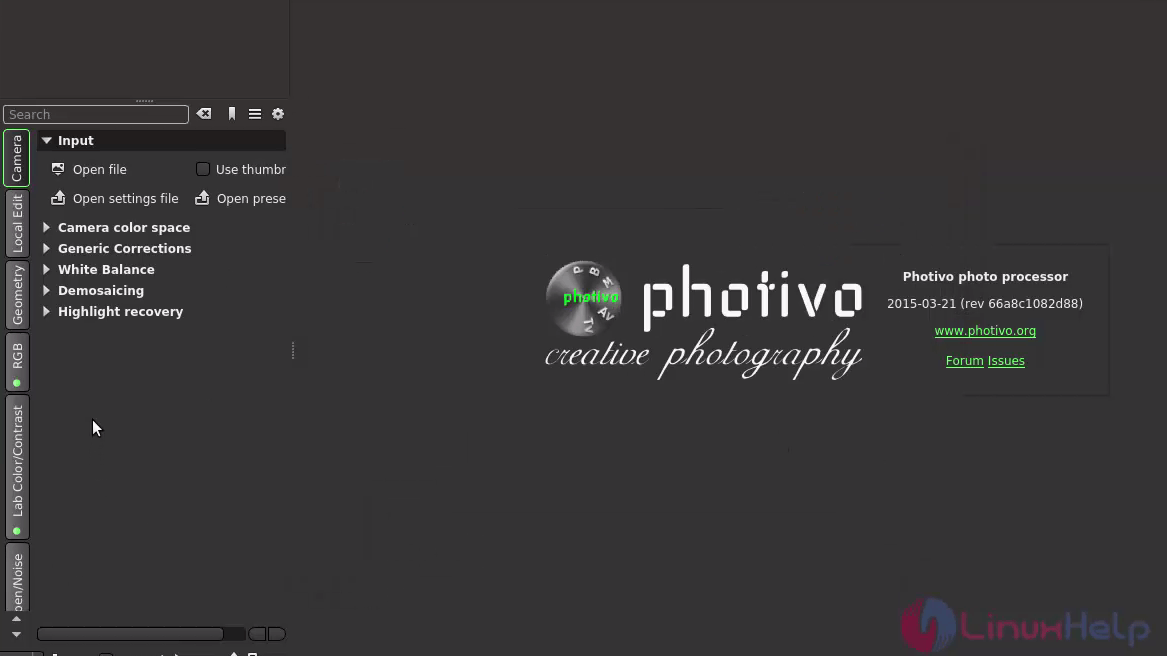
photo_edit

To Uninstall the Photivo Package

root@user1-linuhelp:/home/user1# apt-get remove photivo
Reading package lists... Done
Building dependency tree       
Reading state information... Done
.
.
.
Rebuilding /usr/share/applications/bamf-2.index...
Processing triggers for mime-support (3.58ubuntu1) ...

Tags:
grayson
Author: 

Comments ( 0 )

No comments available

Add a comment
{{postCtrl.cmtErrMsg}}

Frequently asked questions ( 5 )

Q

Does this Photivo helpful for photography?

A

Photivo is a powerful photo editor that works on both standard bitmap images and Raw photos.

Q

Where can I get the package for installing Photivo in windows?

A

For Windows to install Photivo use http://photivo.org/download/windows

Q

How can I use this Photivo application?

A

For better assistance refer the official document page, http://photivo.org/manual/using_photivo

Q

Is Photivo Platform depenedent?

A

Photivo is an open source multi-platform photo processor(GPL3).

Q

Is Photivo supports color filtering?

A

Photiva supports Quick Color filter, Boost image detail, Remove noise and JPEG compression artifacts, Image spot-heal tool and so on.

Back To Top!
Rank
User
Points

Top Contributers

userNamenaveelansari
135850

Top Contributers

userNameayanbhatti
92510

Top Contributers

userNamehamzaahmed
32150

Top Contributers

1
userNamelinuxhelp
31040

Top Contributers

userNamemuhammadali
24500
Can you help Elijah ?
Remote Desktop Connection Has Stopped Working

When accessing my remote machine server using remote desktop on a windows machine I am getting this error

forum (1)

Networking
  • Routing
  • trunk
  • Netmask
  • Packet Capture
  • domain
  • HTTP Proxy
Server Setup
  • NFS
  • KVM
  • Memory
  • Sendmail
  • WebDAV
  • LXC
Shell Commands
  • Cloud commander
  • Command line archive tools
  • last command
  • Shell
  • terminal
  • Throttle
Desktop Application
  • Linux app
  • Pithos
  • Retrospect
  • Scribe
  • TortoiseHg
  • 4Images
Monitoring Tool
  • Monit
  • Apache Server Monitoring
  • EtherApe 
  • Arpwatch Tool
  • Auditd
  • Barman
Web Application
  • Nutch
  • Amazon VPC
  • FarmWarDeployer
  • Rukovoditel
  • Mirror site
  • Chef
Contact Us | Terms of Use| Privacy Policy| Disclaimer
© 2025 LinuxHelp.com All rights reserved. Linux™ is the registered trademark of Linus Torvalds. This site is not affiliated with linus torvalds in any way.